
Bitscale is a good fit if you want waterfall enrichment, buying signals and CRM write-back in one workspace, and you would rather pay one credit meter than juggle several data subscriptions. It is not a database you browse like Apollo or a tool that sends email, so most teams pair it with a CRM and a sequencer. The free plan is enough to test one real workflow before you pay.
Some tool links here are affiliate links (disclosure). Nerdy Joe is a Bitscale affiliate partner. We have not run a hands-on test of Bitscale, so this review is built from Bitscale's pricing page, documentation and official use-case material, checked on October 21, 2026, and every performance figure below is Bitscale's own claim.
Bitscale review: the short verdict
| Bitscale at a glance (as of October 2026) | |
|---|---|
| What it is | "The GTM data layer for your CRM" (Bitscale's tagline): a grid-based enrichment and signals workspace |
| Best for | HubSpot or Salesforce teams that want enriched, current records without stitching together several data vendors |
| Free plan | Yes: 200 lifetime credits, 2,000 searches a month, no card |
| Paid plans | Growth $349/mo, Booster $799/mo (Bitscale cites $314 and $719 billed annually); Enterprise from $15K a year |
| Pricing unit | Platform credits, charged when a provider returns a valid result |
| Core features | Email and phone waterfalls, internal people and company search, intent signals, BitAgent AI research, CRM sync |
| Not included | Email sending, dialing, a CRM of its own |
| Try it | Start on Bitscale's free plan |
Pick Bitscale if your problem is data quality and coverage inside the CRM, or you want signals and research to land as columns next to each contact. Skip it if you need one tool that finds contacts and also sends sequences, or your budget stops well below $314 a month.
Who Bitscale is for, and who it is not for
Good fit:
- RevOps teams on HubSpot or Salesforce that fight decaying records and want enrichment written back to the CRM. Two-way HubSpot sync starts on Growth; Salesforce starts on Booster.
- Outbound teams that hit a single vendor's coverage ceiling. A waterfall queries several providers in order, so you are not limited to one database's hit rate.
- GTM engineers and agencies who build list, signal and research workflows and want per-provider costs published up front.
- Teams that want AI research at volume. BitAgent answers the same question across every row of a grid and returns structured fields.
Not a good fit:
- Solo founders who need data plus sending in one tool. An all-in-one platform like Apollo covers search, contact data and sequences under one per-seat price.
- Teams on a very small budget. After the free credits, the first paid plan is $314 a month billed annually, per Bitscale.
- Anyone who wants a contact browser with zero setup. Bitscale's strength is workflows: you build grids, choose providers and map fields.
What Bitscale is (and what it is not)
Bitscale is a spreadsheet-style workspace. Each table is called a grid, each row is a company or person, and each column can call a data provider, an AI model, a scraper or an integration. You bring records in (from a CSV, your CRM, Bitscale's own database, LinkedIn Sales Navigator, a webhook or other sources), add enrichment columns, filter and score, then send the result somewhere useful.
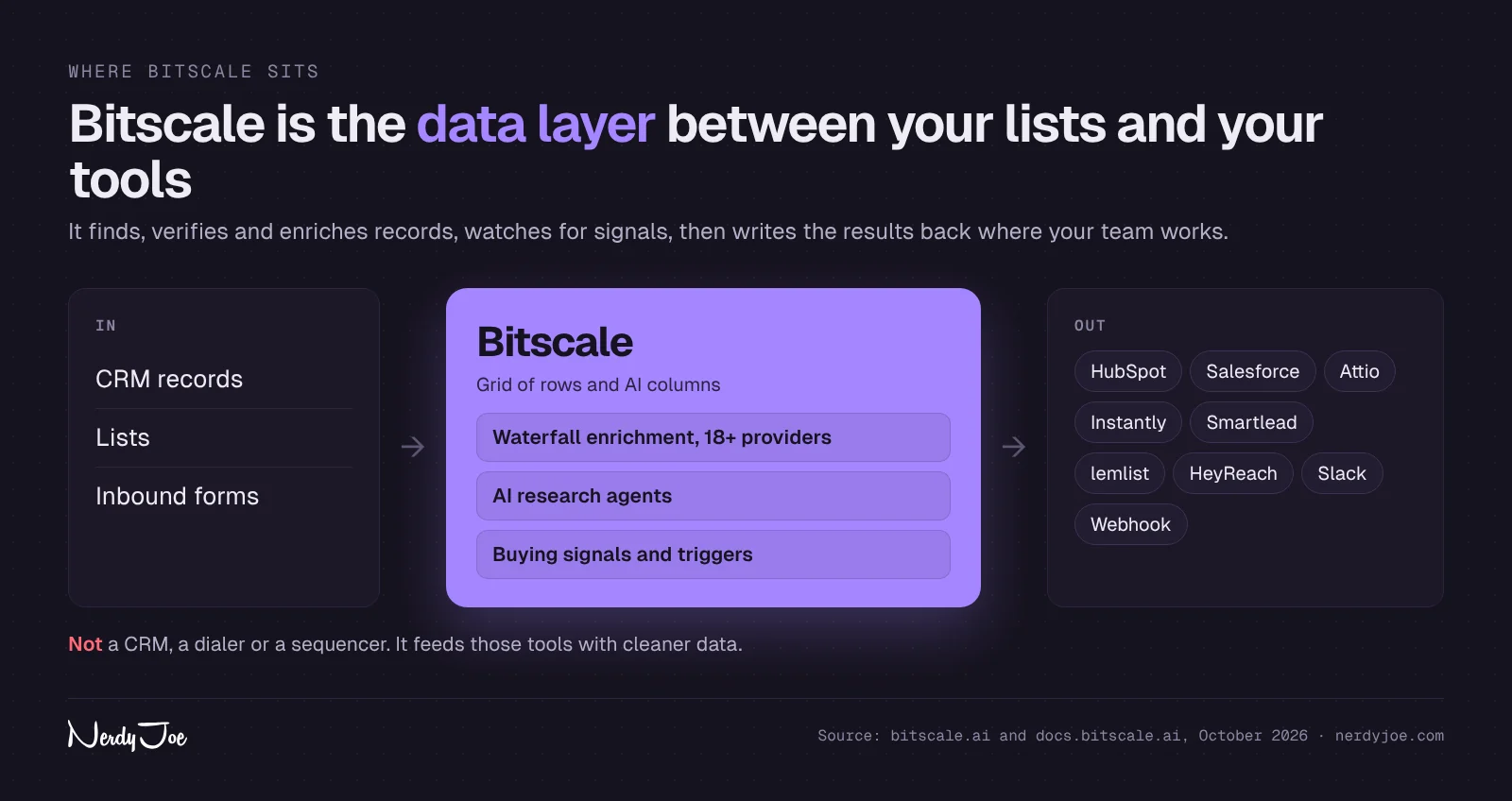
Bitscale's own use-case material puts it plainly: it is not a CRM, a dialer or a sequencer. It is the layer that feeds those tools better data. So a Bitscale plan usually sits alongside a CRM and a sending tool, not in place of them.
The main building blocks, as Bitscale documents them:
- Sources: Find Companies and Find People (Bitscale's internal database), Sales Navigator searches, Google Maps, HubSpot lists and contacts, Salesforce reports, webhook imports, Apify actors, CSV or Excel files, and intent sources such as people engaging with a LinkedIn post or companies hiring for a role.
- Waterfalls: email and phone lookups that query providers one after another until one returns a result.
- Enrichments and signals: funding, hiring, job changes, tech stack, social activity and website visitor data.
- BitAgent: an AI research agent that searches the public web and writes the answer into a column.
- Integrations: HubSpot, Salesforce, Attio, Slack, Instantly, Smartlead, lemlist, HeyReach, webhooks and a custom HTTP API.
Bitscale's homepage claims 100+ data sources, 18+ contact-data providers in one waterfall and use by 1,000+ GTM teams. Its product page sizes its own database at 300M+ people records and 40M+ company records. Those are vendor counts, not independent audits.
How Bitscale pricing and credits work
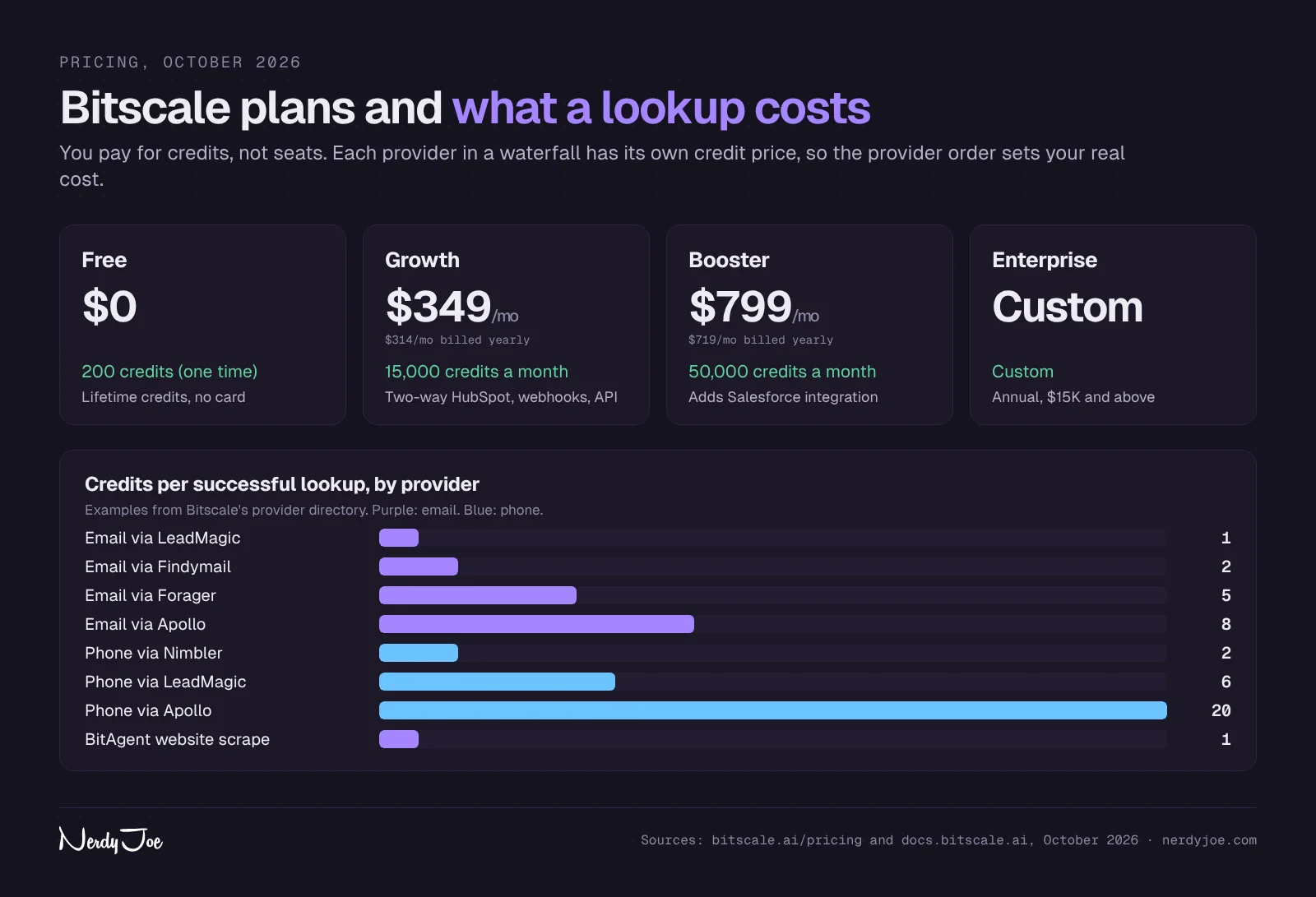
Plans (as of October 2026)
| Plan | Monthly billing | Annual billing (per month) | Platform credits | Searches per month | Rows per grid | Action columns per grid | Notable inclusions |
|---|---|---|---|---|---|---|---|
| Free | $0 | $0 | 200 (lifetime) | 2,000 | 50,000 | 20 | No card required, 50+ intent enrichments |
| Growth | $349 | $314 | 15,000 | 15,000 | 100,000 | 30 | Two-way HubSpot, webhook and HTTP API, RB2B, Factors and Vector inbound, unlimited actions, rollover |
| Booster | $799 | $719 | 50,000 | 50,000 | 100,000 | 50 | Salesforce, custom API support, private Slack channel, curated scraping scripts |
| Enterprise | Custom | $15K and above per year | Custom | Custom | Unlimited | Custom | SOC 2 and SSO, custom two-way CRM integration, private playbooks, custom Slack alerts |
The pricing page shows monthly prices on the cards and a "Save 10%" toggle for annual billing. The $314 Growth figure appears on Bitscale's data enrichment page and its pricing article; the $719 Booster figure comes from that pricing article. Bitscale's August 2026 pricing article also mentions a "Starter" tier at $89 a month billed annually that does not appear on the live pricing page, so ask Bitscale before you plan around it.
Two kinds of credits
Bitscale's docs describe two meters:
- Platform credits pay for enrichments (emails, phones, company data, AI steps), intent signals, external data sources and BitAgent.
- Search credits pay for queries against Bitscale's internal database: 1 search credit per record for Find Companies and Find People. They reset every month.
The pricing page says credits are spent only when a provider returns a valid result, and that failed lookups, formula columns and CRM syncs are free. The credit docs add that external integrations called via API use no credits.
Published credit costs
| Action | Credits (Bitscale docs, October 2026) |
|---|---|
| Email via LeadMagic, Nimbler or Enrow | 1 |
| Email via Findymail, Prospeo, Hunter, Datagma, Snov or RocketReach | 2 |
| Email via Forager | 5 |
| Email via Apollo | 8 |
| Phone via Nimbler | 2 |
| Phone via LeadMagic or RocketReach | 6 |
| Phone via Findymail | 9 |
| Phone via Apollo | 20 |
| Phone via BetterContact | 30 |
| BitAgent website scrape | 1 per query |
| AI enrichment | 1 to 2 per run, by model |
| Find People or Find Companies | 1 search credit per record |
One inconsistency to know about: the credit types page says email and phone finds cost "1 to 12" credits per result, while the provider directory lists phone providers up to 30 credits. Use the directory for planning, since it is per provider.
Worked example 1: emails for 1,000 contacts
Assumptions: you have 1,000 contacts with full name and company domain (the inputs the email waterfall needs), you order the waterfall cheapest first, and validation inside the waterfall is off. Bitscale's waterfall doc says coverage "typically ranges from 90 to 95%", so we assume 900 emails come back. The provider split below is our illustration, not measured data.
| Provider that returned the email | Emails | Credits each | Credits used |
|---|---|---|---|
| LeadMagic | 500 | 1 | 500 |
| Findymail or Prospeo | 250 | 2 | 500 |
| Forager | 100 | 5 | 500 |
| Apollo | 50 | 8 | 400 |
| Not found (100 contacts) | 0 | 0 | 0 |
| Total | 900 | 1,900 |
The floor is 900 credits (every hit from a 1-credit provider) and the ceiling is 7,200 (every hit from Apollo at 8). At Growth's list price, a credit costs about 2.3 cents billed monthly ($349 / 15,000) or 2.1 cents billed annually ($314 / 15,000). So the illustrated run uses about 13% of a Growth month, roughly $40 to $44 of credit value, plus 1,000 search credits if you pulled the contacts from Bitscale's database.
Bitscale's own use-case material quotes "$0.01 per email returned." We could not find that figure on the public pricing page, and at list prices a single 1-credit email costs about 2 cents of plan value. Treat the deck figure as Bitscale's best-case claim and model your own mix.
Worked example 2: mobile numbers for the same 1,000 contacts
Assumptions: all 1,000 contacts have a LinkedIn URL (the only required input for the phone waterfall), you order providers cheapest first, and 800 numbers come back. Again, the split is illustrative.
| Provider that returned the phone | Phones | Credits each | Credits used |
|---|---|---|---|
| Nimbler | 100 | 2 | 200 |
| LeadMagic | 300 | 6 | 1,800 |
| Findymail | 200 | 9 | 1,800 |
| Forager | 150 | 15 | 2,250 |
| Apollo | 50 | 20 | 1,000 |
| Total | 800 | 7,050 |
That is almost half of Growth's 15,000 monthly credits, or about $150 to $165 of plan value. The cost range is wide: 1,600 credits if everything came from Nimbler, 24,000 if everything came from BetterContact. Phone-heavy teams should look closely at Booster's 50,000 credits, or plan to enrich phones only for the contacts that pass an ICP or intent filter first.
Two cost traps
- Validation changes the billing rule. Bitscale's validation doc says that when validation runs inside the waterfall, you are charged for every provider that gives a response, including results later rejected as invalid. That improves list quality but can raise cost per found email. The alternative is a separate verifier after the waterfall; our email verification tools guide compares options.
- Free credits are lifetime. The Free plan's 200 credits do not refresh. That is 200 one-credit emails at most, or about 22 phone numbers at 9 credits each.
Credit rollover helps steady users. The pricing page says Growth and Booster roll over up to 3x the plan's credits; the rollover doc shows both 2x and 3x, applies only to platform credits, and forfeits balances above the new limit if you downgrade or cancel.
The 7 Bitscale use cases
Bitscale publishes seven official use-case decks. Below, each one is broken into the problem, how the workflow runs according to Bitscale's docs, what you need, what it replaces and an honest limit. Customer results come from Bitscale's own case study material and are labeled as such.
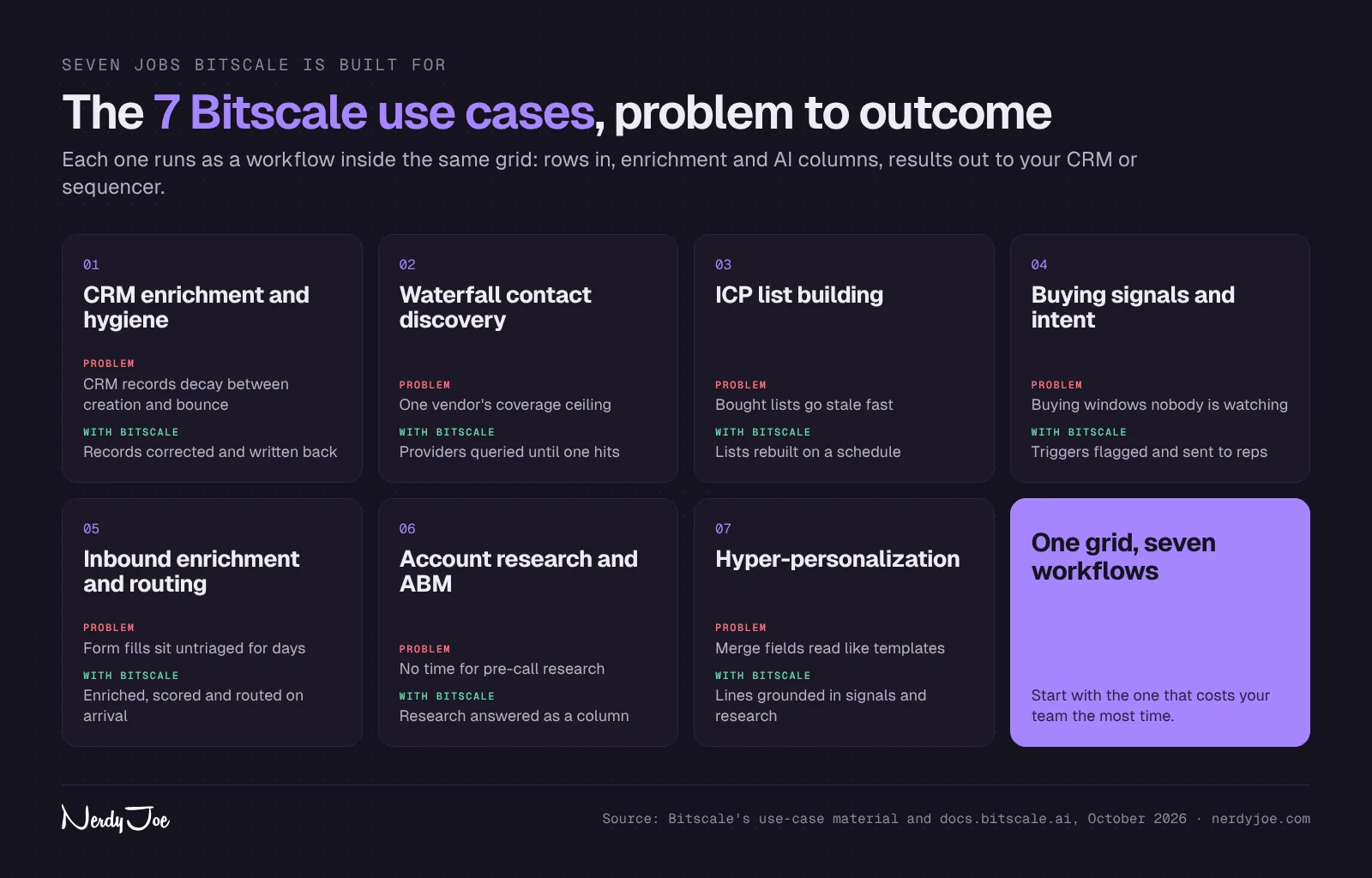
1. CRM enrichment and hygiene
The problem. CRM records decay quietly. People change jobs, domains die and emails start bouncing, and most teams only notice at bounce time. Annual cleanup projects fix a snapshot that starts rotting the next day.
How the workflow runs. Bitscale's HubSpot CRM cleanup playbook lays it out step by step:
- Import contacts from a HubSpot list into a grid, which brings the HubSpot record IDs along.
- Look up current fields: name, company, website, LinkedIn URL and email.
- Validate the existing email. If it is valid, the contact skips re-finding.
- Recover the LinkedIn URL with a reverse-lookup waterfall that starts from the email, with BitAgent as a fallback.
- Enrich the person from LinkedIn only where key fields are empty.
- Re-find an email only for contacts that failed validation.
- Write back with "Update record," matched on the HubSpot record ID, mapping only the fields you want changed.
You then set an auto-fetch on the HubSpot list (the doc suggests bi-weekly or monthly), turn on auto run for new records and use auto dedup so you do not pay to reprocess the same contact. Salesforce works through a Salesforce report as the source and Salesforce Lookup to update or create records.
What you need. Growth for HubSpot two-way sync, Booster for Salesforce. Contacts need an email for the playbook to work as written.
What it replaces. One-off cleanup projects, standalone hygiene tools and reps checking records by hand.
Vendor-reported result. Bitscale reports that Phyllo holds 94% Salesforce coverage, retired $30K a year of stale-data tooling and saw a 70% increase in sales leads.
Honest limit. The cleanup playbook does not describe a dedicated job-change alert. A changed employer shows up when the LinkedIn enrichment pulls current data, but how often you catch it depends on the schedule you set and the credits you are willing to spend each cycle.
2. Waterfall contact discovery
The problem. One vendor's coverage becomes your team's coverage. Single databases thin out by region or segment, and a second seat from the same vendor does not fill the gap.
How the workflow runs. From Bitscale's waterfall docs:
- In a grid, open the Enrichments panel, then People, then Email Waterfall (or Phone Waterfall).
- Map the inputs: full name plus company name or company URL for email (a personal LinkedIn URL is optional and improves coverage); a LinkedIn URL for phone.
- Turn providers on or off and drag them into the order you want. The docs suggest disabling low-yield providers for niche campaigns.
- Optionally turn on validation and choose a validation provider.
- Run it, then add the results as a column.
Bitscale's provider directory lists 13 email providers (Apollo, Forager, ContactOut, BetterContact, Prospeo, Findymail, RocketReach, Hunter, Datagma, Snov, LeadMagic, Nimbler and Enrow) and 12 phone providers. Its marketing describes 18+ providers in the waterfall, so the count depends on the page.
What you need. A list with names and companies (or LinkedIn URLs for phones). The free plan has enough credits to test a sample; recurring volume needs Growth.
What it replaces. Single-vendor licenses, per-provider subscriptions and a separate step of manually re-running misses through a second tool.
Vendor-reported result. Bitscale's homepage claims 95% email and phone coverage, and its waterfall product page claims 94% work email coverage. Its use-case material breaks the email figure down: provider one alone returns 38%, providers two to eighteen take it to 70% and the full waterfall reaches 94%, measured over 30 days. The same material claims 89% phone coverage. These are Bitscale's numbers across its customer base, not a test of your ICP.
Honest limit. Coverage depends on your market. Bitscale's own docs say 90% to 95% is typical, and a niche or non-English-speaking segment can land lower. The only reliable check is a sample of your own accounts.
3. ICP list building
The problem. A purchased list is a snapshot that starts going stale on delivery. Exports from LinkedIn Sales Navigator do not refresh, qualification rules live in one person's spreadsheet and lists wait days to be split among reps.
How the workflow runs. Bitscale's first-grid tutorial describes the start:
- Click New Grid and pick a source: Find Companies (filters include location, industry and headcount), Find People, a Sales Navigator search URL, Google Maps, company lookalikes, HubSpot or Salesforce data, a CSV, or "Find Companies Hiring for a Specific Role."
- Preview results before importing, which the docs recommend to avoid wasting credits.
- Import to a new grid, then use "Export Leads" to create a people grid from an accounts grid. Bitscale groups both in a Workbook.
- Add qualification columns (BitAgent questions, tech stack, funding) and filter to fit.
- Turn on source scheduling so dynamic sources refetch on an interval such as every 30 minutes, hourly or daily.
Bitscale's use-case material also describes a database refreshed every four weeks and round-robin assignment of new records to reps. We could not find either detail in the public docs, so confirm both in a demo if they matter to you.
What you need. Search credits for database pulls (2,000 a month on Free, 15,000 on Growth) plus platform credits for enrichment. The pricing page does not say which plan includes scheduling.
What it replaces. Manual Sales Navigator exports, one-time list purchases and ad hoc research sheets.
Vendor-reported result. Bitscale reports that Guidebook's waterfall reaches 92% coverage on a European ICP and that it generated $2M of pipeline from events in 90 days.
Honest limit. Database size claims (300M+ people, 40M+ companies) are Bitscale's own. For small or regional markets, test whether Find People returns enough of your titles before you commit, and compare it with the dedicated databases in our best B2B data providers roundup.
4. Buying signals and intent
The problem. The moment an account becomes ready to buy usually leaves a public trace (a funding round, a new VP of Sales, three new SDR job posts) that no internal system watches. Shared topic-intent feeds can be late and rarely say which person to call.
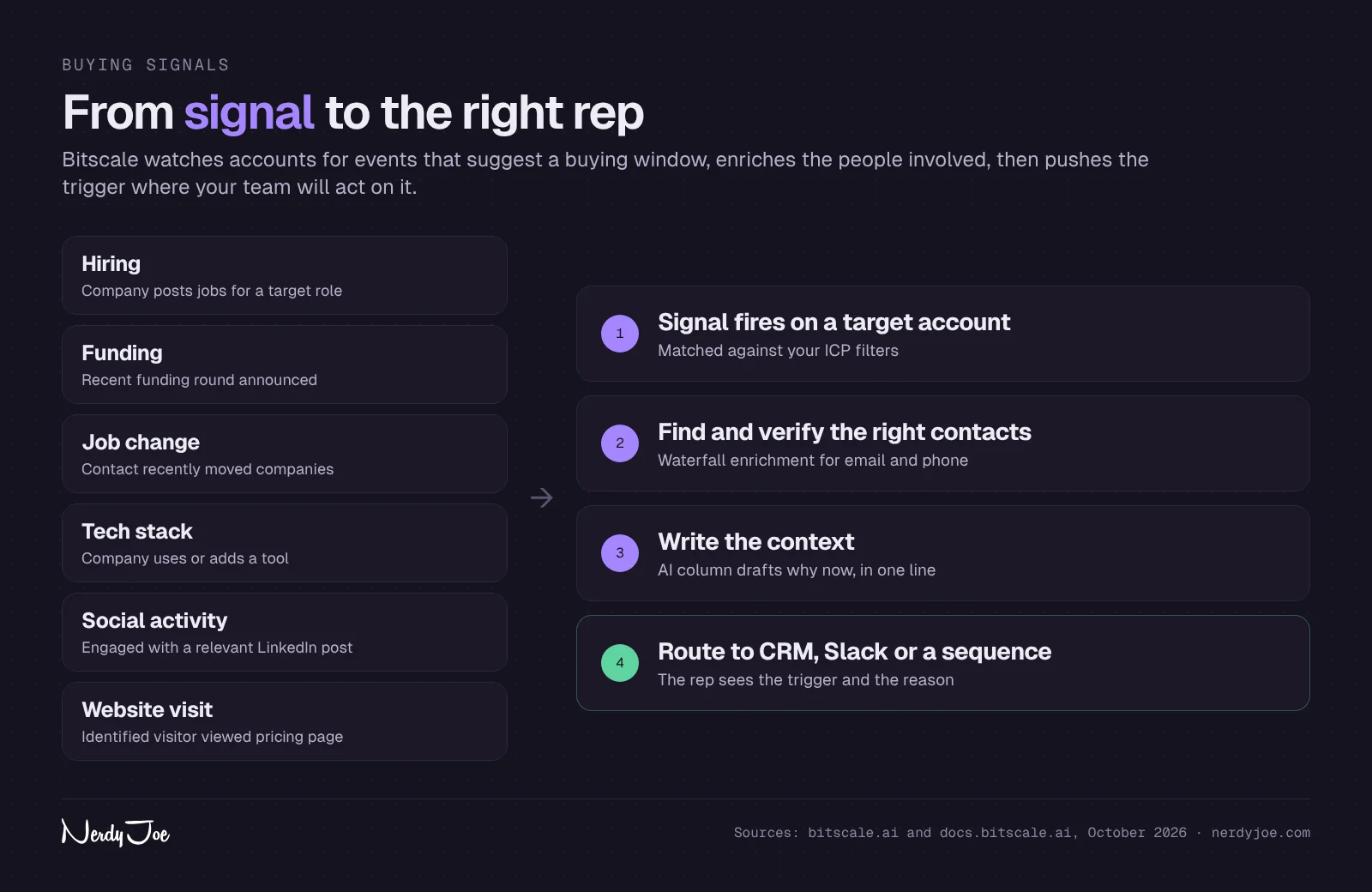
How the workflow runs. Bitscale's intent signals doc groups signals into hiring, funding and growth, job changes, social activity, tech stack, decision-maker classification and website engagement. The pattern is the same for each:
- Create a grid from the right source (LinkedIn job data, LinkedIn post data, a company list, a CRM upload, an Apify import or a webhook).
- Run the signal enrichment, for example Detect Hiring Roles, Get Funding Data, Detect Tech Stack or a Live Profile Scrape compared with older data.
- Filter or score the results (keywords, funding amount, page-based scores).
- Find the decision-makers at accounts that pass and enrich their contact data.
- Push results to your CRM, a sequencer or Slack, and schedule the grid to rerun.
For alerts, Bitscale's Slack integration adds a "Slack, Send to Channel" action anywhere in a grid, with custom fields such as company, job title and the signal that fired. Bitscale's use-case deck also mentions Microsoft Teams, but the Slack doc does not, so we only list Slack.
What you need. The Free plan includes 50+ intent enrichments per the pricing page, which is enough to prototype. Scheduled monitoring of a real account list uses credits every run, so most teams will need Growth.
What it replaces. Shared-pool intent feeds, manual account monitoring and guessing on timing.
Vendor-reported result. Bitscale's homepage says it tracks "15 buying triggers others miss" and reports that Scrut runs about 400 demos a month from Bitscale intent signals, found 5x more compliance-ready accounts and booked 50% more meetings the next quarter.
Honest limit. Signals are building blocks, not a finished scoring model. You decide which triggers matter, set the thresholds and maintain the grids. The docs do not cover competitor-follower tracking as a signal, even though Bitscale's marketing mentions it.
5. Inbound enrichment and routing
The problem. A form fill arrives as a name and an email. Nobody knows the company size, fit or priority, so triage happens late or by whoever is free.
How the workflow runs.
- Send form fills and identified site visitors into a grid. Bitscale's pricing page lists RB2B, Factors and Vector as inbound integrations on Growth, and its webhook import doc covers other sources (Zapier is named as an example).
- Enrich each record on arrival: company, title, seniority and contact data through the waterfall.
- Score it in the grid. Bitscale's signals doc gives an example of page-based scoring, such as +10 for a demo page and +20 for the pricing page, with workflows triggered above a threshold.
- Write the record to HubSpot or Salesforce, and send high-intent leads to Slack.
Bitscale's inbound article says leads can be routed by territory, segment or account owner, with existing accounts flagged for their current rep. Its use-case deck adds round-robin assignment; the public docs we read do not describe how that is configured.
What you need. Growth at minimum (webhooks, HTTP API, HubSpot and the RB2B, Factors and Vector integrations). Booster if your CRM is Salesforce.
What it replaces. Manual MQL triage, scoring logic that lives apart from the data and rule changes that wait on engineering.
Vendor-reported result. Bitscale's use-case material says inbound records are enriched against 100+ sources and that integration traffic consumes no credits. The pricing page confirms that CRM syncs are free.
Honest limit. Bitscale describes the routing as happening "in minutes," not instantly, and it does not publish a speed figure. If your sales team promises a callback within five minutes, test the full path from form to rep before relying on it.
6. Account research and ABM
The problem. Good pre-call research takes a rep 20 to 40 minutes per account, by Bitscale's estimate. Across a full territory that never happens, and quarterly ABM refreshes are stale for most of the quarter.
How the workflow runs. From Bitscale's BitAgent docs:
- In a grid, open Enrichments, then Web search, then Bit Agent.
- Write one simple question, using a column as a placeholder so it runs per row (for example, "Does {company} sell to hospitals?").
- Set an output format; the Use AI button suggests structured fields from your prompt.
- Test on the first 10 rows, which the docs recommend, then run the rest.
- Open any answer and check the Steps section to see which sources BitAgent used.
The docs say BitAgent "will not invent values" when it cannot confirm an answer, and you can run it on your own OpenAI or Claude account through Bring Your Own API. Bitscale's credit docs price a BitAgent website scrape at 1 credit per query.
What you need. At 1 credit per query, researching 1,000 accounts with one question uses about 1,000 credits, or 5,000 credits for five questions. Free is enough to test a prompt; Growth covers ongoing research for most teams.
What it replaces. Manual pre-call research, quarterly ABM refreshes and analyst hours spent on account briefs.
Vendor-reported result. Bitscale reports that DevRev removed six hours of manual research per rep per week across 40+ BD reps, with 4x qualified pipeline and 200+ qualified meetings a month. Bitscale also documents an MCP connector that lets Claude run Bitscale workflows, currently limited to beta users and enterprise customers.
Honest limit. AI research is only as good as the public web. Private companies with thin websites return more empty cells, and any answer you use in a message should be spot-checked. Running BitAgent on your own model key moves the AI cost to your OpenAI or Anthropic bill.
7. Hyper-personalization
The problem. Merge fields (name, company, title) do not give anyone a reason to reply. Bought first lines are often unrelated to the rest of the email, and reps write great custom lines for ten accounts and copy them across the next four hundred.
How the workflow runs.
- Start with a grid that already holds the contact, a verified email, the signal that fired and BitAgent research.
- Add an AI enrichment column (1 to 2 credits per run, depending on the model) that writes a line or a short message using those columns, with different instructions by job function.
- Review a sample, adjust the prompt and run the rest.
- Connect your sequencer with an API key in Bitscale's Integrations tab and push the selected leads, with their custom fields, to a campaign.
Bitscale's integration docs list Instantly, Smartlead, lemlist and HeyReach as API-key integrations, and Bitscale publishes an Instantly outbound playbook. Sending tools Bitscale does not list natively can still take a CSV export or a webhook. If you are still choosing a sender, our Instantly vs Smartlead vs PlusVibe comparison covers the trade-offs.
What you need. Growth, plus a sequencer account. Before the first send, set up domains, mailboxes and warmup properly; our cold email infrastructure guide walks through it.
What it replaces. First-line vendors, rep-written variants and plain merge-field templates.
Vendor-reported result. Bitscale's personalization material reuses the Scrut figures above (400 demos a month, 5x compliance-ready accounts, 50% more meetings).
Honest limit. The Instantly playbook does not document field mapping, campaign selection or custom variables in detail. Check that your personalized columns arrive as custom variables in your sender before you scale a campaign.
Integrations Bitscale documents
| Category | Integrations (from Bitscale docs and pricing page) | Plan notes |
|---|---|---|
| CRM | HubSpot (two-way), Salesforce (two-way), Attio; custom two-way CRM on Enterprise | HubSpot from Growth, Salesforce from Booster |
| Sending tools | Instantly, Smartlead, lemlist, HeyReach (API key) | Pricing page lists outbound email integrations in its comparison table |
| Inbound and visitor ID | RB2B, Factors, Vector | Growth and up |
| Alerts | Slack | Custom Slack alerts on Enterprise; private support channel on Booster |
| Data in and out | Webhook import and export, HTTP API, CSV and Excel, Apify, Sales Navigator, Google Maps | Webhook and HTTP API from Growth |
| AI | BitAgent on Bitscale's setup or your own OpenAI or Claude key; MCP for Claude (beta) | Advanced models such as Claude Sonnet listed on the pricing table |
HubSpot, Salesforce and Slack connect through a permission window ("bridge"), while the sequencers connect with an API key copied from the sending tool. If you are still picking a CRM to sit under this, see our guide to the best CRM for cold email.
Bitscale vs Clay in brief
Clay is the closest alternative. Both run multi-provider waterfalls, AI research agents (BitAgent and Claygent) and grid-style workflows. The differences that usually decide it:
- Price structure. Clay meters actions and data credits separately and has a lower-cost paid entry plan. Bitscale uses one platform credit meter with unlimited actions on paid plans.
- CRM sync. Bitscale includes two-way HubSpot sync on Growth. Clay's CRM sync starts on its Growth plan, which costs more at the smallest settings.
- Catalog. Clay's integration and data marketplace is larger, and it includes a native sequencer.
Our full Bitscale vs Clay comparison covers pricing tables, waterfalls and integrations in detail. For how Clay-style tools differ from contact databases, see Apollo vs Clay.
Bitscale vs Apollo as a data source
These tools solve different jobs, and many teams use both.
| Bitscale | Apollo | |
|---|---|---|
| Core job | Orchestrate many providers, signals and AI research, then write to a CRM | Search a large contact database and run outreach from the same place |
| Data | 300M+ people records in its own database (Bitscale's claim) plus 13 email and 12 phone providers in waterfalls | Apollo's own database |
| Sending | None; pushes to Instantly, Smartlead, lemlist, HeyReach | Built-in sequences and dialer |
| Pricing | Flat plans with a shared credit pool | Free plan; paid from about $49 per user per month billed annually (per our review, from 2026 pricing reviews) |
| Credit cost per email | 1 to 8 Bitscale credits, by provider | 1 Apollo credit per email reveal (per our review) |
Apollo is also one of Bitscale's documented waterfall providers, at 8 credits per email and 20 per phone, the highest email cost in the directory. If you already pay for Apollo, it is often cheaper to pull contacts there and use Bitscale for the gaps, signals and CRM hygiene than to buy Apollo data through Bitscale's waterfall.
Choose Apollo if you want one seat-based tool for finding contacts and sending sequences. Choose Bitscale if coverage across several providers, CRM write-back and research at scale matter more. Our Apollo.io review covers Apollo's plans and credits in depth.
Bitscale pros and cons
Pros
- Charged on success. Bitscale says failed lookups, formula columns and CRM syncs are free.
- Published per-provider costs. You can order a waterfall for cost as well as coverage.
- Two-way HubSpot sync on Growth, with Salesforce on Booster.
- Unlimited actions on paid plans, so formulas, syncs and API calls do not eat credits.
- BitAgent on your own model key, with sources shown for each answer.
- Rollover on paid plans, up to 3x per the pricing page.
- Security claims of SOC 2 Type II, ISO 27001, GDPR and CCPA compliance on the homepage.
Cons
- Entry price. The first paid plan is $314 a month billed annually, and Free's 200 credits are lifetime, not monthly.
- Salesforce costs more. It starts on Booster at $799 a month billed monthly.
- Inconsistent figures across Bitscale's own pages: provider counts (13 in the directory, 18+ in marketing), rollover (2x or 3x), phone credit range (1 to 12 or up to 30) and a Starter tier that only one article mentions.
- No sending. You still need a sequencer and a CRM.
- Seat limits are not stated on the pricing page.
- Validation inside the waterfall charges every provider that responds, which raises cost per valid contact.
Bitscale alternatives
| Tool | Best for | How it differs |
|---|---|---|
| Clay | Custom GTM workflows with the largest integration catalog | Lower-cost paid entry, two meters (actions and data credits), native sequencer |
| Apollo | One tool for data plus sequences | Per-seat pricing, own database, built-in sending and dialer |
| Single-provider finders (Findymail, LeadMagic, Prospeo and others) | Cheap email finding without a workflow layer | One provider's coverage, no grids or CRM sync; several of them run inside Bitscale's waterfall anyway |
How to get started with Bitscale
These steps follow Bitscale's quickstart, first-grid tutorial and waterfall docs:
- Sign up on the free plan. Bitscale's free plan gives you 200 credits and 2,000 searches a month without a card.
- Create a grid. Click New Grid and pick a source. For a first test, upload a CSV of 50 to 100 contacts from your real ICP or use Find People with your filters, and preview before importing.
- Add an email waterfall. Go to Enrichments, People, Email Waterfall. Map full name and company, put the 1-credit providers first and leave validation off for the first test so the cost is easy to read.
- Run on a small sample. Run 10 rows first, check results and credit usage, then run the rest.
- Add one research column. Use BitAgent with a single-sentence question tied to your ICP, and check its Steps output.
- Connect one destination. In the Integrations tab, connect your sequencer with an API key or download a CSV. HubSpot sync needs Growth.
- Measure. Note coverage and credits per found email, then multiply by your monthly volume. Our cold email cost calculator helps you put that next to sending costs.
If the test meets your coverage target at a credit cost that fits, Growth is the plan most HubSpot teams need. Move to Booster only if you need Salesforce or more than 15,000 credits a month on a steady basis.
How we compiled this review
We did not run Bitscale ourselves. This review is based on Bitscale's live pricing page, its documentation (waterfalls, provider directory, credit types, rollover, integrations, BitAgent, signals, CRM cleanup, Salesforce sync, Slack, source scheduling, MCP), its homepage and product pages, and seven official Bitscale use-case decks. Where sources disagree, we say so. All prices were checked on October 21, 2026.
Rather not run it yourself?
Building grids and keeping a sending setup healthy takes real time each week. Koldify is a done-for-you cold email agency that sends campaigns on PlusVibe, Smartlead and Email Bison. Book a 30-minute call with David at Koldify to talk through your list, data and sending setup.
Verdict
Bitscale earns its place when your bottleneck is data, not sending: records that decay in the CRM, coverage that stalls at one vendor's ceiling, or research that reps never have time to do. Its published per-provider costs, charge-on-success model and two-way HubSpot sync on Growth make it a strong mid-market choice, as long as you accept the setup work and the $314 a month entry point.
If you mainly need contacts plus sequences in one seat, Apollo is the simpler buy. If you need the widest catalog, Clay is worth comparing. If you want an enrichment layer that lives with your CRM, test Bitscale on the free plan with 100 of your own contacts and judge it on coverage and credits used.
Disclosure: My relationship with Instantly is that of an independent party. I do not hold any position, nor do I have the power to form binding agreements or act on behalf of Instantly. My earnings are derived from referral compensations provided by Instantly. The views I share are solely mine and should not be seen as official statements, promises, or representations of Instantly, or any related entities or personnel.
Sources
- Bitscale homepage: https://www.bitscale.ai/
- Bitscale pricing: https://bitscale.ai/pricing
- Bitscale, pricing plans and what's included: https://bitscale.ai/blogs/bitscale-pricing-plans-and-whats-included
- Bitscale data enrichment page: https://bitscale.ai/solutions/lp-data-enrichment
- Bitscale waterfall product page: https://bitscale.ai/product/waterfall
- Bitscale lead list building page: https://bitscale.ai/product/create-lead-list
- Bitscale, real-time inbound lead scoring: https://bitscale.ai/blogs/real-time-lead-scoring-with-enrichment-data
- Bitscale docs index: https://docs.bitscale.ai/llms.txt
- Bitscale docs, quickstart: https://docs.bitscale.ai/quickstart.md
- Bitscale docs, creating your first grid: https://docs.bitscale.ai/ingredients/tutorial-first-grid.md
- Bitscale docs, platform vs search credits: https://docs.bitscale.ai/ingredients/tutorial-credit-types.md
- Bitscale docs, platform credit rollover: https://docs.bitscale.ai/ingredients/rollover-policy.md
- Bitscale docs, waterfalls: https://docs.bitscale.ai/ingredients/tools-waterfall.md
- Bitscale docs, validation inside waterfalls: https://docs.bitscale.ai/ingredients/tutorial-contact-validation.md
- Bitscale docs, providers and partners directory: https://docs.bitscale.ai/playbook/provider-integrations-directory.md
- Bitscale docs, setting up integrations: https://docs.bitscale.ai/ingredients/tutorial-integrations.md
- Bitscale docs, outbound using Instantly: https://docs.bitscale.ai/playbook/instantly-magic.md
- Bitscale docs, Slack integration: https://docs.bitscale.ai/ingredients/integrations-slack.md
- Bitscale docs, HubSpot CRM cleanup: https://docs.bitscale.ai/crm/hubspot/crm-cleanup.md
- Bitscale docs, Salesforce two-way integration: https://docs.bitscale.ai/playbook/salesforce-2-way.md
- Bitscale docs, intent signals: https://docs.bitscale.ai/ingredients/intent-signals.md
- Bitscale docs, BitAgent: https://docs.bitscale.ai/basics/bitagent.md
- Bitscale docs, source scheduling: https://docs.bitscale.ai/ingredients/source-scheduling.md
- Bitscale docs, MCP: https://docs.bitscale.ai/mcp-reference.md
- Bitscale use-case decks (CRM enrichment and hygiene, waterfall contact discovery, ICP list building, buying signals and intent, inbound enrichment and routing, account research and ABM, hyper-personalisation), provided by Bitscale
- Apollo pricing: https://www.apollo.io/pricing
- Clay homepage: https://www.clay.com/
Frequently asked questions
How much does Bitscale cost?
As of October 2026, Bitscale's pricing page lists Free at $0 with 200 credits, Growth at $349 a month with 15,000 credits and Booster at $799 a month with 50,000 credits. Bitscale's own pages put annual billing at $314 and $719 a month, and Enterprise starts at $15K a year on annual billing.
Is Bitscale free to use?
Yes, there is a lifetime Free plan with 200 Bitscale credits, 2,000 company and people searches a month and no credit card required. The 200 credits do not refresh each month, so the plan is for testing a workflow, not for running one.
How many credits does Bitscale charge per email?
It depends on which provider in the waterfall finds the email. Bitscale's provider directory lists costs from 1 credit (LeadMagic, Nimbler, Enrow) to 8 credits (Apollo) per email, and you are charged only for the provider that returns a valid result.
Is Bitscale a CRM?
No. Bitscale is an enrichment and data workspace that reads from and writes to a CRM such as HubSpot or Salesforce. It does not send emails or make calls; you push its output to a sequencer or your CRM.
Which Bitscale plan includes Salesforce?
Bitscale's pricing page lists the Salesforce integration on Booster ($799 a month billed monthly, as of October 2026) and Enterprise. Two-way HubSpot sync starts on Growth.
Do unused Bitscale credits roll over?
Platform credits on Growth and Booster roll over, and the pricing page says up to 3x the plan's credits. Bitscale's rollover doc shows both 2x and 3x figures, search credits reset monthly, and a downgrade or cancellation forfeits rollover above the new plan's limit.
Can Bitscale send leads to Instantly or Smartlead?
Yes. Bitscale's integration docs list Instantly, Smartlead, lemlist and HeyReach as integrations you connect with an API key, so enriched leads can be pushed from a grid into those tools.