
Nerdy Joe is a certified Apollo.io Managed Services Partner. We set up and run Apollo for clients, so this review comes from daily use.
Apollo.io is the best all-in-one prospecting tool for startups, agencies, founders and small to mid-size B2B sales teams that want a large contact database, built-in sequences and a dialer at a published per-seat price. It is the tool we reach for first when a client needs pipeline and does not have an enterprise data budget. Skip it if you need deep enterprise intelligence with a dedicated account team (look at ZoomInfo or Cognism), or if you plan to send tens of thousands of cold emails a month from Apollo's own sequencer. At that volume, Apollo should be your data layer, not your sending engine.
Disclosure: Nerdy Joe is a certified Apollo.io Managed Services Partner. That means Apollo has certified us as a vendor that sets up and runs Apollo for clients. Links to Apollo in this article are affiliate links, so we may earn a commission if you sign up, at no cost to you. It does not change what we say about the product, including the weaknesses. Read our full affiliate disclosure.
Try Apollo free and test the data on your own ICP before you commit to a paid plan.
Official Apollo partner. Nerdy Joe is a certified Apollo.io Managed Services Partner, an Apollo-approved vendor that implements, configures and manages Apollo for B2B teams. If you would rather have a certified partner set Apollo up for you, book a call with David.
Quick verdict
| Best for | Startups, agencies, founders and SMB to mid-market sales teams doing outbound |
| Price | Free plan; paid plans from about $49 per user per month billed annually (as of October 2026) |
| Database | Apollo says 240M+ contacts and 30M+ accounts |
| Biggest strength | Data, enrichment, sequences, dialer and CRM sync in one tool at a published price |
| Biggest weakness | Data quality varies by region and title, and credits (especially phone numbers) run out fast |
| Our rating | Nerdy Joe's rating: 4.4/5 |
What Apollo.io is
Apollo.io is a go-to-market platform that combines a B2B contact and company database with the tools to act on it. You search for prospects, reveal their emails and phone numbers, enrich your CRM, then reach them through email sequences, calls and LinkedIn tasks. All of it lives in one workspace.
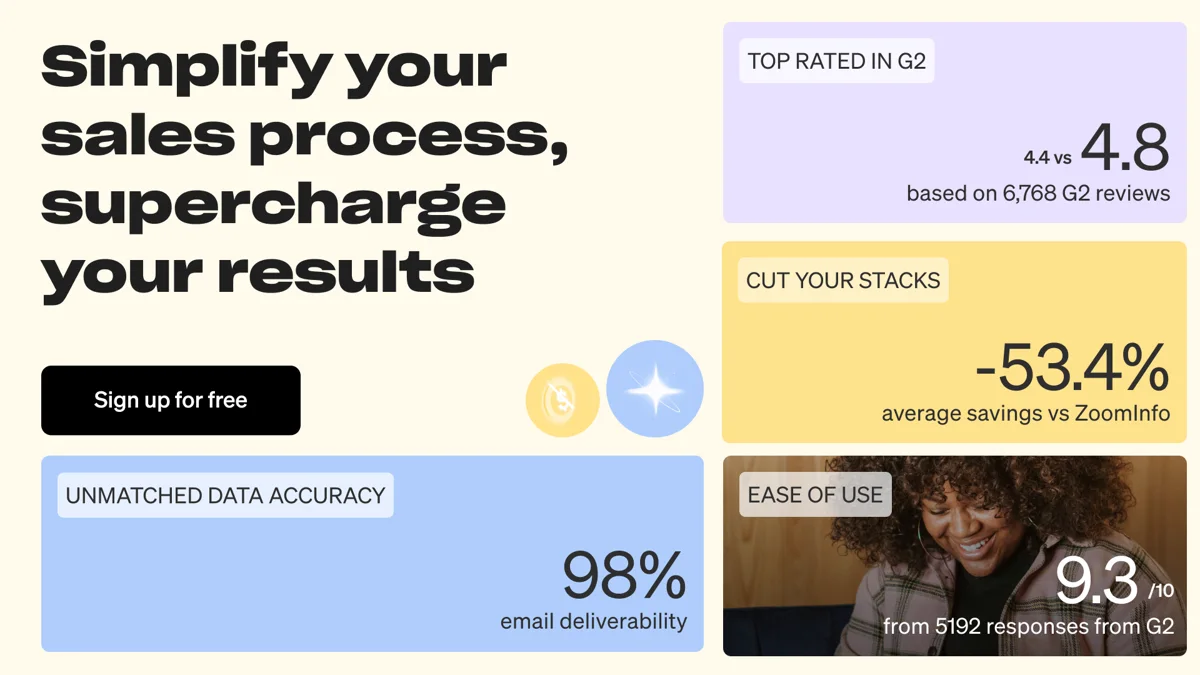
Apollo's own published claims (G2 ratings, accuracy, savings vs ZoomInfo). Treat vendor numbers as marketing until you test them on your own ICP. Start free on Apollo.
On its homepage, Apollo says it has 240M+ contacts and 30M+ accounts, and that over 600,000 companies use the platform. It also lists 200+ integrations. Those are Apollo's own figures, and we treat them as marketing claims rather than audited numbers.
Apollo now describes itself in three layers: Data, Intelligence and Execution. In plain terms: the database, the AI and signals that tell you who to contact, and the sequences, dialer and meetings that do the outreach.
Who Apollo is for (and who it isn't)
Apollo fits a wide range of buyers, but it fits some much better than others. Here is how we think about it after setting it up for many teams.
Apollo is a strong fit for
- Founders and solo sellers who need to build lists and send their first sequences without buying three tools.
- Startups and SMB sales teams with two to twenty reps who want data, sequencing, a dialer and CRM sync in one login.
- Agencies that run outbound for clients and need to pull targeted lists across many industries quickly.
- RevOps teams that want to enrich and clean an existing CRM using Apollo's bulk and waterfall enrichment.
Apollo is a weaker fit for
- Large enterprises that need deep org charts, compliance guarantees in specific regions and a dedicated support team. ZoomInfo or Cognism usually suit them better.
- High-volume cold email senders who plan to send from dozens or hundreds of inboxes. Apollo can send email, but dedicated sending platforms handle inbox rotation and volume better.
- Teams that live on the phone and need lots of direct dials. At 8 credits per phone number (per 2026 pricing reviews), mobile-heavy workflows get expensive fast.
- Markets outside North America where coverage can be thinner. Test your exact countries and titles on the free plan first.
Apollo pricing explained (as of October 2026)
Apollo's pricing page renders dynamically, and the text we could extract on October 15, 2026 lists the plans without dollar amounts. The figures below come from multiple 2026 pricing reviews that read the live page, cross-checked against each other. Prices change often, so confirm on Apollo's site before you buy.
Apollo plans and prices
| Plan | Annual billing (per user/month) | Monthly billing (per user/month) | Credits per seat | Notes |
|---|---|---|---|---|
| Free | $0 | $0 | About 75 per month | 2 sequences, 1 mailbox per user, 25-record selection limit |
| Basic | $49 | About $59 to $65 | 30,000 per year on annual | Email sequencing and core integrations |
| Professional | $79 | About $99 | 48,000 per year on annual | Higher credits, AI features, call recording, advanced CRM integrations |
| Organization | $119 | Reported as annual only by some sources | 72,000 per year on annual | Three-seat minimum |
| Custom | Talk to sales | Talk to sales | Custom | SSO, advanced security, dedicated support |
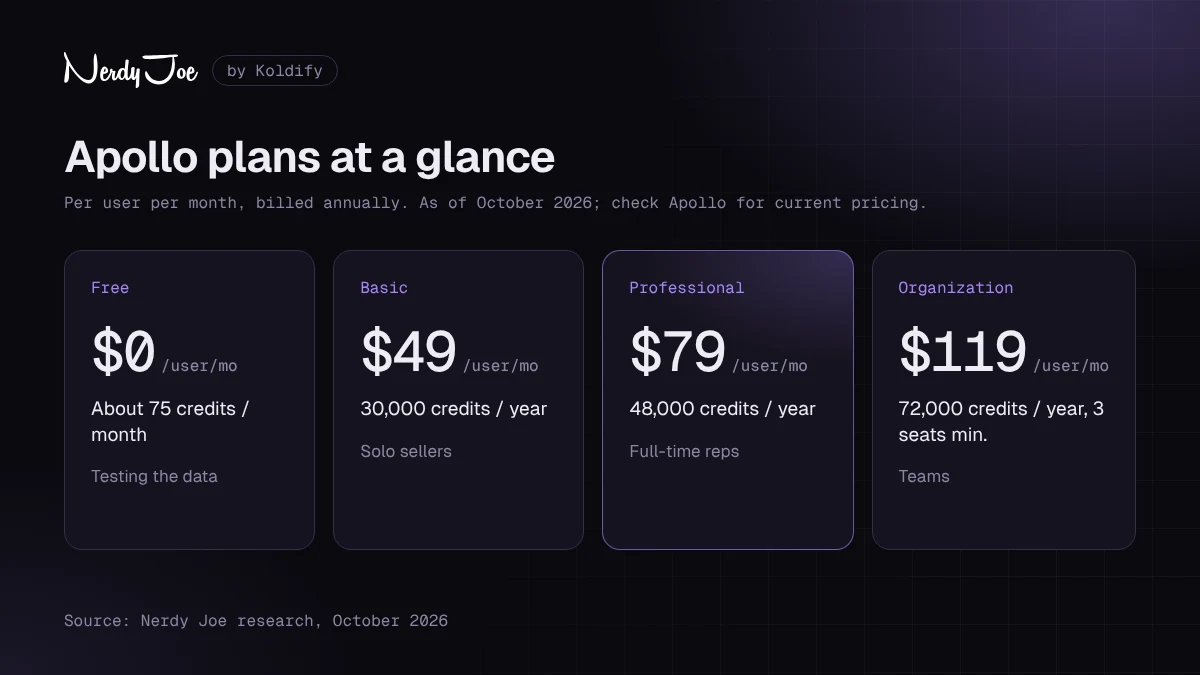
Apollo pricing at a glance, as of October 2026. As an official Apollo partner, we help clients choose the smallest plan that fits; see current plans on Apollo.
Sources disagree on a few details. Basic's monthly price is reported at $59 by Saleshandy (September 2026) and $65 by Valley (read from Apollo's page on October 6, 2026). Organization is listed by most reviews, but Apollo's own page text now describes Free, Basic, Professional and Custom tiers, so check which plans you are offered at checkout.
See current Apollo plans before you budget, because a few dollars per seat adds up across a team.
How Apollo credits work
Credits are Apollo's usage currency. According to Apollo's knowledge base, credits pay for revealing emails and phone numbers, enriching records, running AI research, email warmup and other actions, depending on your plan. Apollo's pricing page says credits are pooled across the team, granted at the start of each billing cycle, and do not roll over.
The per-action costs reported consistently across 2026 reviews (Saleshandy, Valley, Zeliq, CostBench) are:
| Action | Typical credit cost |
|---|---|
| Reveal a verified email | 1 credit |
| Reveal a phone number | 8 credits |
| AI research run | 1 credit |
| Enrichment | 1 to 8 credits depending on fields |
| US dialer | Charged per 30 seconds of connected call time |
Apollo's own help center confirms the dialer applies a 30-second minimum per connected call and that calls that ring out, are busy or fail use zero credits. It also says email and mobile waterfall data use separate credit balances, and that export credits "may only apply to certain plans or legacy configurations." If you are on an older Apollo plan, you may still see separate mobile and export credit counters.
One detail worth knowing: Apollo says that if an email it marked as verified bounces within 30 days of your request, it refunds the email credit.
Monthly vs annual billing
Annual billing is cheaper. Saleshandy and CostBench report the annual discount at about 17% on Basic and 20% on Professional and Organization. On annual plans, credits for the whole year are granted upfront, which gives you flexibility to front-load a big list build.
Monthly billing lets you cancel any time, but the effective cost is higher. Apollo's pricing page says you can switch from monthly to annual at any time, but switching from annual to monthly means canceling and waiting for the annual term to end. Our advice: start monthly for one or two cycles, prove the data works for your ICP, then move to annual.
Hidden costs to plan for
The sticker price is rarely the whole bill. Budget for these:
- Extra credits. Apollo lets admins add credits with a slider under Manage Subscription. Add-on credits are charged immediately and renew every billing cycle until you remove them.
- Phone-heavy workflows. At 8 credits per number, revealing mobiles for a call campaign burns credits much faster than email.
- Add-ons. 2026 reviews report an Inbound add-on and an Advanced Dialer add-on (international dialing, parallel and power dialing) at about $119 per team per month on annual billing.
- Seat minimums. Organization is reported to require at least three seats.
- Sending infrastructure and verification. Separate domains, mailboxes and a second verification tool all cost extra.
Database and data quality
Data is why most people buy Apollo, and it is also where most complaints come from. Both things are true: the coverage is broad, and the accuracy varies.
Where Apollo's data comes from
According to Apollo's Data Overview article, the database is built from four inputs: a data contributor network (users who share business contact information), engagement data from replies and bounces, public web crawling, and vetted third-party providers. Apollo says it processes over 200 million records each month from third parties and runs monthly checks across the full database. Records also update when Apollo detects a signal such as a job change.
How accurate is it?
Apollo states that its verified emails have an accuracy rate of 91%. It explains that the remaining bounces come mostly from full mailboxes, unresponsive servers and the sender's domain reputation, with invalid addresses making up a small part. That is Apollo's own claim, so treat it as a ceiling rather than a guarantee.
Users tell a more mixed story. On Capterra (Canada), Apollo holds a 4.5 out of 5 rating from 398 reviews as of October 15, 2026, and recent reviewers mention phone numbers that turn out to be generic company lines and saved searches that return different results on later runs. In our experience, email data is strongest for US companies and common titles, and weakest for mobile numbers, very small companies and some international markets.
Apollo's email statuses, explained
Apollo labels every email with a status. Knowing them is the single most important habit for protecting deliverability.
| Status | What Apollo says it means | Send to it? |
|---|---|---|
| Verified | A fully confirmed, valid email | Yes, this is your default |
| Unverified | Apollo could not verify it or has low confidence | Apollo calls it "an infrequent last resort" |
| Catch-all | The domain accepts every email sent to it | Only with caution, and in small batches |
| Update required | Apollo has newer info, usually after a job change | Re-enrich first |
| Unavailable | Apollo could not find or verify an email | No |
| User managed | Uploaded or edited by your team | Verify first |
How to verify emails before sending
Here is the process we use before any list goes into a sequence:
- Filter to verified only in your Apollo search using the email status filter.
- Decide on catch-alls separately. Put catch-all contacts in their own list and send to them later, at lower volume, once your domains have a track record.
- Export and re-verify with a dedicated verification tool, especially for lists over a few thousand contacts or lists that are more than a few weeks old.
- Remove role addresses (info@, sales@) and anything that fails the second check.
- Watch bounces in the first 48 hours. Apollo's own guidance says a bounce rate of 8% or higher calls for immediate action. We aim to stay well under that, ideally below 2 to 3%.
Feature deep dive
Apollo has grown into a very broad product. Here is what matters for outbound teams, feature by feature.
Prospecting and search filters
Apollo's people and company search is the core of the product. Apollo's documentation mentions more than sixty-five data attribute filters, including job title, seniority, department, location, company headcount, revenue, industry, technologies used, funding and hiring signals. You can save searches, set up intent topics on paid plans and build lists directly from results.
The strength is speed: an ICP definition becomes a filtered list in minutes. The weakness is that filters are only as good as the data, so title filters can pull in outdated or inflated titles.
Enrichment and data health
Apollo can enrich records from CSV uploads, your CRM, saved records and web forms. It also offers waterfall enrichment, which checks additional data providers when Apollo's own data comes up empty. Job change detection flags contacts who have moved, and Apollo says you are not charged again for job change data your team already bought in a previous enrichment.
For RevOps teams, scheduled enrichment is one of Apollo's most underrated uses.
Sequences and email
Sequences combine automatic emails, manual emails, calls, LinkedIn tasks and general to-dos into a cadence. You can set sending schedules, use A/B variants, personalize with variables and AI, and pause contacts who reply. Apollo's help center recommends starting at 50 emails per day per mailbox, with a recommended range of 50 to 100 per day and 10 to 20 per hour. It says you can add up to 15 mailboxes per user, depending on plan.
If you need copy to load into those steps, our cold email templates and follow-up email templates are good starting points.
Deliverability tools
Apollo has invested heavily here. According to its knowledge base and product page, the deliverability suite includes:
- Domain and mailbox purchase inside Apollo, with SPF, DKIM and DMARC set up automatically for domains bought through Apollo.
- Email warmup for connected mailboxes, which Apollo says typically takes a few weeks.
- Blocklist monitoring against over fifty blocklist databases.
- Inbox placement tests using seed mailboxes, which Apollo says do not consume credits.
- Bounce guard and catch-all protection, enabled by default for all teams, plus sequence autopause when bounce rates spike.
- Health dashboards showing authentication status, bounce rates and deliverability scores per mailbox.
This is a real improvement over Apollo of a few years ago. It is still a deliverability suite inside a data platform, not a dedicated sending platform, which matters at scale (more on that below).
Dialer
Apollo includes a built-in dialer with call recording and logging. US calls are billed in credits per 30 seconds of connected time, and 2026 pricing reviews report that international, parallel and power dialing require the Advanced Dialer add-on. It is convenient for reps mixing calls with email; dedicated calling teams should compare specialist dialers.
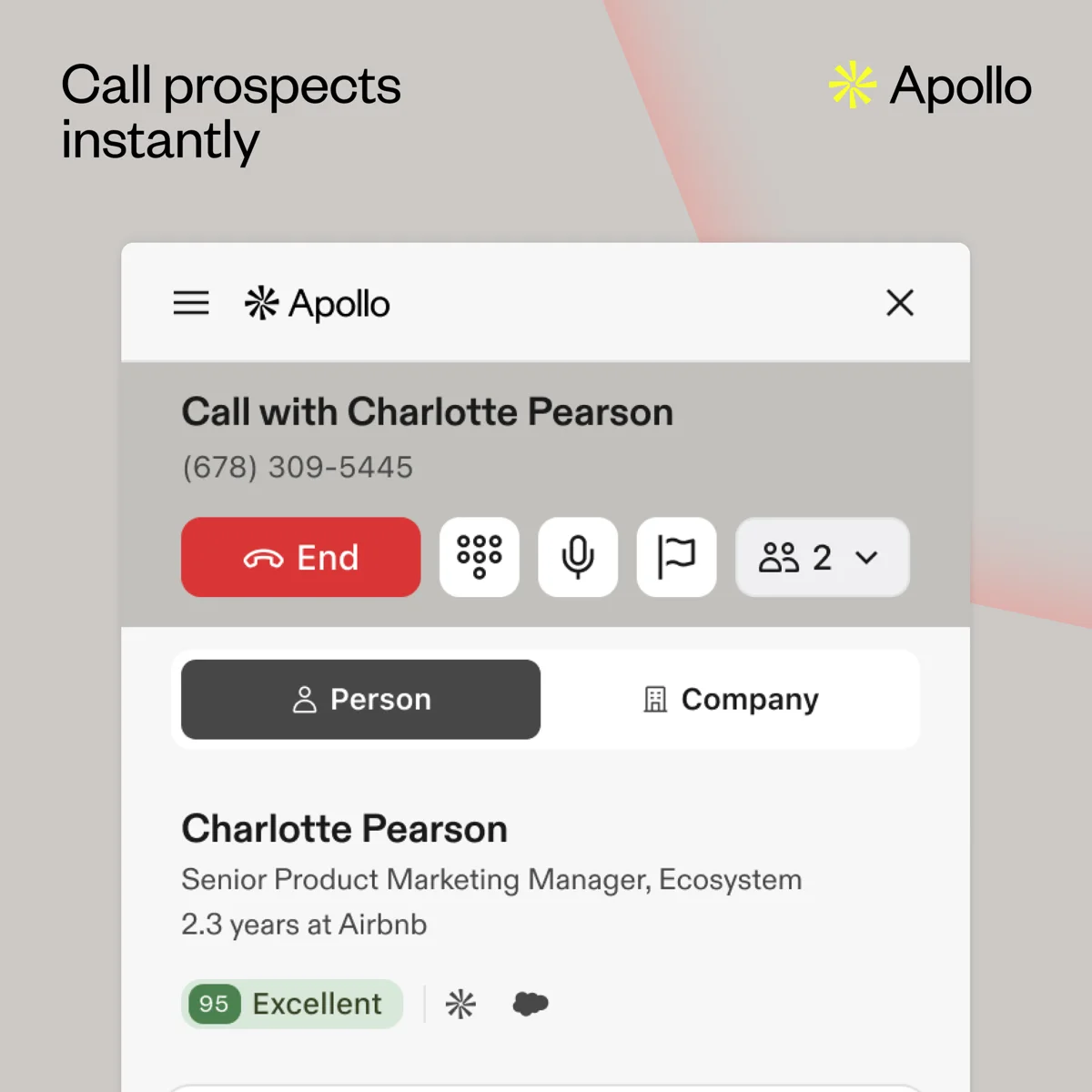
Apollo's built-in dialer, with the contact record beside the call. Image: Apollo.
Meetings and conversations
Apollo Meetings gives you booking links tied to your live calendar, with single-host, multi-host and round-robin meeting types. Inbound routers can qualify and route prospects using form answers and Apollo data such as company size. Recording, transcripts and AI summaries come from Apollo Conversations, which pulls out objections, pain points and next steps. Meetings sync to your CRM and appear on contact, account and deal records.
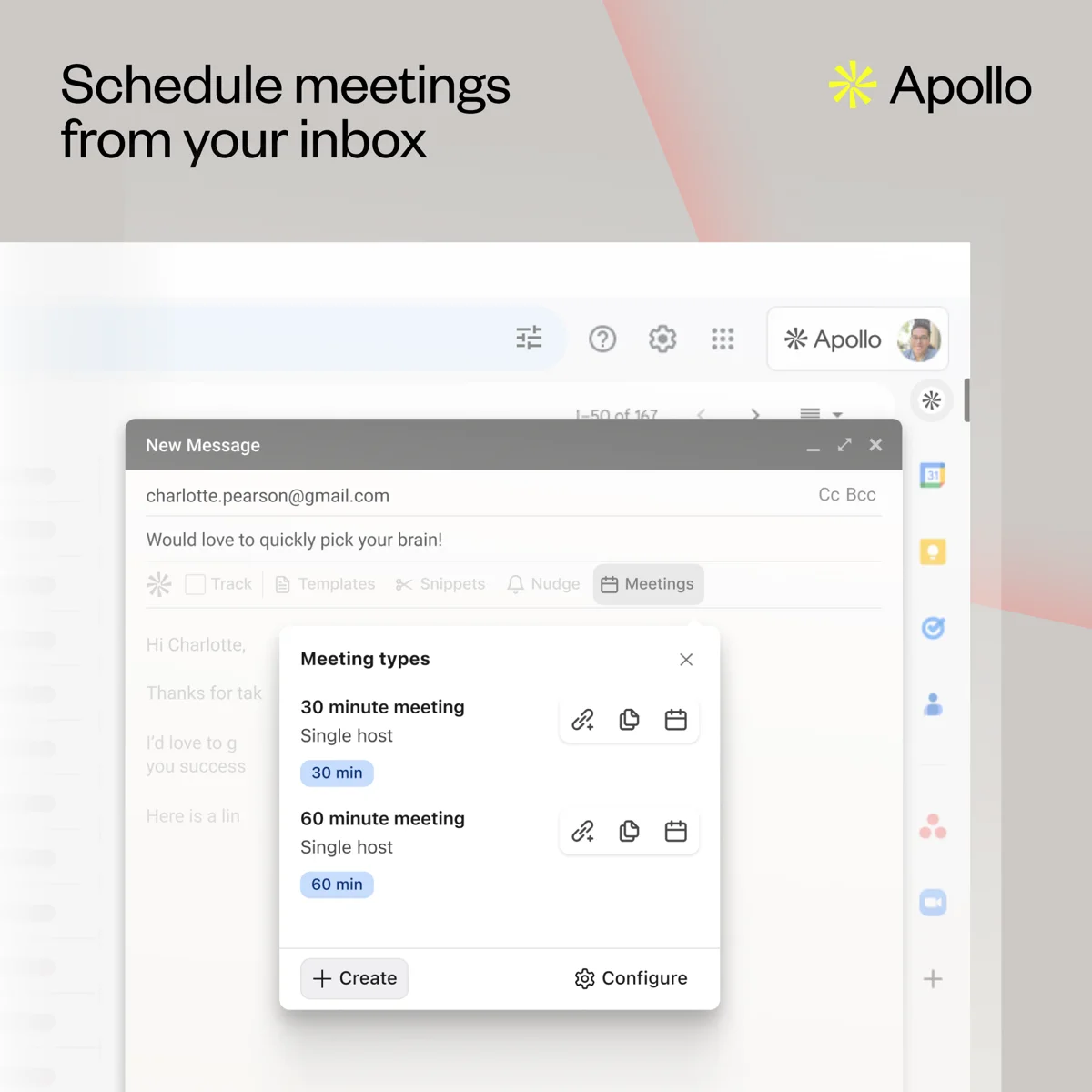
Booking links inside Gmail through Apollo Meetings. Image: Apollo.
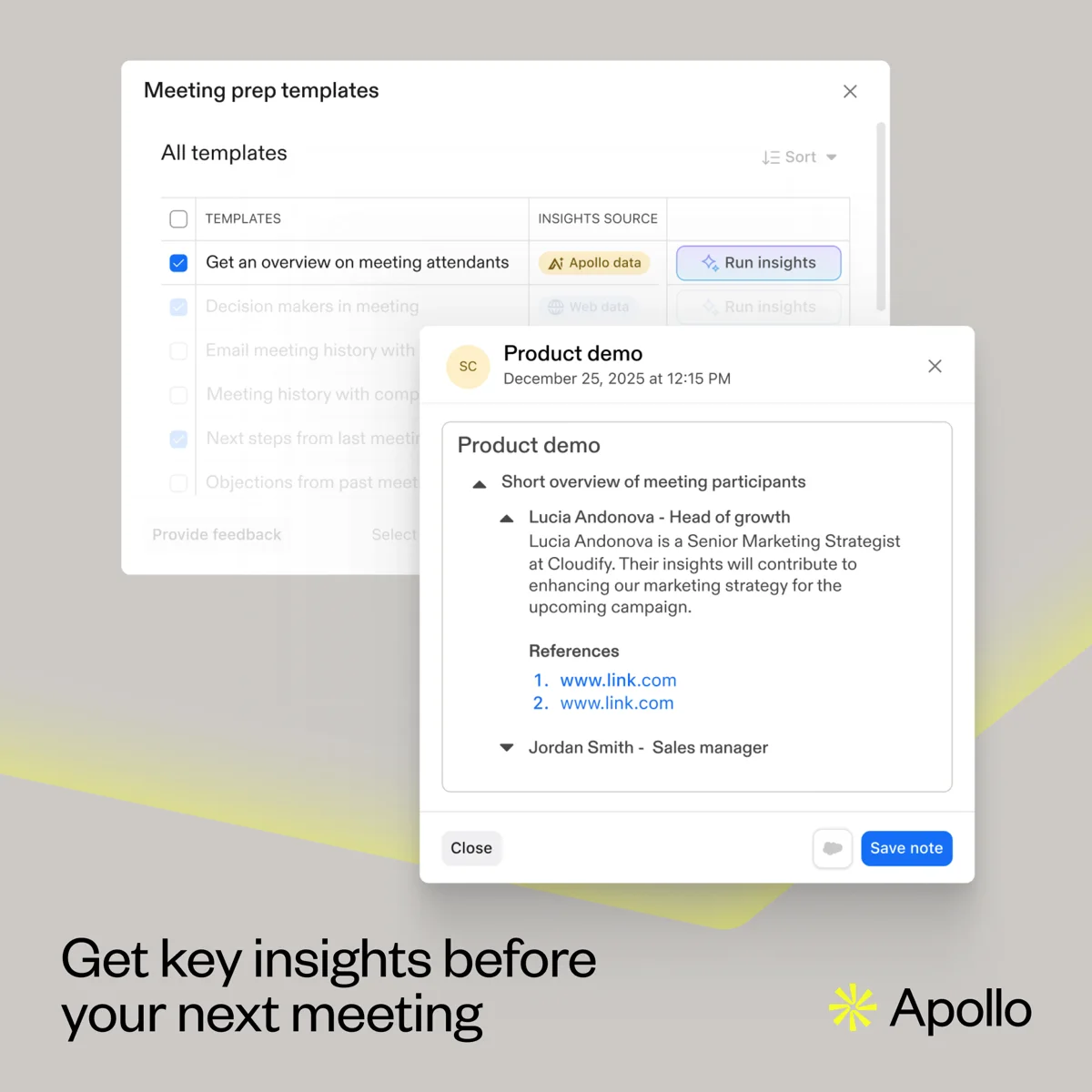
AI meeting prep that pulls attendee and account context before a call. Image: Apollo.
AI features and agents
Apollo launched its AI Assistant on March 4, 2026. According to Apollo's announcement, it can handle prospect research, list building, workflow setup, sequence building and content creation from plain-language prompts. Apollo said it was free as an introductory offer on Basic, Professional and Organization plans, with Free plans getting up to 5 chats, and noted that pricing may change.
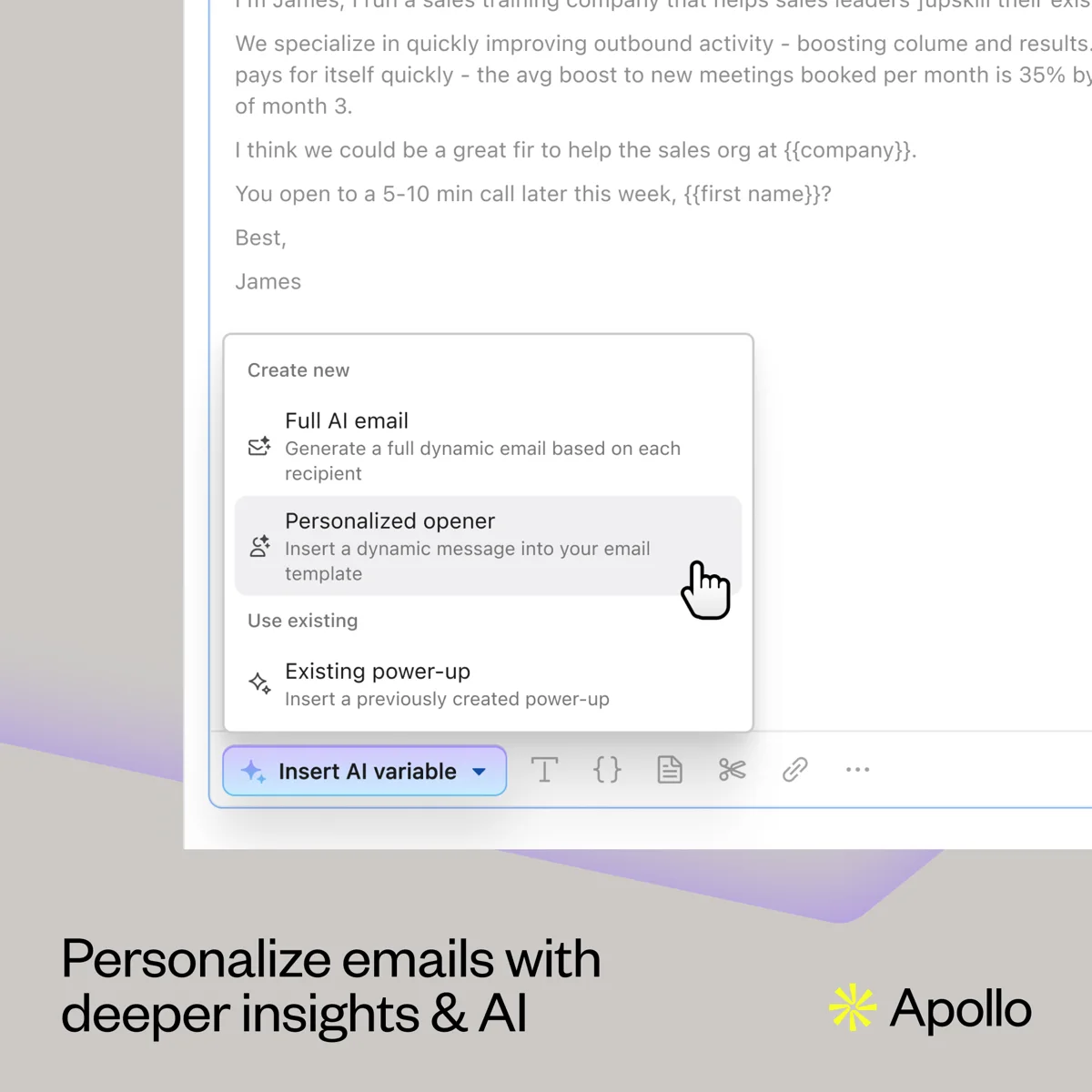
AI variables generate personalized openers or full emails per recipient. Review AI copy before it goes out at volume. Image: Apollo.
Apollo's site also highlights an AI Context Center for training agents on your ICP and product, agents that run in the background, AI research runs (reported at 1 credit each) and Apollo MCP for connecting Apollo to outside AI tools. Our view: the AI is useful for research and first drafts, but every message still needs a human edit before it goes to a cold prospect.
Chrome extension
The Apollo Chrome extension works on LinkedIn, Gmail, Google Calendar, Salesforce, HubSpot and any company website, according to Apollo. From a LinkedIn profile you can reveal contact details, add the person to a list or sequence, and log tasks. In Gmail, you can track emails, use templates and sync activity to your CRM. It can also add contacts to Outreach or Salesloft sequences if your team uses those.
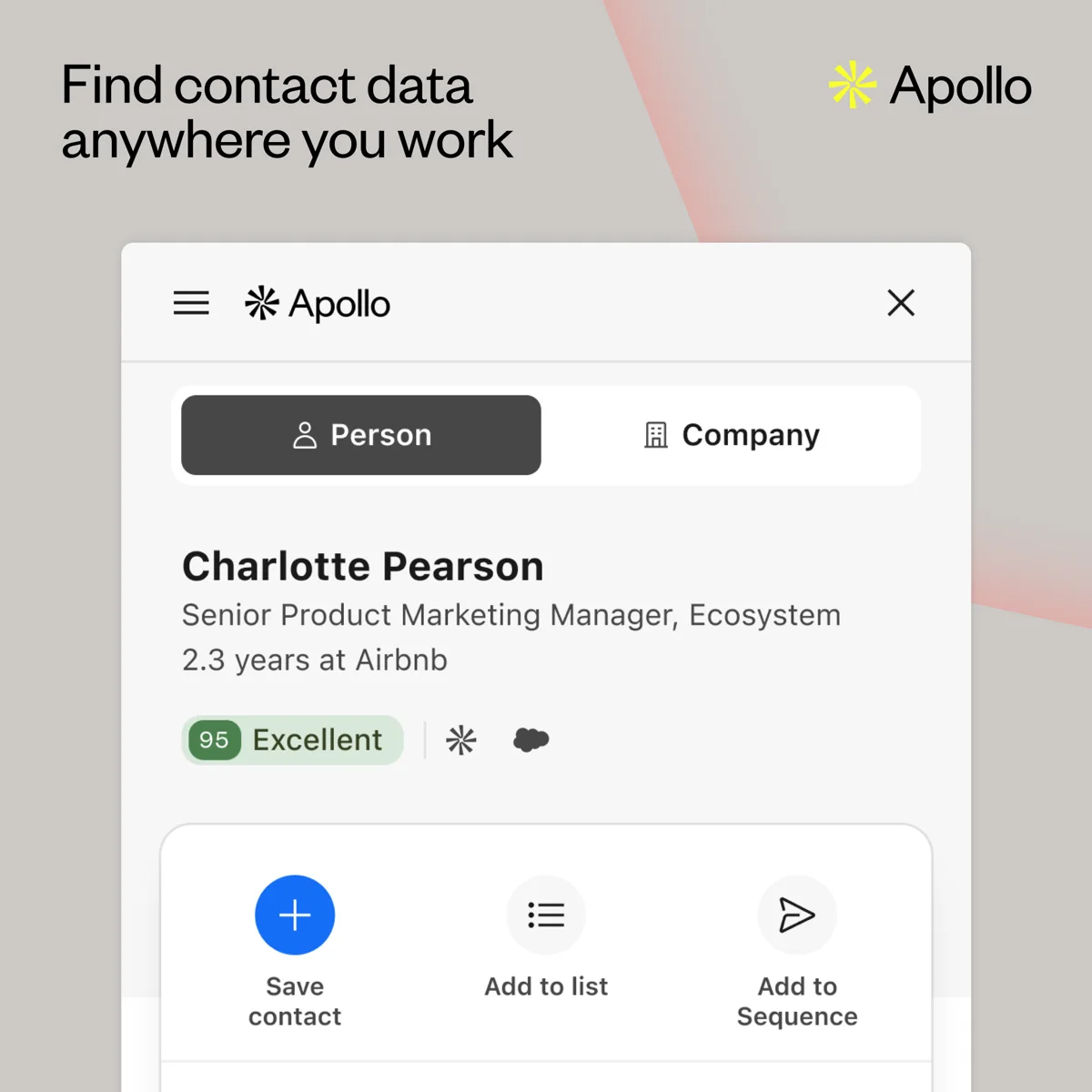
The Chrome extension surfaces contact data on LinkedIn and company sites, with one-click save, list and sequence actions. Image: Apollo.
CRM integrations
Apollo integrates with Salesforce, HubSpot and Pipedrive, among others. Apollo's HubSpot article describes a two-way sync where you can push and pull contacts, accounts and deals, and push activities like calls, emails, meetings, tasks and notes. One limit to know: Apollo says you can only connect one CRM at a time.
Apollo also has its own deals and pipeline features, fine for a very small team. Most companies we work with keep their CRM as the system of record.
API
Apollo's developer docs list API rate limits for each plan. As of October 2026, general endpoints allow 600 requests per day on Free, 2,000 on Basic and Professional, and 6,000 on Organization. Enrichment endpoints consume credits, so higher rate limits do not mean unlimited data.
Analytics
Apollo reports on sequence performance, rep activity, deliverability health and meetings. That is enough for most SMB teams; larger teams usually push the data into their CRM or BI tool.
How to set up Apollo for cold email the right way
Most Apollo problems we fix are setup problems. Follow this order.
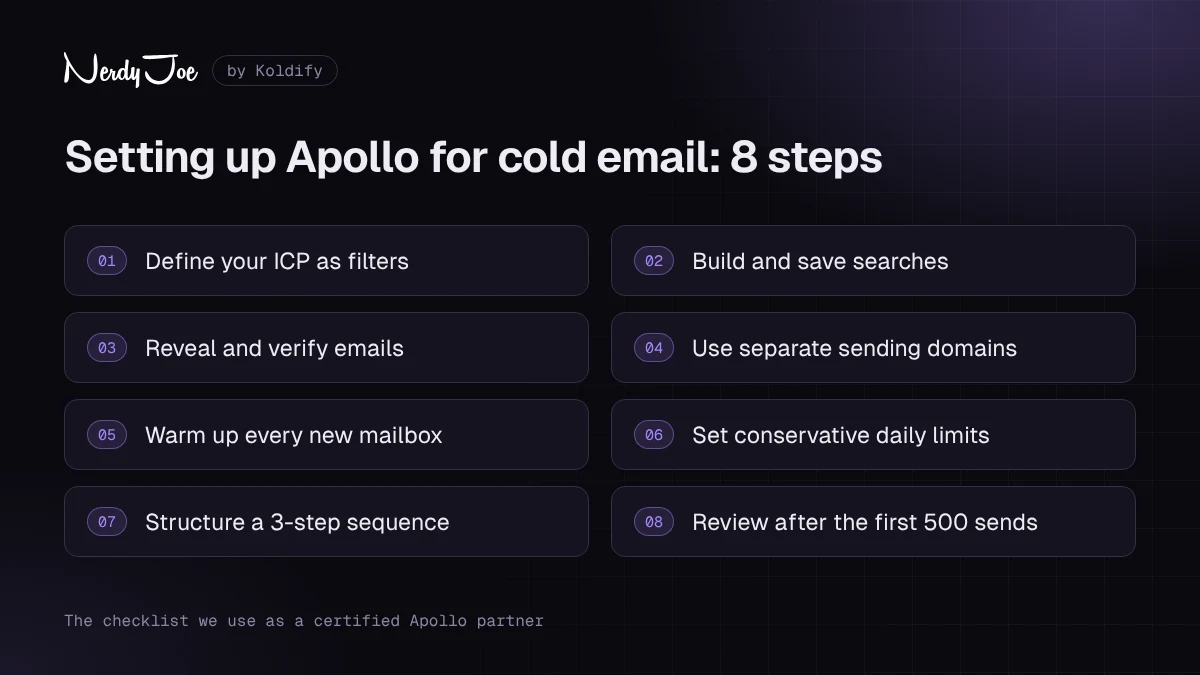
The 8-step setup we use with clients as a certified Apollo partner.
Step 1: Define your ICP as filters
Write your ideal customer profile in the language of Apollo's filters before you search. For example: US-based, 20 to 200 employees, SaaS industry, uses HubSpot, titles containing "Head of Sales" or "VP Sales". Narrow beats broad. A list of 800 well-matched prospects will outperform a list of 8,000 loose ones.
Step 2: Build and save searches
Save each ICP segment as its own search so you can write separate messaging and compare results. Re-run weekly to catch new matches.
Step 3: Reveal and verify
Filter to verified emails, reveal only what you will actually contact this cycle, and run a second verification on the export. Keep catch-all contacts in a separate list.
Step 4: Use separate sending domains
Never send cold email from your main company domain. Register a few lookalike domains (for example, if you are acme.com, consider tryacme.com or acmehq.com), redirect them to your main site, and set up SPF, DKIM and DMARC on each. Apollo can buy and configure these for you, or you can buy them elsewhere and connect the mailboxes.
Step 5: Warm up every new mailbox
Turn on warmup for every new mailbox and give it a few weeks before you send cold. Apollo's product page says warmup typically takes a few weeks. Keep warmup running at a low level even after you start sending.
Step 6: Set conservative daily limits
Apollo recommends starting at 50 emails per day per mailbox and increasing only after you consistently reach at least a 5% reply rate with a strong domain reputation. We often start new mailboxes lower than that. To scale, add mailboxes rather than pushing more volume through each one.
Step 7: Structure your sequence
Keep sequences short, plain-text and focused on one problem. Three to four emails over two to three weeks is plenty for most offers. Avoid links and images in the first email, and check your copy against our list of spam trigger words. For the full writing process, see how to write a cold email.
Here is a sample three-step sequence you can adapt. Variables use Apollo's double-brace format.
Step 1 (Day 1) | Automatic email
Subject: {{company}} outbound

Hi {{first_name}},

Noticed {{company}} is hiring two SDRs. Usually that means pipeline
targets just went up.

We help B2B teams like yours book qualified meetings without adding
headcount, by building targeted lists and running outbound on
dedicated sending infrastructure.

Worth a 15-minute call to see if it fits your Q1 plan?

{{sender_first_name}}
Step 2 (Day 4) | Automatic email, same thread

Hi {{first_name}},

Quick follow-up. The most common issue we see with new SDR teams is
not effort, it is list quality. Reps spend the first month calling
people who were never a fit.

Happy to share how we would build a list for {{company}}'s ICP,
no strings attached. Open to it?

{{sender_first_name}}
Step 3 (Day 9) | Automatic email, new thread
Subject: close the loop?

Hi {{first_name}},

I have not heard back, so I will assume outbound is covered for now.

If that changes, just reply "later" and I will check back next
quarter.

{{sender_first_name}}
Step 8: Review after the first 500 sends
Check bounce and reply rates by segment. Pause high-bounce segments, rewrite dead steps, then scale.
If you would rather have this built for you, book a call with David and we will walk through how we set up Apollo for teams like yours.
Apollo for cold email at scale: where it fits
Apollo can send cold email. The question is how much.
Where Apollo works well for sending
Apollo is a good sender for a few reps on a handful of warmed mailboxes, running multichannel sequences. At Apollo's recommended 50 emails per mailbox per day, 15 mailboxes gives one user a theoretical ceiling of about 750 sends a day. That is plenty for most sales teams.
Where dedicated sending tools do better
Dedicated cold email platforms such as Instantly, Smartlead and Email Bison are built for one job: sending large volumes across many inboxes. They typically focus on:
- Inbox rotation across dozens or hundreds of mailboxes on many domains.
- Large-scale warmup networks and per-inbox health controls.
- Pricing that scales by sending volume or inboxes rather than by user seat.
- Unified inboxes for managing replies across every sending account in one place.
Exact features and prices vary by tool, so check each one directly.
Why serious senders separate data from sending
The setup we see work best at volume, and the one we run ourselves, is Apollo (or another data source) for finding and verifying prospects, and separate sending infrastructure for delivery. There are three reasons:
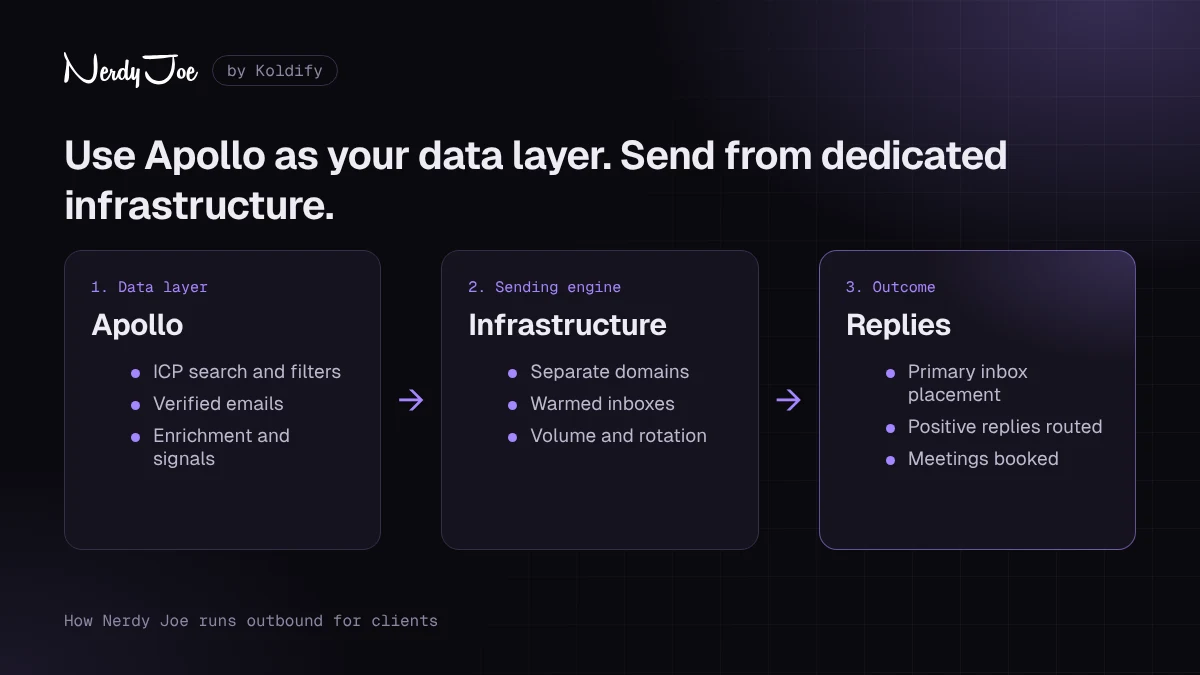
How we run outbound for clients: Apollo for data, dedicated infrastructure for sending. Want this built for you? Book a call with David.
- Risk isolation. If a sending domain gets burned, it does not touch your data platform, your CRM or your main domain.
- Cost. Paying per seat to send from many inboxes gets expensive. Sending platforms built around inbox count are usually more economical at volume.
- Control. Owning the domains, inboxes and warmup lets you swap tools without rebuilding your reputation from scratch.
This is exactly how our done-for-you service, Koldify, operates. Koldify owns its sending infrastructure (domains, inboxes, warmup and deliverability), the team sends 1M+ cold emails a month, plans are month-to-month, and replies are the deliverable. If you want cold email at volume without building that stack yourself, book a call with David. You can also read more about our cold email services.
Pros and cons
Pros
As an official Apollo partner we see both sides daily: the wins and the support tickets. Here is the honest list.
- Large database: Apollo says 240M+ contacts and 30M+ accounts.
- Generous free plan with no time limit, so you can test the data before paying.
- Published per-seat pricing, starting at about $49 per user per month on annual billing.
- Data, enrichment, sequences, dialer, meetings and CRM sync in one product.
- Strong user ratings: 4.7 out of 5 on G2 from 9,846 reviews as of October 15, 2026.
- Built-in deliverability suite with domain purchase, warmup, blocklist checks and bounce protection.
- Credit refund on verified emails that bounce within 30 days, per Apollo.
- Fast-moving AI features, including the AI Assistant launched in March 2026.
Cons
- Data accuracy varies, especially for mobile numbers, small companies and some international markets.
- Phone numbers cost 8 credits each (per 2026 pricing reviews), so call-heavy teams burn credits quickly.
- Credits do not roll over, so unused credits are lost each cycle.
- Pricing and plan structure change often, and sources disagree on monthly prices.
- Support gets mixed reviews. On Capterra (Canada), customer support scores 4.2 out of 5, the lowest of its sub-ratings.
- Many features sit behind higher tiers or paid add-ons.
- Only one CRM can be connected at a time.
- Not designed for very high-volume, many-inbox cold email sending.
Apollo vs alternatives
No single tool wins on every axis. Here is how Apollo compares with the tools prospects most often ask us about. Prices are listed only where we could verify them in 2026 sources; otherwise check each vendor's site.
| Tool | Best for | Starting price (as of Oct 2026) | Main strength | Main weakness |
|---|---|---|---|---|
| Apollo.io | SMB and mid-market outbound teams, agencies | Free; paid from about $49/user/month billed annually | All-in-one data plus sequences at a published price | Data accuracy varies; credit limits |
| ZoomInfo | Large enterprise sales and marketing teams | Custom | Deep company intelligence and enterprise features | Expensive annual contracts |
| Lusha | Reps who want fast contact lookups | Free plan; paid plans see site | Simple, quick contact reveals | Narrower workflow features |
| Seamless.AI | High-volume contact searching | Free plan; paid plans see site | Real-time search approach | Mixed reviews on data quality |
| Cognism | Teams selling into Europe | Custom | Strong European coverage and compliance focus | Quote-based pricing |
| Clay | RevOps and growth teams building custom enrichment | Free; Launch from about $185/month billed annually | Waterfall enrichment across many providers | Steep learning curve; not a sender |
Apollo vs ZoomInfo
ZoomInfo is the enterprise standard for company intelligence and sells on custom annual contracts. Apollo offers broad coverage, sequencing and a dialer at published per-seat pricing. For most teams under 50 reps, Apollo is the better value. Large enterprises that need depth, compliance reviews and dedicated support often still choose ZoomInfo.
Apollo vs Clay
Clay is not a database in the same sense. It orchestrates enrichment across many data providers (including Apollo) and is great for complex, custom research. Many advanced teams use Clay and Apollo together rather than choosing one.
Tips to get more from your Apollo credits
Credits are the real constraint in Apollo. These habits stretch them further:
- Search before you reveal. Searching is how you qualify. Only reveal contacts you will actually sequence this cycle.
- Narrow filters first. Tighter ICP filters mean fewer wasted reveals on poor-fit prospects.
- Prioritize email over phone. At 1 credit for an email versus 8 for a phone number, reveal mobiles only for your highest-priority accounts.
- Set per-user credit caps. Apollo lets admins cap credits per user so one rep cannot drain the team pool.
- Avoid duplicate reveals. Sync your CRM first so Apollo recognizes contacts you already own.
- Plan around the billing cycle. Credits do not roll over, so schedule large list builds before the cycle resets.
- Use enrichment selectively. Enrich only the fields you actually use in targeting or personalization.
How Nerdy Joe works with Apollo as a certified partner
Nerdy Joe is a certified Apollo.io Managed Services Partner. In practice, a managed services partner is a vendor Apollo has certified to set up and run Apollo on behalf of clients. Instead of your team learning every setting the hard way, a partner configures the platform around your ICP and keeps it running.
Here is what that work typically includes:
- Setup and configuration. Workspace structure, user roles, credit caps, mailbox connections and sending limits.
- ICP and list building. Translating your ideal customer profile into saved searches and segmented lists.
- Data hygiene. Verification workflows, catch-all handling, de-duplication and job change monitoring.
- Sequence design. Writing and structuring multichannel sequences, with copy tested for deliverability. For more on structure, see our guide to cold email sequences.
- Deliverability. Separate sending domains, authentication, warmup and ongoing health checks.
- CRM integration. Field mapping and two-way sync with HubSpot, Salesforce or Pipedrive so your CRM stays the source of truth.
Some teams want Apollo configured and handed back. Others want the whole outbound motion handled, closer to outsourced SDR services. Either way, if you want Apollo set up and run properly, or you want done-for-you cold email at volume on owned infrastructure through Koldify, book a call with David.
Final verdict
Apollo.io is the best value all-in-one prospecting platform for most startups, agencies and SMB to mid-market sales teams in 2026. You get a large database, solid enrichment, sequences, a dialer, meetings and real AI features at a published price, with a free plan to test it first. We give it 4.4 out of 5.
It is not perfect. Data accuracy varies, credits run out faster than you expect (especially for phone numbers), and it is not the right engine for very high-volume cold email. Use it as your data and workflow hub, verify every list before you send, and pair it with dedicated sending infrastructure when you scale.
If that sounds like the right fit, start with Apollo's free plan, build one tightly filtered list, and see the data for yourself. When you are ready to upgrade, compare Apollo's paid plans against the credit math above.
Sources
- Apollo.io homepage
- Apollo.io pricing page
- Apollo Knowledge Base: What Are Credits?
- Apollo Knowledge Base: Apollo Data Overview
- Apollo Knowledge Base: How Apollo Verifies Emails
- Apollo Knowledge Base: Email Status Overview
- Apollo Knowledge Base: Configure Email Sending Limits
- Apollo Knowledge Base: Manage Mailboxes and Domains
- Apollo Knowledge Base: Integrate HubSpot with Apollo
- Apollo Knowledge Base: Meetings Overview
- Apollo email deliverability suite
- Apollo Chrome extension
- Apollo AI Assistant launch announcement (March 4, 2026)
- Apollo API rate limits
- G2: Apollo.io reviews
- Capterra: Apollo reviews
- Valley: Apollo pricing and credits explained (2026)
- Saleshandy: Apollo.io pricing 2026
- CostBench: Apollo.io pricing
- Zeliq: Apollo.io pricing 2026
- Docket: Clay pricing
Frequently asked questions
Is Apollo.io free?
Yes. Apollo has a free plan with no time limit. As of October 2026, third-party pricing reviews report it includes about 75 credits per seat per month, two sequences per team, one mailbox per user and a 25-record selection limit. It is enough to test the data and the workflow, but not to run real outbound volume.
How much does Apollo.io cost?
As of October 2026, paid plans start at about $49 per user per month for Basic billed annually, $79 for Professional and $119 for Organization (which has a three-seat minimum). Monthly billing costs more, roughly $59 to $65 for Basic and $99 for Professional. Custom pricing is available for larger teams. Always confirm on Apollo's pricing page before you buy.
Is Apollo.io data accurate?
Apollo says its verified emails have a 91% accuracy rate and that it refunds the email credit if a verified email bounces within 30 days. Accuracy is generally strongest for US contacts and weakest for mobile numbers and smaller international markets, so you should still filter to verified emails and run a second verification before sending at volume.
Apollo vs ZoomInfo: which is better?
Apollo is the better value for startups, agencies and small to mid-size sales teams because it combines data, sequencing and a dialer at published per-seat prices. ZoomInfo is built for larger enterprises that want deeper company intelligence, intent data and dedicated support, and it is sold on custom annual contracts.
Is Apollo good for cold email?
Apollo is good for finding and verifying prospects and for running moderate-volume sequences from a handful of mailboxes. For high-volume cold email across many domains and inboxes, most serious senders pair Apollo data with a dedicated sending platform and separate sending infrastructure.
What are Apollo credits?
Credits are Apollo's usage currency. According to Apollo and 2026 pricing reviews, revealing an email costs 1 credit, a phone number costs 8 credits, and AI research, enrichment, warmup and dialer minutes also draw from the balance. Credits are pooled across the team, granted each billing cycle and do not roll over.
Does Apollo have a Chrome extension?
Yes. Apollo's Chrome extension works on LinkedIn, Gmail, Google Calendar, Salesforce, HubSpot and company websites. It lets you find emails and phone numbers, add contacts to lists or sequences, and log activity without leaving the page.
Can Apollo replace my CRM?
For a very small team, Apollo's deals, tasks and pipeline features can cover the basics. Most teams keep a dedicated CRM such as HubSpot or Salesforce and use Apollo's two-way sync. Note that Apollo connects to one CRM at a time.