
lemlist is an outbound platform that combines cold email, a 650M+ lead database (lemlist's figure) and, on its Multichannel plan, LinkedIn, calls, SMS and WhatsApp in one sequence. It is a strong fit for sales teams that want email and LinkedIn in the same workflow, and a weaker fit for agencies that need white label or for email-only senders chasing the lowest price at small volume. As of October 2026, the Email plan starts at $69 a month for 50,000 emails ($55 billed yearly), and Multichannel is $109 per user per month ($87 billed yearly).
Some tool links here are affiliate links (disclosure). Nerdy Joe is a lemlist affiliate partner.
Nerdy Joe is also a certified Apollo.io Managed Services Partner and a PlusVibe Certified Silver Partner. We did not test lemlist hands-on for this review. Everything below comes from lemlist's pricing page, product pages and help center, with sources at the end.
lemlist review: the short verdict
lemlist is built for one type of outbound: a sequence that mixes email with LinkedIn touches and, if you want them, calls and texts. On the Multichannel plan you can visit a profile, send an invite, follow up by email, leave a LinkedIn voice note and drop a call into the same campaign, with conditions that change the next step based on what the lead did. Few cold email tools do all of that natively.
The trade-offs are clear. Multichannel is priced per user, so a five-person team pays five seats. Lead data, buying signals, SMS and calls run on credits that cost extra beyond what the plan includes. Agencies get separate client teams through the Agency Cockpit, but lemlist's documentation does not mention white label.
| Question | Short answer |
|---|---|
| Best for | Sales teams that want email plus LinkedIn in one sequence |
| Not ideal for | Agencies that need white label client portals |
| Entry price | Email plan, $69 monthly or $55 per month billed yearly (50,000 emails) |
| Plan for LinkedIn and calls | Multichannel, $109 monthly or $87 per user per month billed yearly |
| Users and senders | Unlimited on Email; 5 senders per user on Multichannel |
| Contacts | Unlimited, per lemlist's comparison table |
| Warmup | lemwarm, included in all plans |
| Trial | 14 days with Multichannel features (no in-app calls) and 200 credits |
All prices in this review come from lemlist.com/pricing as of October 2026, unless we say otherwise. If you want to see the current plans yourself, you can start a lemlist trial.
Who lemlist is for, and who it is not for
lemlist describes its Email plan as "for teams that want to go big on email" and Multichannel as "for teams that want to maximize every touchpoint." That split is the best way to think about it. One plan is a volume email tool with data built in, and the other is a sales engagement tool for reps.
lemlist is a good fit if:
- Your reps prospect on LinkedIn and by email, and you want both in one sequence instead of two tools.
- You want calls and SMS as sequence steps, with a power dialer, without buying a separate dialer.
- You want a lead database, email finder and sending in one login, paid by credits as you go.
- You upload large lists and want unlimited contacts, which lemlist lists on all plans.
- You have a small team that needs many users on one account. The Email plan includes unlimited users.
- You want an AI agent that drafts the list, sequence and copy from a goal you describe.
lemlist is probably not the right fit if:
- You run an agency and want branded client portals on your own domain. lemlist's agency documentation does not mention white label.
- You only send email, at low volume, and price is the main factor. Entry plans from Instantly, Smartlead and PlusVibe start lower.
- You want LinkedIn automation without any account risk. LinkedIn's User Agreement prohibits bots and unauthorized automated methods to add contacts or send messages, so any automation tool carries some risk to the LinkedIn account.
- You need a fixed monthly bill for calls, texts and data. Those run on credits, so heavy usage adds cost.
What you get in lemlist
lemlist groups its features into data, outreach, multichannel steps, AI, deliverability and integrations. Here is what matters for a cold outbound team, plan by plan.
Lead data: database, finder and enrichment
Every plan includes access to lemlist's lead database (650M+ leads, per lemlist), account-based prospecting, lead scoring, an email finder and verifier, a phone number finder and LinkedIn enrichment. You can export LinkedIn leads and CSVs, and lemlist's comparison table lists unlimited contacts.
Finding data costs credits. lemlist's help center lists 5 credits per email from the Email Finder and Verifier, charged only when the result is deliverable or risky, and 20 credits per phone number found. Verification is included in the email finder cost, so you do not pay twice to find and check an address.
Outreach: sequences, conditions and personalization
Campaigns support scheduling, auto-launch, auto-stop and conditional next steps, so a lead who opens or clicks can take a different path than one who does not. lemlist uses Liquid syntax for conditional text, which lets one template change wording based on lead fields.
Personalized images are a long-running lemlist feature. In the email step editor you add custom media, place text elements on an image and insert variables like the lead's first name or company. lemlist's help center suggests keeping image text to one or two short sentences with one to three variables, and testing with long names so the text does not overflow.
Multichannel: LinkedIn, calls, SMS and WhatsApp
This is where lemlist stands apart from most cold email tools. On Multichannel and Enterprise, a sequence can include LinkedIn profile visits, follows, invites, text messages, voice messages and InMails. It can also include in-app calls, a power dialer and SMS with a phone number, and WhatsApp is available as an add-on.
You can also work in lemlist from Gmail and from LinkedIn through its extensions, which keeps reps in the tools they already use. The Email plan does not include any of these channels.
AI: lemAgent and agents
lemAgent is lemlist's conversational campaign builder. You describe the goal, the target buyer and your tone, proof points and call to action, and it returns a lead list, a multichannel sequence with timing and branching, and the messages for each channel. lemlist says most campaigns are ready in under 15 minutes and that "nothing launches without your approval."
Around it sit other AI features listed on the pricing page: signal, enrichment and messaging agents, AI data cleaning, web search enrichment, reply intent detection, out-of-office detection, AI-generated replies, AI voice notes for LinkedIn, call summaries and CRM auto-fill. lemlist also offers an MCP server and a CLI on all plans, which lets AI assistants and scripts work with your account.
Some AI actions use credits. The help center lists 1 credit per AI variable request (charged only for a valid result) and 1 credit per company for AI contact sourcing, charged per run even if no one is found.
Inbox, team and reporting
lemlist includes a unified inbox for replies, task management, shared campaigns, a template library, campaign review, step preview and custom reporting. Roles and permissions management is listed, and custom user roles, activity logs and custom credit assignment sit at the top of the range.
Integrations
lemlist lists native CRM integrations with HubSpot, Salesforce and Pipedrive, plus Zapier, Make, n8n, Clay, an API with documentation, and VoIP integrations with Aircall and Ringover. Working in lemlist from inside your CRM is listed on Enterprise.
If your CRM is not on that list, Zapier, Make or the API are the routes. Close, for example, is not on lemlist's native list, so a Close team would connect through one of those (see our Close CRM review). Our best CRM for cold email guide covers which CRMs connect most cleanly to cold email tools.
lemlist pricing explained
lemlist has three plans: Email, Multichannel and Enterprise. Billing can be monthly, quarterly (save 10%) or yearly (save 20%). Here is how the published prices compare as of October 2026.
| Plan | Monthly | Yearly (per month) | Volume | Users and senders |
|---|---|---|---|---|
| From $69 | From $55 | 50,000 emails/month at the entry tier | Unlimited users and email senders | |
| Multichannel | $109 per user | $87 per user | Unlimited emails and messages | 5 senders per user |
| Enterprise | Custom | Custom | Unlimited | 5 or more senders per user |
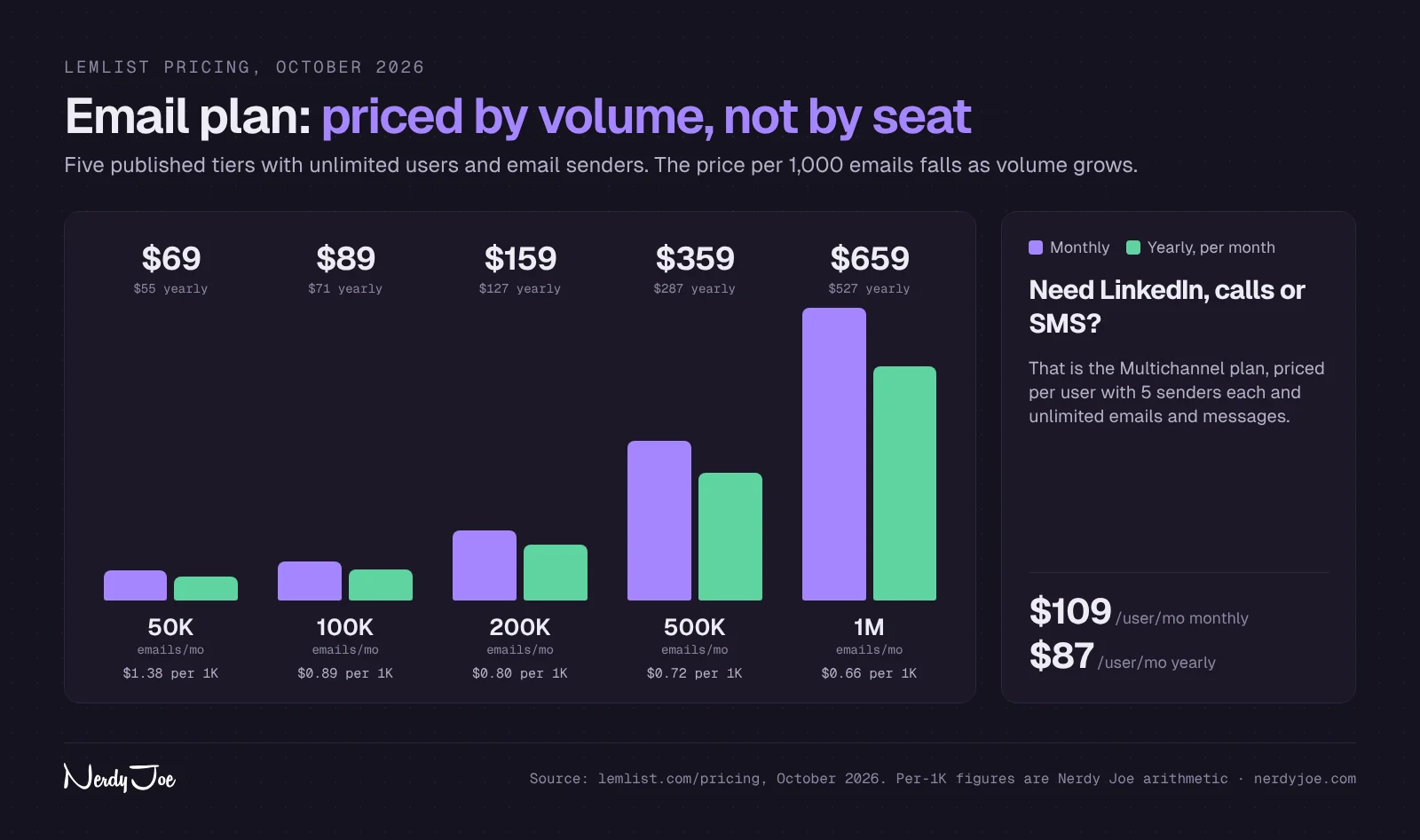
The Email plan is priced by monthly email volume, not by seat. lemlist publishes five tiers, and the price per 1,000 emails falls as volume grows.
| Email plan volume | Monthly | Yearly (per month) | Cost per 1,000 emails (monthly) |
|---|---|---|---|
| 50,000 emails | $69 | $55 | $1.38 |
| 100,000 emails | $89 | $71 | $0.89 |
| 200,000 emails | $159 | $127 | $0.80 |
| 500,000 emails | $359 | $287 | $0.72 |
| 1,000,000 emails | $659 | $527 | $0.66 |
Above 1,000,000 emails a month, lemlist asks you to talk to sales for a custom limit. The cost per 1,000 column is our arithmetic from the published monthly prices.
What Multichannel really costs
Multichannel is per user, so the math changes fast for teams. One rep is $109 a month, three reps are $327, and five reps are $545 on monthly billing. On yearly billing, the same five reps cost $435 a month.
Each user gets 5 senders, so five users can run 25 sending mailboxes. lemlist's help center says Multichannel and Enterprise accounts receive 400 credits per user per month (the article calls the plan Multichannel Expert), while the Email plan includes no free credits for new accounts.
Data add-ons and credits
Lead data enrichment and buying intent signals are sold as add-ons. Enrichment starts at $20 a month ($16 yearly) for 2,000 credits, which lemlist translates to 400 emails or 100 phone numbers. Buying intent signals start at $29 a month ($21 yearly) for 100 signals.
| Enrichment add-on | Monthly | Yearly (per month) | What it covers (lemlist's figures) |
|---|---|---|---|
| 2,000 credits | $20 | $16 | 400 emails or 100 phones |
| 5,000 credits | $49 | $39 | 1,000 emails or 250 phones |
| 10,000 credits | $94 | $75 | 2,000 emails or 500 phones |
| 25,000 credits | $225 | $180 | 5,000 emails or 1,250 phones |
| 50,000 credits | $441 | $353 | 10,000 emails or 2,500 phones |
| 100,000 credits | $833 | $666 | 20,000 emails or 5,000 phones |
| 200,000 credits | $1,568 | $1,254 | 40,000 emails or 10,000 phones |
At the entry tier, a found email works out to about $0.05 and a found phone number to about $0.20 on monthly billing. At the 200,000 credit tier, an email drops to about $0.039. Add-on credits roll over while the add-on stays active, and lemlist charges most data actions only on success.
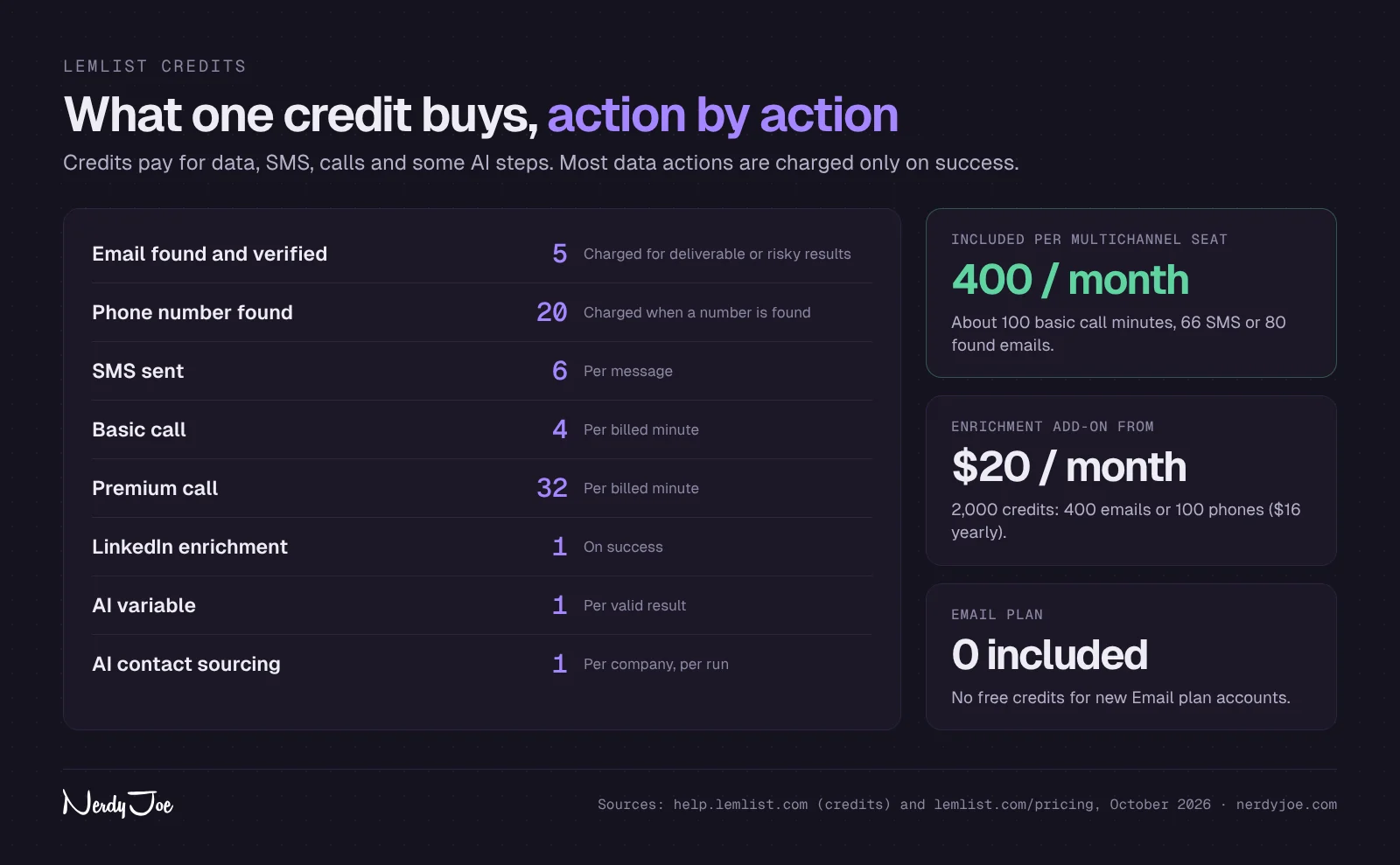
Credits also pay for some channel actions, which is easy to miss when budgeting Multichannel.
| Action | Credit cost (per lemlist's help center) |
|---|---|
| Email found and verified | 5 credits, charged for deliverable or risky results |
| Phone number found | 20 credits, charged when a number is found |
| LinkedIn enrichment | 1 credit |
| SMS | 6 credits per message |
| Calls, basic | 4 credits per billed minute |
| Calls, premium | 32 credits per billed minute |
| AI variable | 1 credit per valid result |
| AI contact sourcing | 1 credit per company, per run |
Put together, one Multichannel seat's 400 monthly credits cover about 100 basic call minutes, or about 66 SMS, or 80 found emails. Heavy callers will likely need a top-up or the enrichment add-on.
What lemlist costs in practice: three examples
List prices are only the start. Here is how the published numbers add up for three common setups, on monthly billing, before mailbox and domain costs (which you pay to Google, Microsoft or a reseller, not lemlist).
| Setup | lemlist plan | Add-ons | lemlist total per month |
|---|---|---|---|
| Founder sending email only, finding 400 emails a month | Email, 50,000 tier ($69) | Enrichment, 2,000 credits ($20) | $89 ($71 on yearly billing) |
| Three SDRs on email, LinkedIn and calls | Multichannel, 3 users ($327) | Enrichment, 10,000 credits ($94) | $421 ($336 on yearly billing) |
| High-volume email team at 500,000 emails | Email, 500,000 tier ($359) | Enrichment, 50,000 credits ($441) | $800 ($640 on yearly billing) |
The founder. The Email plan's entry tier is generous for one person, since 50,000 emails a month is far more than a single founder usually sends. The real cost is the mailboxes: at lemlist's recommended 25 to 30 cold emails per mailbox per day, even 10,000 emails a month needs about a dozen warmed mailboxes.
The three-SDR team. Multichannel gives the team 15 senders and, per lemlist's help center, 1,200 credits a month across the three seats. If each rep spends those credits on about 100 minutes of basic calls, list building runs on the add-on, which is why we included 10,000 credits (about 2,000 found emails). Teams that call more will spend more on credits.
The high-volume team. At 500,000 emails a month, the Email plan costs about $0.72 per 1,000 emails, which is competitive with the email-only tools we compare below. Data is the larger line item here, and at lemlist's recommended per-mailbox caps the team would need more than 550 mailboxes sending daily. Many teams at that volume buy data elsewhere, for example from Apollo, and use lemlist mainly for sending.
These totals are our arithmetic from lemlist's published prices as of October 2026. Your bill will vary with billing period, credit use and any custom terms.
Free trial
The trial lasts 14 days. It includes the Multichannel features except in-app calls, plus 200 one-time credits, and you can try lemAgent on your own data before upgrading to launch campaigns. lemlist does not list a free plan.
If you want to model your full outbound budget, including mailboxes and domains, our cold email cost calculator adds it up.
Deliverability: lemwarm, sending limits and the real mailbox count
lemlist's pricing page says lemwarm and built-in deliverability protections are included in all plans. lemwarm sends warmup emails from your connected inboxes to build sender reputation, and it reports a Warmup Score out of 100 based on DNS setup (40 points), warmup spam rate (30), blacklists (20) and domain age (10).
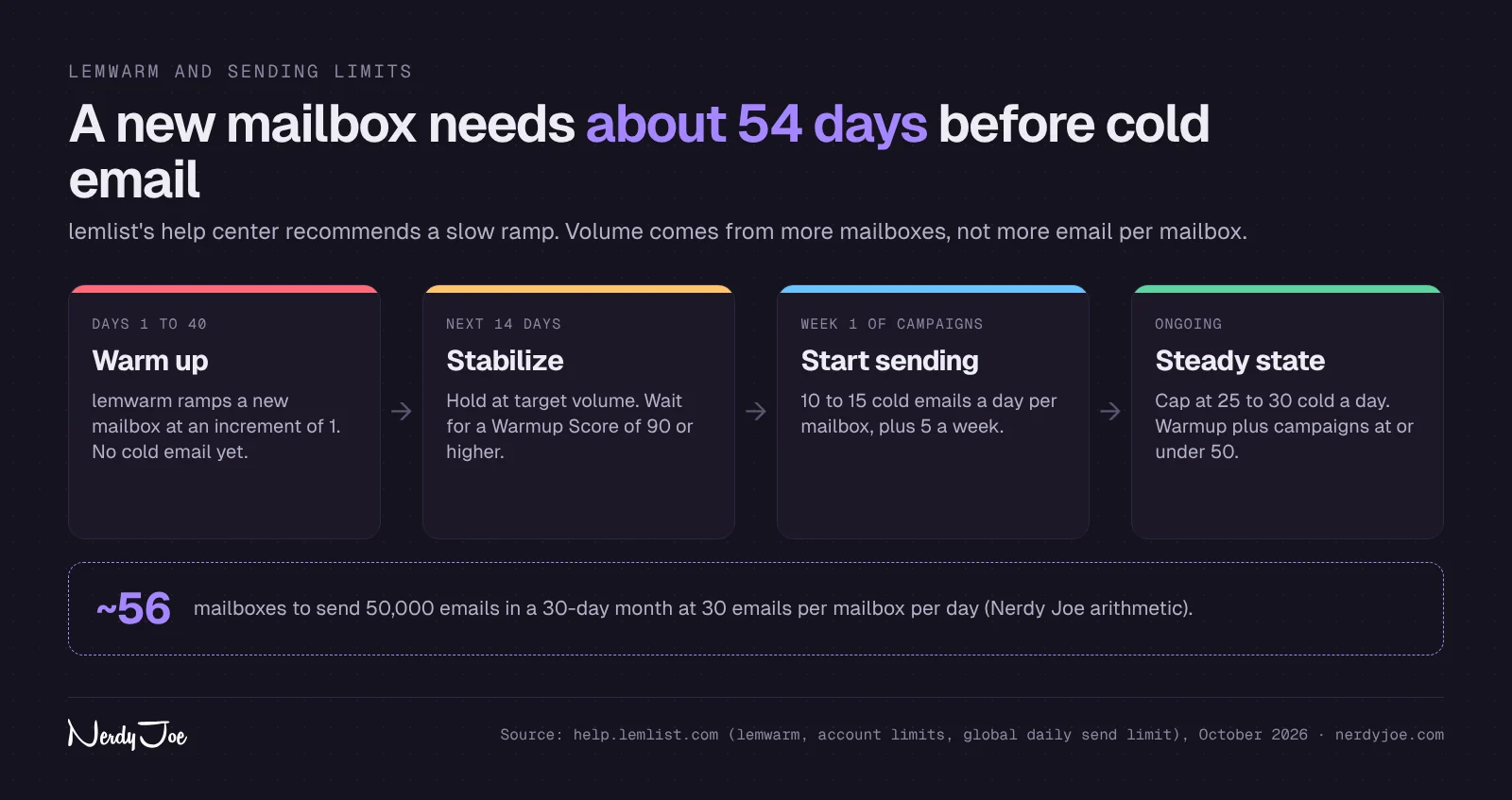
lemlist's help center is conservative about ramp-up, which is a good sign. For a brand new mailbox it describes about 40 days of warmup at an increment of 1, then 14 days of stable sending at target, before launching cold campaigns once the Warmup Score is 90 or higher.
| Stage | What lemlist's help center recommends |
|---|---|
| New domain, first month | Keep the whole domain under 100 emails a day across all its mailboxes |
| Warmup | About 40 days at a ramp increment of 1, no cold email yet |
| Stabilize | 14 days at target volume, Warmup Score 90 or higher |
| Start sending | 10 to 15 cold emails a day per mailbox, adding 5 per week |
| Steady state | Cap at 25 to 30 cold emails a day; warmup plus campaigns at or under 50 a day |
| Keep warmup on | Leave lemwarm at about 10 a day as a reputation signal |
One article in the help center describes a slightly higher path (30 a day at launch, 40 a day after a clean month), so treat these as ranges, not hard rules. Either way, the numbers point to a fact every cold email team learns: volume comes from more mailboxes, not more email per mailbox.
Here is the arithmetic. To send the Email plan's 50,000 emails in a 30-day month at 30 emails per mailbox per day, you need about 56 mailboxes sending every day. The Email plan's unlimited senders allow that, but each mailbox and domain is a separate cost with Google, Microsoft or a reseller. Our cold email infrastructure guide explains how to set that up.
Beyond lemwarm, lemlist lists inbox rotation across mailboxes, sending limits per inbox, sending in each lead's timezone, a pre-send check it calls Deliverability Boost, email verification, custom tracking domains, DNS and deliverability testing, domain purchase, rotating IPs, alerts and a Deliverability Hub. It supports Google, Microsoft and SMTP mailboxes.
LinkedIn automation in lemlist: limits and risk
LinkedIn steps are the main reason teams choose Multichannel. lemlist's help center publishes recommended daily maximums, and they are worth following.
| LinkedIn action | lemlist's recommended maximum |
|---|---|
| Connection invites | 20 a day on working days (LinkedIn caps invites at about 100 per rolling week) |
| Profile visits | 30 a day |
| Messages, including voice | 30 a day |
| Follows | 30 a day |
| Comments and likes | About 20 a day |
| All actions combined | 100 a day |
For new or dormant LinkedIn accounts, lemlist suggests starting around 50 total actions a day and raising them over two to three weeks. Manual activity and other tools on the same LinkedIn account count against the same limits, so lower lemlist's settings if you also prospect by hand.
There is also a risk no setting removes. LinkedIn's User Agreement prohibits bots and other unauthorized automated methods to add contacts or send messages, so any LinkedIn automation can lead to restrictions on the account. Many teams accept that risk with conservative limits, but it is a decision to make on purpose.
lemlist for agencies
lemlist has more agency support than its pricing page suggests. Its help center describes an Agency Cockpit, a control center where each client gets its own team with separate campaigns, leads, unsubscribe lists, users and billing. Each team receives its own monthly invoice, and you can set a custom tracking domain per team.
Roles cover the basics. Admins manage billing and the Cockpit, Members run campaigns, and an Extern role lets a client view team reports without editing anything. lemlist's help center says some plans include up to 5 guest seats that do not use a paid seat, and Enterprise includes unlimited guest seats.
What the documentation does not mention is white label, meaning clients logging in on your domain with your logo. If that matters, compare Smartlead, which sells white label client workspaces from its Pro plan, and PlusVibe, which offers extra workspaces from Business and white label on Agency. Our Smartlead vs lemlist comparison and our guide to cold email tools for agencies go deeper on that split.
lemlist vs Instantly, Smartlead and PlusVibe
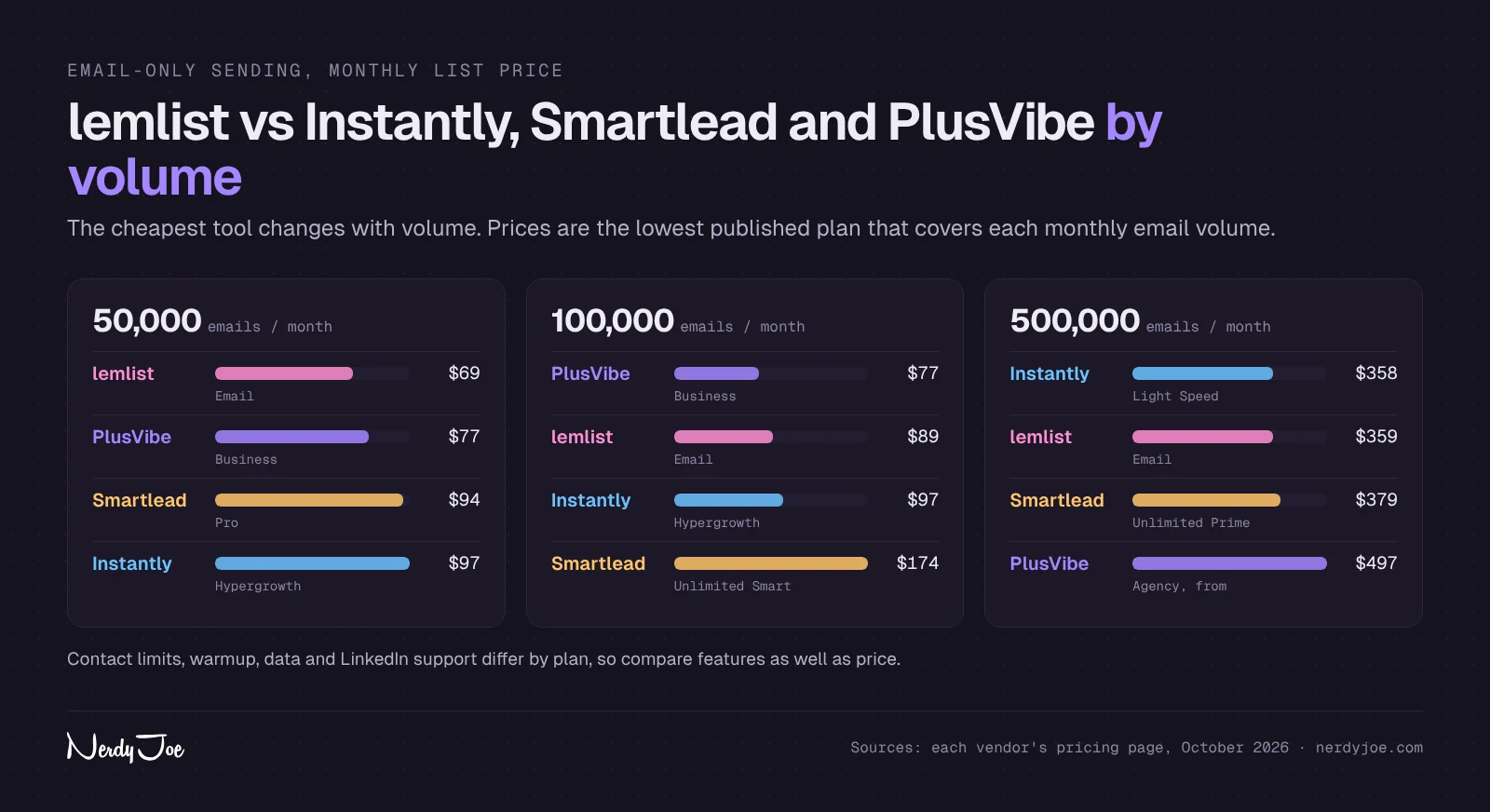
For email-only sending, the price picture depends on volume. Here is what each tool's list price looks like at three common monthly volumes on monthly billing, as of October 2026.
| Monthly emails | lemlist (Email plan) | Instantly | Smartlead | PlusVibe |
|---|---|---|---|---|
| 50,000 | $69 | $97 (Hypergrowth) | $94 (Pro) | $77 (Business) |
| 100,000 | $89 | $97 (Hypergrowth) | $174 (Unlimited Smart) | $77 (Business) |
| 500,000 | $359 | $358 (Light Speed) | $379 (Unlimited Prime) | From $497 (Agency) |
At 50,000 emails, lemlist's Email plan has the lowest list price of the four. At 100,000, PlusVibe Business is lower, and at 500,000, lemlist and Instantly land within a dollar of each other. Contact storage differs too: lemlist lists unlimited contacts, while Instantly Hypergrowth caps uploaded contacts at 25,000 and PlusVibe Business allows 100,000 active leads.
Price is only part of it. Here is how they split by job.
| If you need | Look first at | Why |
|---|---|---|
| Email plus LinkedIn, calls and SMS in one sequence | lemlist Multichannel | The only one of the four with these channels built in |
| Email-only sending with data in the same account | Instantly | SuperSearch data on Credits plus a large sending range |
| An agency that needs white label | Smartlead | White label client workspaces from Pro |
| Lowest price for a solo sender or small team | PlusVibe | Lower entry price and Unibox on all plans |
| A large B2B database with sequences | Apollo | Data-first platform with built-in sequencing |
For head-to-head details, read Instantly vs lemlist and our three-way Instantly vs Smartlead vs PlusVibe breakdown.
lemlist pros and cons
Pros
- Email, LinkedIn, calls, SMS and WhatsApp in one sequence on Multichannel.
- Email plan includes unlimited users and email senders.
- Unlimited contacts listed on all plans.
- Lead database, email finder and verifier built in, charged mostly on success.
- lemwarm and deliverability tools included in every plan.
- Conservative, detailed help center guidance on warmup and LinkedIn limits.
- Native HubSpot, Salesforce and Pipedrive integrations, plus API, MCP and CLI.
- Email plan has the lowest list price of the four tools we compared at 50,000 emails a month.
Cons
- Multichannel is per user, so team costs grow with headcount.
- Calls, SMS and most data use credits, which makes monthly cost less predictable.
- The Email plan includes no free credits for new accounts.
- No white label mentioned in lemlist's agency documentation.
- LinkedIn automation carries account risk under LinkedIn's User Agreement.
- In-app calls are not part of the free trial.
lemlist alternatives
If lemlist is close but not quite right, the most common alternatives are Instantly and Smartlead for email-heavy volume, PlusVibe for lower cost, Apollo for data-first prospecting and Reply.io for another multichannel option. Our lemlist alternatives guide compares nine tools side by side.
If LinkedIn steps are the reason you are looking at lemlist, keep that requirement front and center. Most email-first tools do not automate LinkedIn natively, so switching usually means adding a second tool.
How to get started with lemlist
If you decide lemlist fits, the setup order matters more than the campaign. Here is the sequence lemlist's help center describes, in plain steps.
- Start the trial. The 14-day trial gives you Multichannel features (except in-app calls) and 200 credits. Start your lemlist trial here.
- Connect your sending mailboxes. Connect Google, Microsoft or SMTP and IMAP inboxes, ideally on secondary domains rather than your main company domain.
- Start lemwarm on every mailbox. Set the warmup value to roughly your planned daily volume (30 to 40 a day for a new mailbox) and keep the ramp increment at 1 for new mailboxes.
- Set sending limits. In Settings, then Sending limits, set the maximum emails lemlist sends from each address in 24 hours. Start at 10 to 15 cold emails a day and raise slowly.
- Set LinkedIn limits if you use Multichannel. Use the same Sending limits area to keep invites at or under 20 a day and total actions at or under 100.
- Build your list. Pull leads from the database, import a CSV or bring a list from Apollo, then let the finder and verifier fill gaps.
- Build the first campaign. Write the sequence yourself or let lemAgent draft it, then review every step before you approve the launch.
- Connect your CRM. Turn on the HubSpot, Salesforce or Pipedrive integration, or route replies through Zapier, Make or the API.
Before you launch, run your first email through our free spam word checker to catch wording that can hurt inbox placement.
How we compiled this review
We built this review from lemlist's public pricing page, product pages and help center articles as of October 2026, plus LinkedIn's User Agreement and the published pricing of the tools we compare. Prices for Instantly, Smartlead and PlusVibe come from our recent reviews and comparisons, each checked against the vendor's own pricing page.
We did not use lemlist hands-on, and we do not report deliverability results or reply rates for it. Where lemlist's own materials disagree (for example, two help articles with different steady-state sending figures), we show both. If you spot something out of date, email us and we will fix it.
Rather not run it yourself?
Warming mailboxes for 40 or more days, managing dozens of senders, building lists and writing copy that gets replies is a weekly job, before a single meeting is booked.
If you would rather hand off the outbound work, book a 30-minute call with David at Koldify. Koldify is a done-for-you cold email agency where David Tile is a partner, and it sends client campaigns on PlusVibe, Smartlead and Email Bison.
Verdict
lemlist is one of the most complete outbound tools for sales teams that want email and LinkedIn working together. Multichannel puts LinkedIn, calls, SMS and WhatsApp in the same sequence as email, the Email plan includes unlimited users, senders and contacts, and lemwarm plus detailed deliverability guidance come with every plan.
It is not the cheapest choice for a small email-only sender, Multichannel costs scale with each user, and agencies that need white label will want to compare Smartlead and PlusVibe. Budget for credits if you plan to call, text or pull a lot of data.
If your process mixes email and LinkedIn, lemlist is worth a serious trial. Try lemlist free for 14 days and build one real campaign with your own list before you choose a plan.
Disclosure: My relationship with Instantly is that of an independent party. I do not hold any position, nor do I have the power to form binding agreements or act on behalf of Instantly. My earnings are derived from referral compensations provided by Instantly. The views I share are solely mine and should not be seen as official statements, promises, or representations of Instantly, or any related entities or personnel.
Sources
- lemlist pricing
- lemlist: lemAgent
- lemlist: Inbox delivery and inbox rotation
- lemlist Help: Understand credits in lemlist
- lemlist Help: Set account limits
- lemlist Help: Set your global daily send limit
- lemlist Help: How to set up and use lemwarm
- lemlist Help: Add personalized text to images
- lemlist Help: Get started with Agency Cockpit and roles
- lemlist Help: Custom tracking domain
- LinkedIn User Agreement
- LinkedIn Help: Prohibited software and extensions
- Instantly pricing
- Smartlead pricing
- PlusVibe pricing
Frequently asked questions
How much does lemlist cost?
As of October 2026, the Email plan starts at $69 a month for 50,000 emails, or $55 a month billed yearly, with unlimited users and senders. Multichannel is $109 per user per month, or $87 billed yearly, and Enterprise is custom. Lead data and buying signals are paid add-ons.
Does lemlist have a free plan?
No. lemlist offers a 14-day free trial that includes the Multichannel features except in-app calls, plus 200 one-time credits for finding emails and phone numbers. After the trial you pick a paid plan.
Is lemwarm included in lemlist?
Yes. lemlist's pricing page says lemwarm and its built-in deliverability protections are included in all plans. lemlist's help center recommends a long ramp for new mailboxes, about 40 days of warmup plus 14 days of stable sending before cold campaigns.
Can lemlist automate LinkedIn?
Yes, on the Multichannel and Enterprise plans. You can add profile visits, follows, invites, messages, voice messages and InMails to a sequence, and lemlist's help center suggests staying at or under 20 invites and 100 total actions per day.
Is lemlist good for agencies?
Yes, for many agencies. lemlist's Agency Cockpit lets you run a separate team per client, each with its own campaigns, leads, users and monthly invoice, and an Extern role lets clients view reports. lemlist's documentation does not mention white label, so agencies that want branded client portals usually compare Smartlead or PlusVibe.
How do lemlist credits work?
Credits pay for data and some channel actions. lemlist's help center lists 5 credits per found email, 20 per found phone number, 6 per SMS and 4 per billed minute on basic calls, and most actions are charged only on success. Credits come from the trial, from Multichannel seats and from paid add-ons.
Is lemlist better than Instantly?
It depends on the job. lemlist is the stronger pick if LinkedIn, calls or SMS belong in the same sequence as email, or if you need unlimited contacts. Instantly is usually cheaper for email-only sending at low volume and bundles more inboxes per dollar on its higher tiers.