
Close is a sales CRM built around the phone and the inbox, with calling, SMS, two-way email sync and a pipeline on every plan. It is a strong fit for small B2B teams that call leads quickly after they reply, and a weaker fit if you want a free plan, deep marketing automation or native sync with your cold email sender. As of October 2026, plans run from $9 to $139 per user per month on annual billing, and the features most outbound teams want (Workflows and the Power Dialer) start on Growth at $99 per user per month billed annually.
Some tool links here are affiliate links (disclosure). Nerdy Joe is a Close affiliate partner.
Nerdy Joe is also a certified Apollo.io Managed Services Partner and a PlusVibe Certified Silver Partner. We are not a Close customer, and we did not test Close hands-on for this review.
Close CRM review: the short verdict
Close does one job well: it puts every call, text and email with a lead on one timeline, then gives reps tools to work through a list fast. If your process is "a lead shows interest, a rep calls within minutes, the deal moves," Close is one of the few CRMs where that motion lives in the product, not in add-ons.
The trade-offs are real. There is no free plan, Workflows and the Power Dialer sit on Growth, the Predictive Dialer sits on Scale, and calls, numbers and SMS are billed as usage on top of the seat price. Close also has no native integration with Instantly, Smartlead or PlusVibe, so cold email replies reach it through Zapier, webhooks or a third-party sync.
| Question | Short answer |
|---|---|
| Best for | Small B2B sales teams that call and email from one place |
| Not ideal for | Teams that need a free plan, marketing automation or native sender sync |
| Entry price | Solo, $19 monthly or $9 per month billed annually (1 user) |
| Plan most outbound teams need | Growth, $109 monthly or $99 per user per month billed annually |
| Trial | 14 days, no credit card |
| Current promotion | Extra first-year discount on annual billing until December 31, 2026 (see the offer box below) |
All prices in this review come from close.com/pricing as of October 2026, unless we say otherwise.
Who Close is for, and who it is not for
Close's partner materials describe its typical buyer as a small business with 2 to 100 employees and "a human and communication first sales process," usually in B2B SaaS, personal coaching or digital marketing agencies. That matches what the product is built to do.
Close is a good fit if:
- Your reps make calls every day and you want calling, recording and voicemail inside the CRM.
- You run inbound or outbound where speed to lead matters, and you want follow-up steps to run on their own.
- You have a small team that needs to be selling within days, not configuring for months.
- You want SMS for follow-up and appointment reminders without a separate texting tool.
- You are a founder who wants a simple pipeline today and room to add a dialer later.
Close is probably not the right fit if:
- You need a free plan to start. Close has a trial, not a free tier.
- You mostly run email campaigns and rarely call. A cheaper pipeline CRM will cover you.
- You need marketing automation, landing pages or a content hub. Close lists HubSpot as its marketing automation integration rather than building those tools.
- You want your cold email sender to sync natively with your CRM. HubSpot and Pipedrive have native routes with major senders, and Close does not.
- You need custom objects or granular permissions on a budget. Close puts custom roles and custom objects on Scale.
What Close replaces: the stack argument
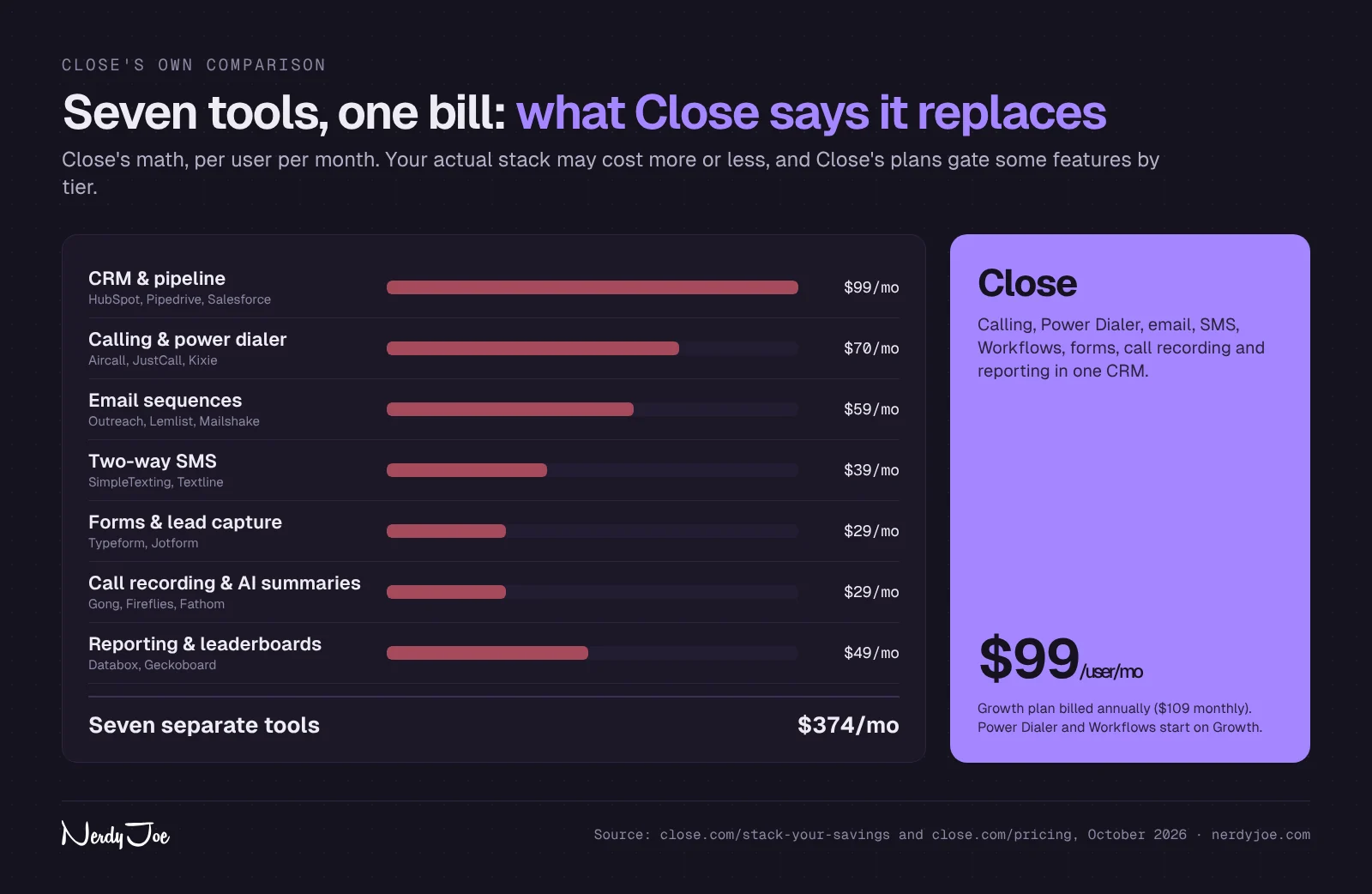
Close's main pitch is consolidation. On its Stack Your Savings page, Close compares itself with a stack of seven separate tools a sales team might pay for, priced per user per month.
| Tool category | Examples Close names | Close's estimate per user per month |
|---|---|---|
| CRM and pipeline | HubSpot, Pipedrive, Salesforce | $99 |
| Calling and power dialer | Aircall, JustCall, Kixie | $70 |
| Email sequences | Outreach, Lemlist, Mailshake | $59 |
| Two-way SMS | SimpleTexting, Textline | $39 |
| Forms and lead capture | Typeform, Jotform | $29 |
| Call recording and AI summaries | Gong, Fireflies, Fathom | $29 |
| Reporting and leaderboards | Databox, Geckoboard | $49 |
| Total | $374 |
These are Close's own figures, not ours, and your real stack may cost more or less. The point holds anyway: if you pay separately for a CRM, a dialer and a texting tool, Close can remove a few logins and a few invoices.
Two caveats. Close's calling and SMS still carry usage charges, so "replaces a dialer" does not mean "calls are free." And if you send cold email at volume, you will likely keep a dedicated sender, because cold campaigns belong on secondary domains and mailboxes, as our cold email infrastructure guide explains.
What you get in Close
Close's homepage groups the product into sales communication, automation, lead and pipeline management, the dialer, native forms, reporting and integrations. Here is what each one includes and where the plan gates fall.
Calling, the Power Dialer and the Predictive Dialer
Calling is built in on every plan. Solo includes worldwide calls, call logging, voicemail and call forwarding, Essentials adds standard call transfer, and Growth adds custom call outcomes, voicemail drop and text scheduling.
The Power Dialer is on Growth and Scale. Close's help center says it "will automatically start calling through any saved Smart View," moving past numbers that are disconnected, busy or unanswered and connecting the rep when someone picks up.
The Predictive Dialer is on Scale only. Close says it dials multiple numbers at once and connects a rep when "an actual human answers the phone," discarding voicemails, 1800 numbers and busy signals. Live call coaching is also a Scale feature.
Call recording is included, with retention set by plan: 30 days on Solo and Essentials, 90 days on Growth and unlimited on Scale. Close's AI Call Assistant, which transcribes calls, is billed separately at $50 per month per billing account plus $0.02 per transcribed minute, according to Close's help center.
Email, bulk email and Workflows
Every plan includes two-way email sync, templates and snippets, and the Close integrations page lists Gmail and Microsoft 365 connections. Essentials adds open tracking.
Growth is where email becomes an outbound tool. It adds bulk email, scheduling, sending limits, unsubscribe management, AI rewrite, Send As and domain filtering, along with Workflows.
Workflows are Close's multi-step automation. Close's help center says Workflows are "only available on the Growth and Scale plans," and that steps can send email, send SMS, create call tasks, update leads, create opportunities and assign tasks.
A few details that matter for follow-up:
- Triggers. Workflows can start manually or automatically on lead, contact, opportunity, call, meeting, custom activity or form submission events.
- Goals. Incoming email, SMS, call and meeting-booked goals are on by default, so a run pauses and is marked "Goal Met" when the lead responds.
- Schedule. By default, email and SMS steps send Monday to Friday at a random time between 9 AM and 4 PM in the contact's time zone, with delays from 1 minute to 365 days.
- Limits. Email steps follow your overall email sending limits, which Close does not publish as a number on the Workflows page.
If you write your own follow-up steps, our follow-up email templates are a good starting point for the email side.
SMS and WhatsApp
Every plan can send and receive SMS with templates, and Growth adds SMS steps inside Workflows. Close's help center lists MMS in the US and Canada at $0.03 per outgoing and $0.01 per incoming message, and points to Twilio's rates for standard SMS.
If you text US numbers, plan for A2P 10DLC registration. Close lists one-time registration fees (for example, $4 for a low-volume standard brand plus a $15 campaign verification fee) and recurring fees from $1.50 per month after approval.
WhatsApp works differently. Close's help center describes a native WhatsApp link you enable in Settings, which lets reps open a chat from the lead page, plus third-party sync through TimelinesAI, Zapier or the API. The pricing table does not list WhatsApp as a plan feature, so treat full WhatsApp message sync as an integration, not a built-in channel.
AI: Chloe, AI credits and Agents
Close calls Chloe its "built-in AI sales teammate." According to Close's help center, Chloe has two main parts:
- Chloe Voice Agents call your leads, run conversations and log outcomes to the lead record. They are limited to outbound calls, in English, to US and Canadian numbers.
- Chloe Chat answers questions about leads and pipeline and can take actions. Close says Chat is in beta and free to use.
Close's homepage also shows Agents, which you give "a job and your rules," labeled as in beta. Several agent types (coaching, briefing, meeting follow-up, lead routing, deal risk and win-back) are listed as coming soon, so judge Close on what is live today.
AI usage runs on AI credits. Close's help center lists 500 credits per user on Solo (1 user), 1,000 per user on Essentials, 1,500 on Growth and 2,000 on Scale, each capped at 10 users, so the most a single account gets is 20,000 credits a month on Scale. Credits are pooled across the account, reset monthly and do not roll over.
Credits cover Voice Agents, enrichment and auto updates, while chat, AI search, the notetaker and lead summaries do not use credits. You can buy an AI credit subscription, from $20 per month for 1,200 credits up to $10,000 per month for 1,000,000 credits. Close's usage page also lists enrichment at $0.05 per enriched field, so check which meter applies to your account before you enrich a large list.
Growth adds lead summaries, suggested actions and Chloe inside Workflows. Scale adds admin controls over who can use Chloe.
Reporting
Reporting grows by plan. Solo includes an opportunity funnel, Essentials adds email template performance and a leaderboard, Growth adds a workflow performance report, and Scale adds custom graphs through Close's Explorer.
Forms, API and integrations
Native forms are on every plan, so you can capture leads straight into Close without a separate form tool. API access and the event log are also on every plan, which matters if you plan to connect a cold email sender with webhooks.
Close's integrations page lists Zapier, Make, HubSpot, Calendly, Gmail, Microsoft 365, Google Calendar and Segment, among others. Close's "Who is Close" partner sheet also highlights SavvyCal, ActionDesk, HelpScout, Fathom and QuotaPath. Close's one-pager says 170+ integrations, while its website says 100+, so treat the exact count loosely.
Pipeline, leads and Smart Views
Close organizes work around leads (companies) with contacts underneath, plus opportunities for deals. Smart Views are saved searches, and they matter because the Power Dialer calls through them in order.
Solo stores up to 10,000 leads, and the other plans list unlimited leads. Solo and Essentials allow up to 250 custom fields, Growth and Scale add 250 custom activities, and Scale adds custom objects.
Permissions are a Scale feature. Role-based access, lead visibility rules, user groups, required fields and field editing restrictions are all listed on Scale only.
Close pricing explained
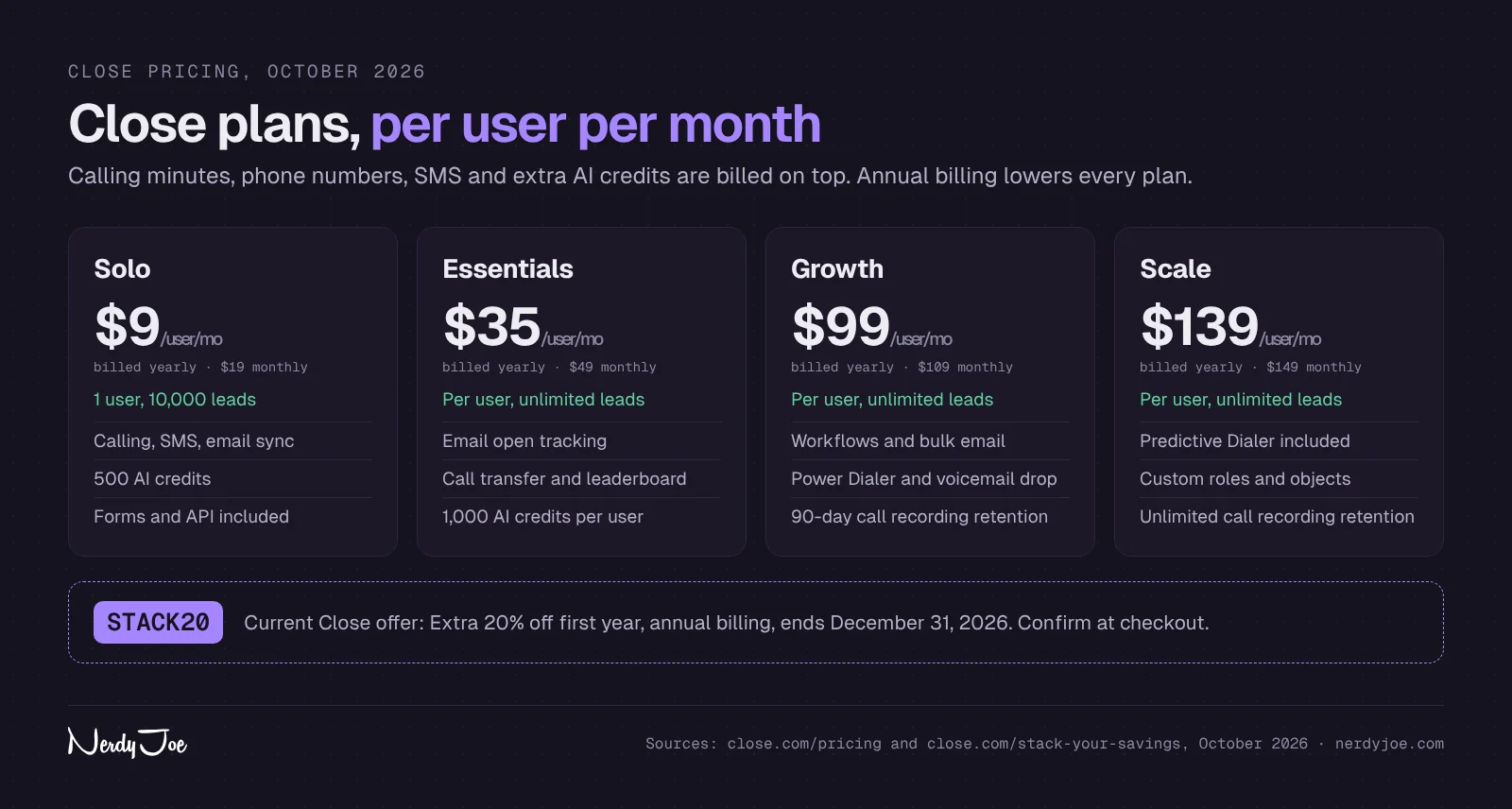
Close sells four plans, priced per user per month. Here is the full grid as of October 2026, from close.com/pricing.
| Plan | Monthly billing | Annual billing (per month) | Seats and leads | Key additions |
|---|---|---|---|---|
| Solo | $19 | $9 | 1 user, 10,000 leads | Calling, SMS, two-way email sync, forms, API, 500 AI credits |
| Essentials | $49 | $35 | Per user, unlimited leads | Open tracking, call transfer, leaderboard, 1,000 AI credits per user |
| Growth | $109 | $99 | Per user, unlimited leads | Workflows, bulk email, Power Dialer, voicemail drop, 90-day recording retention, 1,500 AI credits per user |
| Scale | $149 | $139 | Per user, unlimited leads | Predictive Dialer, live call coaching, custom roles, custom objects, unlimited recording retention, 2,000 AI credits per user |
The pricing page headline says annual billing saves "up to 50%," and Close's partner FAQ (January 2025) says up to 35%. Working from the listed prices, the annual saving is about 53% on Solo, 29% on Essentials, 9% on Growth and 7% on Scale, so the big discount is on the smallest plan.
What costs extra
- Calls and SMS. Close bills usage at cost. Its pricing page says most outbound calls run about $0.02 per minute and phone numbers start at about $1 per month, and its help center points to Twilio's rates by country.
- Call rounding. Close rounds calls up to the nearest minute and cent, so a 70-second call bills as 2 minutes.
- AI Call Assistant. $50 per month per billing account plus $0.02 per transcribed minute.
- Extra AI credits. Subscription packs from $20 per month.
- Extra organizations. $50 per organization per month, with one free organization on Growth and Scale.
Trial, refunds and cancellation
The trial lasts 14 days with no card, and it includes calling and AI credits (a fixed 1,000 AI credits, per Close's help center). Close lists a 30-day money-back guarantee after purchase. Monthly plans can be changed or canceled anytime, and annual downgrades or cancellations take effect at the end of the term.
Worked example 1: solo founder
A founder selling alone has two realistic options: Solo for a simple CRM with calling, or Growth if they want Workflows and the Power Dialer.
| Solo founder | Monthly billing | Annual billing |
|---|---|---|
| Solo plan, 1 user | $19 a month, $228 a year | $9 a month, $108 a year |
| Growth plan, 1 user | $109 a month, $1,308 a year | $99 a month, $1,188 a year |
Add usage on top. As an illustration using Close's own "about" figures, one number at about $1 a month and 500 outbound minutes at about $0.02 per minute adds roughly $11 a month, before SMS and rounding.
The choice comes down to automation. On Solo you run follow-up by hand from tasks, and on Growth a positive reply can kick off an email, an SMS and a call task on its own.
Worked example 2: a five-rep team
A five-rep outbound team almost always wants Growth, because the Power Dialer and Workflows are where the time savings are.
| Five reps | Monthly billing | Annual billing |
|---|---|---|
| Essentials, 5 users | $245 a month, $2,940 a year | $175 a month, $2,100 a year |
| Growth, 5 users | $545 a month, $6,540 a year | $495 a month, $5,940 a year |
| Scale, 5 users | $745 a month, $8,940 a year | $695 a month, $8,340 a year |
On Growth, annual billing saves $600 a year for five reps at list price. Usage scales with activity: as an illustration, five numbers and 1,000 outbound minutes per rep would add roughly $105 a month at Close's "about" rates. If you want transcripts, add the Call Assistant's $50 monthly fee plus $0.02 per transcribed minute.
Current Close offer
Current Close offer (as of October 21, 2026): Close's partner landing page says new customers can use code STACK20 for an extra 20% off their first year on annual billing, and that this brings savings to up to 60% off compared with monthly pricing. The code must be redeemed on an annual plan by December 31, 2026. To use it: start a 14-day free trial (no card), choose annual billing in Settings > Billing when you upgrade, and enter the code at checkout before you confirm payment. Close shows Growth at $79 per user per month with the code. After the first 12 months, the plan renews at the standard annual rate. Close says the offer is for new accounts, cannot be combined with other offers and can change or end at any time, so confirm the terms at checkout. See the offer on Close.
Applied to the worked examples, and assuming the code applies to your plan, a solo founder on Growth would pay about $79 a month in year one (about $950 for the year instead of $1,188). Five reps on Growth would pay about $396 a month (about $4,750 for the first year instead of $5,940).
Close for cold email teams
This is where most of our readers will judge Close. Cold email teams usually send from Instantly, Smartlead or PlusVibe, then need a place to work the replies, and Close's calling is the reason to consider it.
Keep cold sending in your sender
Close can send bulk email and run email Workflows, but that does not make it a cold email sender. Cold volume should stay on secondary domains and warmed mailboxes in a dedicated tool, while Close connects to your main domain inbox for one-to-one follow-up after the reply.
If you have not picked a sender, our Instantly vs Smartlead vs PlusVibe comparison covers price, volume and plan gates. Our roundup of the best CRM for cold email compares Close with HubSpot, Pipedrive, Capsule, Attio and others on reply sync.
How replies from your sender get into Close
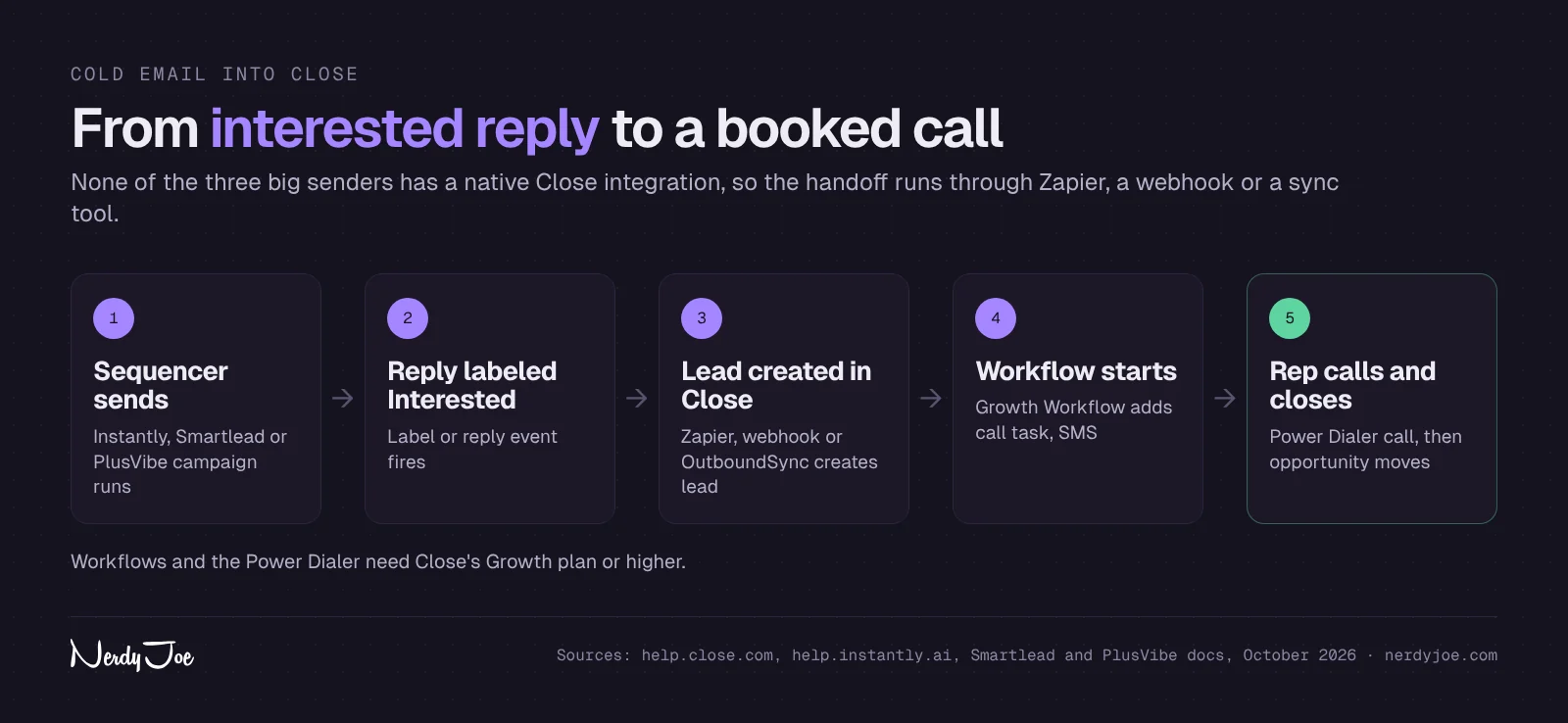
Close's integrations page does not list Instantly, Smartlead or PlusVibe, and none of the three lists a native Close integration. These are the documented routes:
| Sender | Documented route into Close | Plan notes |
|---|---|---|
| Instantly | Instantly's help center has a Zapier guide: trigger on "Lead is marked as interested," then create a lead in Close | The guide does not state plan requirements; check your Instantly and Zapier plans |
| Smartlead | OutboundSync offers a one-way Smartlead to Close sync that matches or creates Close leads and logs sends, opens, clicks, replies, bounces, unsubscribes and lead category updates as activity; Smartlead webhooks (such as EMAIL_REPLY and LEAD_CATEGORY_UPDATED) can also feed Zapier or Make | OutboundSync says it requires Smartlead Pro or higher; the Close connection is in beta |
| PlusVibe | PlusVibe's help center lists webhook events for all replies and for lead labels such as Interested and Meeting Booked; send them to Close through Zapier, Make or Close's API | PlusVibe puts webhooks, Zapier and Make on its Business plan |
In each case, the useful trigger is the same: an Interested label or a positive reply, not every open. Syncing only warm leads keeps Close clean and stops reps from calling people who never engaged.
The phone follow-up motion
Here is a simple motion that uses only documented Close features. It assumes you are on Growth, because it relies on Workflows and the Power Dialer.
- Sender labels the reply. Your sequencer, or your team, marks a reply as Interested.
- The lead lands in Close. Zapier, a webhook or OutboundSync creates or matches the Close lead and adds the reply context.
- A Workflow starts. Trigger it on the new lead or a lead status change. Add a call task for the owner, an SMS step if you have consent to text, and a short email step from the rep's main inbox.
- Reps call from a Smart View. Build a Smart View of new interested leads, then run the Power Dialer through it so reps work the list in order.
- Goals stop the noise. When the lead replies, calls back or books a meeting, the Workflow goal pauses the run, and the rep moves the opportunity forward.
Speed is the reason to do this. Our sales follow-up statistics collect published research on response time and follow-up, and Close's own homepage claims that only 7% of companies respond to a new lead within five minutes (Close cites no source on the page).
If you want a separate phone system instead of Close's calling, our KrispCall review covers a cloud phone option with CRM integrations.
Where Close fits next to Apollo
Close does not include a prospecting database. If you build lists in Apollo, its documented two-way deal sync covers HubSpot and Salesforce, so for Close you would move contacts by CSV, Zapier or the API. Our Apollo review covers Apollo's data, sequences and CRM options.
Close vs HubSpot
HubSpot and Close solve different problems. HubSpot is a broad platform with marketing, sales and service hubs, and Close is a focused sales CRM with calling and SMS built in.
| Close | HubSpot | |
|---|---|---|
| Free plan | No (14-day trial) | Yes, free CRM for up to 2 users |
| Entry paid price | Solo $19 monthly, $9 annual | Sales Hub Starter, shown at $7 to $20 per seat depending on billing when checked |
| Sequences or Workflows | Growth, $109 monthly ($99 annual) | Sales sequences on Professional, $100 per seat monthly ($90 annual) plus a $1,500 onboarding fee |
| Calling and SMS | Built in on every plan, usage billed at cost | Check HubSpot's pricing page for calling by plan |
| Native sync with Instantly, Smartlead, PlusVibe | No | Yes, documented by all three |
| Marketing automation | Through integrations (Close lists HubSpot) | Built into Marketing Hub |
HubSpot figures come from our October 2026 check of HubSpot's pricing page and pricing guide in our best CRM for cold email roundup.
Pick HubSpot if you want a free start, native reply sync with your sender, or marketing tools in the same place. Pick Close if your reps call every day and you want calling, SMS and automation in one sales tool. Close's partner materials claim it is "50% faster than Salesforce and HubSpot," which is Close's own claim, not a measured result we can verify.
Close vs Pipedrive
Pipedrive is built around a visual deal pipeline, and Close is built around communication. Both are aimed at small and mid-size sales teams.
| Close | Pipedrive | |
|---|---|---|
| Free plan | No | No |
| Entry price (annual) | Solo, $9 per user per month | Lite, $14 per seat per month |
| Automation | Workflows on Growth ($99 annual) | Automations on Growth ($39 annual) |
| Higher tiers (annual) | Growth $99, Scale $139 | Premium $59, Ultimate $79 |
| Built-in calling and SMS | Yes, every plan | Check Pipedrive's pricing page for calling |
| Native sync with cold email senders | No | Smartlead native; Instantly via Automations |
| Trial | 14 days, no card | 14 days, no card |
Pipedrive prices are from pipedrive.com/en/pricing (annual billing, as checked in October 2026). Pipedrive is cheaper for automation and connects natively to Smartlead and Instantly. Close costs more per seat for automation but includes calling, the Power Dialer and SMS steps in the same Workflow.
Close pros and cons
Pros
- Calling, SMS and email on every plan. Even Solo includes worldwide calls, call logging, SMS and two-way email sync.
- A real dialer. The Power Dialer on Growth calls through Smart Views, and Scale adds a Predictive Dialer.
- Workflows that span channels. Email, SMS and call tasks run in one sequence, with goals that pause the run when the lead responds.
- Fast to start. Close says setup to first deal takes under an hour, and it offers free data migration and a no-cost onboarding call (both are Close's claims).
- API and forms on every plan. Useful for connecting a cold email sender with webhooks.
- Transparent usage pricing. Close publishes its add-on fees and says calls and SMS are billed at cost.
Cons
- No free plan. You get a 14-day trial, then a paid plan.
- Key features are gated. Workflows, bulk email and the Power Dialer start on Growth ($99 annual), and the Predictive Dialer, custom roles and custom objects need Scale.
- Usage adds up. Calls, numbers, SMS, 10DLC fees and the Call Assistant are billed on top of seats.
- Small annual discount on the plans teams need. About 9% on Growth and 7% on Scale at list prices.
- No native cold email sender sync. Instantly, Smartlead and PlusVibe connect through Zapier, webhooks or a third-party sync.
- Voice Agent limits. Chloe Voice Agents call only US and Canadian numbers, outbound, in English.
- AI credit caps. Included credits are capped at 10 users per account and do not roll over.
Close alternatives
| Alternative | Best for | Why consider it |
|---|---|---|
| HubSpot | Native sync and a free start | Free CRM for 2 users; native integrations with Instantly, Smartlead and PlusVibe |
| Pipedrive | Visual pipeline on a budget | Automations from $39 per seat on annual billing; native in Smartlead |
| Capsule CRM | Simple, low-cost pipeline | Free plan for 2 users and 250 contacts; Zapier on every plan |
| Attio | Flexible data model | Free for up to 3 seats; an Instantly app built by Instantly |
HubSpot is the safest default if native reply sync matters most. Pipedrive wins if you think in deal stages and want cheaper automation.
Capsule CRM suits founders and small agencies that want a plain contact and pipeline tool without calling. Capsule's free plan covers 2 users, 250 contacts and 1 pipeline, and workflow automation starts on Growth.
Attio suits teams that want to shape their own objects and lists. Its free plan covers up to 3 seats, Plus is $44 per user per month ($35 annual) and Pro is $99 ($79 annual), per Attio's pricing page.
How to get started with Close
- Start the trial. Sign up for Close's 14-day trial. No card is required, and the trial includes calling and AI credits.
- Connect your inbox and calendar. Link Gmail or Microsoft 365 for two-way email sync, and your calendar for meetings.
- Import your leads. Bring in a CSV or ask Close about its free migration from your current CRM.
- Get a phone number. Rent a number for calling and SMS, and register for A2P 10DLC if you will text US numbers.
- Build Smart Views. Create one for new interested leads and one for stale opportunities.
- Set up a Workflow (Growth and Scale). Start with a short follow-up: a call task, an SMS and an email, with reply goals left on.
- Connect your sender. Use your sender's Zapier, webhook or OutboundSync route to create Close leads from Interested replies.
- Choose billing before the trial ends. If you want the current annual-billing offer described above, pick annual billing in Settings > Billing and enter the code at checkout.
How we compiled this review
We did not use Close ourselves for this review and are not a Close customer. We based it on Close's live pricing page, its Stack Your Savings partner page, its homepage and integrations directory, Close's help center articles on Workflows, dialing, WhatsApp, Chloe, AI credits and usage costs, and Close's own partner materials (its "Who is Close" sheet, partner FAQs, sales deck and one-pager), which are vendor marketing.
For integrations, we checked the Instantly and PlusVibe help centers, Smartlead's API documentation and OutboundSync's integration pages. Where Close's sources disagree, such as the integration count and the annual discount, we say so. All prices were checked on October 21, 2026.
Rather not run it yourself?
A CRM is only as good as the pipeline feeding it. Domains, mailboxes, lists, copy and reply handling take real time every week before a single call gets made.
If you would rather hand off the outbound side, book a 30-minute call with David at Koldify. Koldify is a done-for-you cold email agency where David Tile is a partner, and it sends client campaigns on PlusVibe, Smartlead and Email Bison.
Verdict
Close is a strong choice for small B2B teams whose next step after a positive reply is a phone call. Calling, SMS, email and a pipeline on every plan, plus the Power Dialer and multichannel Workflows on Growth, make it one of the most complete sales tools in its price range.
It is not the cheapest option, and the features outbound teams want sit on Growth at $99 per user per month billed annually, plus usage. If you want a free plan or native sync with Instantly, Smartlead or PlusVibe, look at HubSpot first.
If Close fits, the timing helps: Close's current STACK20 code takes an extra 20% off the first year on annual billing, and it must be redeemed by December 31, 2026 (confirm the terms at checkout). Start a Close trial and test the dialer with your own lead list before you commit.
Disclosure: My relationship with Instantly is that of an independent party. I do not hold any position, nor do I have the power to form binding agreements or act on behalf of Instantly. My earnings are derived from referral compensations provided by Instantly. The views I share are solely mine and should not be seen as official statements, promises, or representations of Instantly, or any related entities or personnel.
Sources
- Close pricing
- Close: Stack Your Savings
- Close homepage
- Close integrations
- Close automation
- Close Help: Workflows
- Close Help: Power and Predictive Dialing
- Close Help: WhatsApp
- Close Help: Chloe
- Close Help: AI credits
- Close Help: Variable usage costs (calling, SMS, phone numbers, AI tools)
- Instantly Help: Integrations
- Instantly Help: Add a lead to Close CRM when marked as Interested
- OutboundSync: Smartlead to Close
- Smartlead API: Webhook events
- PlusVibe Help: Understanding webhooks
- PlusVibe pricing
- HubSpot Sales Hub pricing
- HubSpot blog: Sales Hub pricing
- Pipedrive pricing
- Capsule CRM pricing
- Attio pricing
- Apollo Knowledge Base: HubSpot integration
Frequently asked questions
Is Close CRM worth it for a small sales team?
It is worth a look if your reps live on the phone and email and you want calling, SMS and a pipeline in one tool. If your team rarely calls, a cheaper pipeline CRM or a free plan from HubSpot or Capsule will likely cover you.
Does Close have a free plan?
No. Close offers a 14-day free trial with no credit card required, and the trial includes calling and AI credits. If you do not upgrade, Close pauses the account and keeps your data for a limited period.
Can Close send cold email?
Close can send bulk email and run email steps in Workflows on Growth and Scale, subject to its email sending limits. For cold volume, most teams keep sending in a dedicated tool on secondary domains and use Close for warm follow-up after a reply.
Does Close integrate with Instantly, Smartlead or PlusVibe?
Not natively. Instantly's help center documents a Zapier zap that creates a Close lead when a lead is marked Interested, OutboundSync offers a one-way Smartlead to Close sync, and PlusVibe's webhooks can feed Close through Zapier or Make.
Can I cancel Close anytime?
Monthly plans can be changed or canceled at any time, according to Close's pricing page. Annual plan downgrades or cancellations take effect at the end of the billing term, and Close lists a 30-day money-back guarantee after purchase.
Is Close good for agencies?
Close says its typical buyer includes digital marketing agencies with 2 to 100 employees. Growth and Scale include one free additional organization, and extra organizations cost $50 per month each, which helps if you want a separate workspace for internal testing.
Does Close work outside the US?
Close's Solo plan lists worldwide calls, and phone number and calling rates vary by country based on Twilio's pricing. Chloe Voice Agents are limited to outbound calls in English to US and Canadian numbers, according to Close's help center.