
Nerdy Joe is the content site of Koldify, a done-for-you cold email agency that runs its outbound on PlusVibe.
PlusVibe is one of the best-value cold email platforms in 2026 for agencies and outbound teams sending between about 25,000 and 150,000 emails a month. Warmup, sender rotation, a unified inbox, AI reply handling and email verification come in one app, with API access from $77. The tradeoffs are real: no lead database, no LinkedIn or calling steps, placement testing costs extra, and its review base is small next to Instantly and Smartlead.
We use it, and we are certified on it. Koldify, the agency behind Nerdy Joe, runs its outbound on PlusVibe, and Nerdy Joe is a PlusVibe Certified Silver Partner. This review is built on that working view of the product.

Nerdy Joe is a PlusVibe Certified Silver Partner.
Disclosure: Links to PlusVibe in this article are affiliate links, so we may earn a commission if you sign up, at no cost to you. Nerdy Joe is also a PlusVibe Certified Silver Partner. Neither relationship changes our verdict, and we cover the weaknesses as plainly as the strengths. Read our full affiliate disclosure.
You can start a PlusVibe free trial with no credit card and connect up to 3 email accounts before you pick a plan.
Rather not run it yourself? Koldify builds and runs cold email campaigns for B2B companies, from infrastructure to reply handling. Book a call with David.
Quick verdict
| Best for | Lead gen agencies, outbound teams and founders sending at mid volume across many inboxes |
| Price | From $37 per month, or $30.80 per month billed annually (as of October 2026) |
| Free trial | 14 days, no credit card, 1,000 emails, warmup for 3 inboxes |
| Biggest strength | High sending and lead limits per dollar, with API access on the $77 plan |
| Biggest weakness | No lead database or multichannel, and placement testing is a paid add-on |
| Our rating | Nerdy Joe's rating: 4.2/5 |
The scorecard is our editorial judgment, not a lab test:
- Value for money: strong. The cheapest of the big three from roughly 6,000 to 150,000 emails a month.
- Sending and warmup: strong. Rotation, ESP matching and adjustable warmup on every plan.
- Deliverability safeguards: good, with useful automatic pauses. Placement testing is extra.
- Agency features: good, though white-label gating is unclear across PlusVibe's own pages.
- Lead data and channels: weak. Email only, with no database to search.
- Proof and maturity: fair. Strong G2 scores, but only 75 reviews.
Pick PlusVibe if you already have a data source, care most about cost per email and want an API without paying for a top tier.
Look elsewhere if you want to find leads in the same tool, need LinkedIn or calls in sequences, or send 500,000 emails a month on the cheapest plan available.
What PlusVibe is
PlusVibe is a cold email sending and deliverability platform. Its homepage pitch is "Inbox-first cold email outreach at scale." In practice, it connects your mailboxes, warms them up, rotates sends across them, runs sequences and pulls every reply into one inbox.
The company behind it is Pipl Software Inc, and Yaro Yashnyk is co-founder and CEO, according to a PartnerStack case study. G2 lists it as founded in 2023 and based in Philadelphia. Crunchbase lists Dover, Delaware, with 11 to 50 employees and no funding shown.
Limits are set by emails and leads rather than seats, and every plan includes unlimited team members. That design suits agencies and growing outbound teams.
Why PlusVibe used to be called pipl.ai
Old reviews of pipl.ai describe this same product. In a help article dated May 7, 2025, the company said it had received a trademark cease-and-desist letter from "a bigger company" and would move from pipl.ai to plusvibe.ai with "No changes to the app work or service interruption." The sender of the letter was not named.
Traces remain. The footer still carries a "Pipl Software Inc" copyright, sign-up buttons point to both app.pipl.ai and app.plusvibe.ai, and Capterra still lists the product as pipl.ai. It has no connection to Pipl (pipl.com), an unrelated identity data company.
Who PlusVibe is for (and who should skip it)
PlusVibe's partner materials name three target customers: lead gen agencies with 3 to 30 clients, teams scaling from 5 to 50+ inboxes, and email infrastructure resellers. The pricing rewards exactly those buyers.
Good fit:
- Agencies that run outbound for several clients and want workspaces, a client app and an API.
- In-house SDR teams that buy data elsewhere and need a cheaper sending layer.
- Founders sending 25,000+ emails a month who have outgrown entry plans elsewhere.
Who should not use PlusVibe:
PlusVibe's own partner kit lists who partners should not promote it to. We agree, and we add two groups.
- Lead sourcing buyers. If finding contacts is the main job, PlusVibe is the wrong purchase.
- Pure price shoppers. If price is the only criterion, a bare-bones sender or wholesale inbox reseller may beat it.
- Spammy senders. In the kit's words, "Spammy senders who want unlimited volume with zero guardrails." PlusVibe adds automatic pauses and recipient filters on purpose.
- Multichannel teams. There are no LinkedIn or call steps.
- Salesforce or Pipedrive shops that need a native sync today. Only HubSpot is native.
PlusVibe pricing explained (as of October 2026)
These figures come from PlusVibe's pricing and plans pages, which matched when we checked on October 16, 2026. Confirm them on the live page before you buy.
PlusVibe plans and prices
| Personal | Business | Agency | |
|---|---|---|---|
| Monthly | $37 | $77 | From $497 |
| Annual (per month) | $30.80 | $64.20 | From $415 |
| Emails per month | 25,000 | 150,000 | 500,000+ |
| Active leads in campaigns | 30,000 | 100,000 | 1,000,000+ |
| Leads stored in lists | 300,000 | 1,000,000 | Unlimited |
| Enrichment credits per month | 1,000 | 3,000 | Custom |
| Warmup | Basic | Advanced | Included, plus recovery scheme |
| Workspaces | 1 | 1, extras from $29/mo | Dedicated client workspaces |
| API and webhooks | No | Yes | Yes |
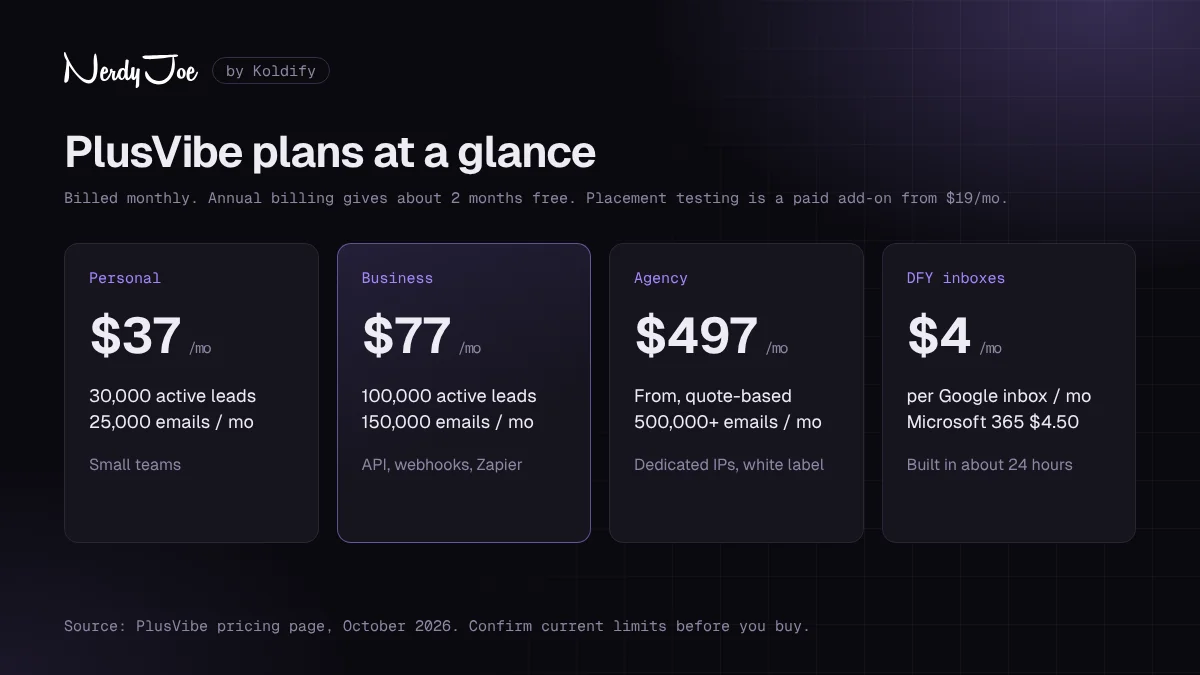
PlusVibe pricing at a glance, as of October 2026. Check the live pricing page before you buy.
Annual billing is sold as "Get 2 Months Free!", about 17% off. G2 says 18%, but PlusVibe's own math matches 2 months free.
- Personal includes unlimited campaigns, the AI Sequence Writer, warmup and deliverability monitoring, basic ESP matching, the Unified Inbox, AI reply sentiment detection, sender rotation and unlimited team members.
- Business ("Popular") adds advanced warmup, advanced ESP matching, AI Reply Agents, webhooks, Zapier and Make triggers, API access and priority support.
- Agency adds isolated sending servers, dedicated connector IPs with AI-driven IP rotation, client workspaces, sender reputation checks, white-labeling, custom integrations and private Slack support.
Credit tiers on Personal and Business
Both lower plans have a ladder of enrichment credit tiers. Our reading of the page is that each "+$X" label is the step up from the base price, not an extra charge.
- Personal: 1,000 credits for $37, 3,000 for $45, 5,000 for $52, 7,000 for $58.
- Business: 3,000 credits for $77, 7,000 for $92, 15,000 for $119, 30,000 for $165, 50,000 for $220.
Credits pay for verification, website scraping, AI personalization, email finding and LinkedIn lookups. On Personal, 1,000 credits equals roughly 200 verifications or 500 AI personalizations.
How the lead limits really work
The active lead limit is the one to watch. PlusVibe's help center says "any lead connected to your campaigns is counted towards the limit," including paused and completed campaigns. Clean out finished campaigns or you will hit the ceiling early.
PlusVibe says it plans "to eventually remove" the list storage caps. Unibox emails are kept 9 months, and replies that cannot be matched to a lead only 7 days.
What about mailbox limits?
This is the murkiest point. The pricing and plans pages state no mailbox cap for paid plans, but they also never say "unlimited email accounts." The only stated cap is 3 accounts on the trial.
PlusVibe does not charge per mailbox, and reviewers report connecting unlimited inboxes. G2's listing copy says "unlimited mailboxes and warmup slots with no per-seat upcharge." Since the pricing page itself makes no such promise, get your limit confirmed in writing if you plan to connect hundreds of inboxes.
Add-ons and what they cost
| Add-on | Price (as of October 2026) | What you get |
|---|---|---|
| Placement Tests, Starter | $19/mo | 300 credits; inbox, promotions, spam and missing detection |
| Placement Tests, Growth | $39/mo | 1,000 credits; adds personal inbox seeds and randomization |
| Placement Tests, Scale | $89/mo | 5,000 credits; adds multi-sender and multi-domain testing |
| Extra workspace | From $29/mo | Available from Business |
| Enrichment packs | From $4 one-time, or monthly | 1,000 to 50,000 credits (per G2) |
Placement testing is a separate subscription "on top of your existing PlusVibe plan," in the help center's words. It is not built into any plan. One credit covers one sender account per test run, and the help center calls the middle tier "Pro" while the pricing page says "Growth."
Done-for-you inbox pricing
| Offer | Price | What PlusVibe says is included |
|---|---|---|
| Google Workspace | $4 per inbox per month | Inboxes built and connected, with SPF, DKIM, DMARC and warmup |
| Microsoft 365 | $4.50 per inbox per month | Inboxes across multiple domains, optional BIMI |
| Microsoft Azure | $49 per domain per month | Dedicated IPs, 10+ inboxes, reputation scoring, blacklist risk monitoring |
| Custom architecture | $1,500 per month | Multi-domain, multi-region setup; discovery call required |
A second Google card on the same page says "Starting a $5/mo," so expect $4 or $5. G2 lists domains from $13 per domain per year. The page also shows Managed Services at "$9876/Month," which may be a typo, so ask before planning around it.
Free trial
Feature deep dive
Email accounts and sender rotation
You can connect Gmail, Google Workspace, Microsoft 365 and any SMTP account. Microsoft 365 mailboxes need SMTP authentication enabled first, a common snag on day one.
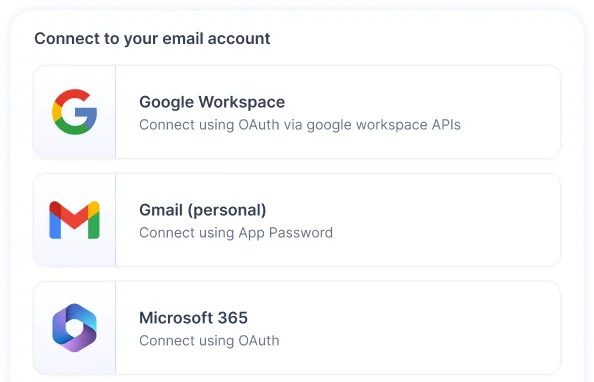
Connect Google Workspace, Gmail and Microsoft 365 accounts from one screen. Image: PlusVibe.
Every plan rotates sends across the inboxes in a campaign. ESP matching pairs senders and recipients by provider, with a basic version on Personal and an advanced one from Business. Agency adds dedicated connector IPs and "AI-algorithmic IP rotation."
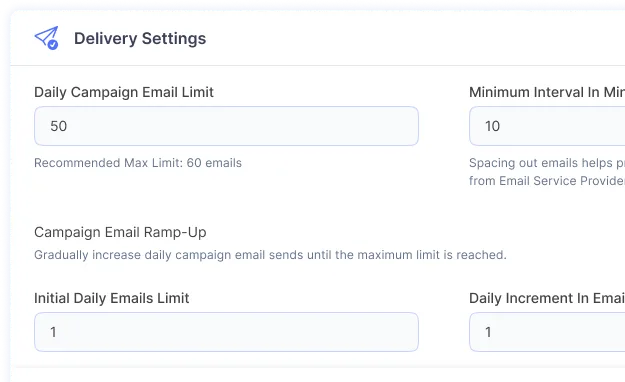
Daily campaign limits and ramp-up settings keep new campaigns from spiking volume. Image: PlusVibe.
Warmup
Warmup is included on every plan, trial included. The default ramp starts at 5 emails a day, adds 5 a day and tops out at 50.
Business adds advanced controls: a daily limit randomized by up to 40%, business-type keywords, a warmup schedule, your custom tracking domain inside warmup, a signature and a reply rate setting (PlusVibe recommends 35%). Agency adds a "Specialized Warmup Recovery Scheme."
PlusVibe's pricing page lists its warmup network at "350k+" accounts, and the homepage calls it "the most secure warmup pool in the industry." Those are PlusVibe's claims. We found no help article explaining how the pool screens out spam senders, so treat the size and vetting as unverified.
Unibox
The Unibox pulls replies from every mailbox into one view. It labels sentiment with AI, schedules replies, sends push notifications, assigns threads by AI round-robin and can send automatic follow-ups. For agencies, round-robin assignment means positive replies reach a person quickly even when dozens of inboxes feed one view.
Sequences, A/B testing and spintax
Campaigns are unlimited on every plan. You get sub-sequences, an AI Sequence Writer, Auto-Spintax, A/B testing, bulk editing (added March 2026) and re-engagement for leads who went quiet.
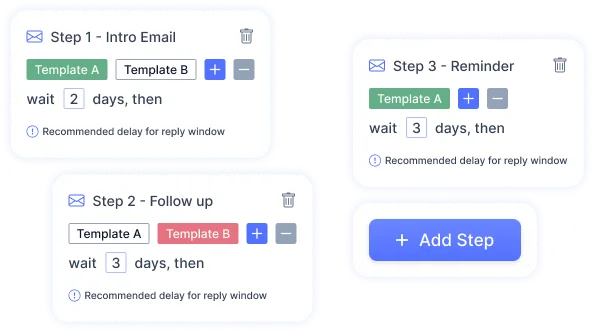
Sequence steps with templates and wait times between them. Image: PlusVibe.
AI personalization and the AI Reply Agent
On the writing side, PlusVibe offers AI personalization, icebreakers and campaign generation, and its FAQ says it works with your own OpenAI key.
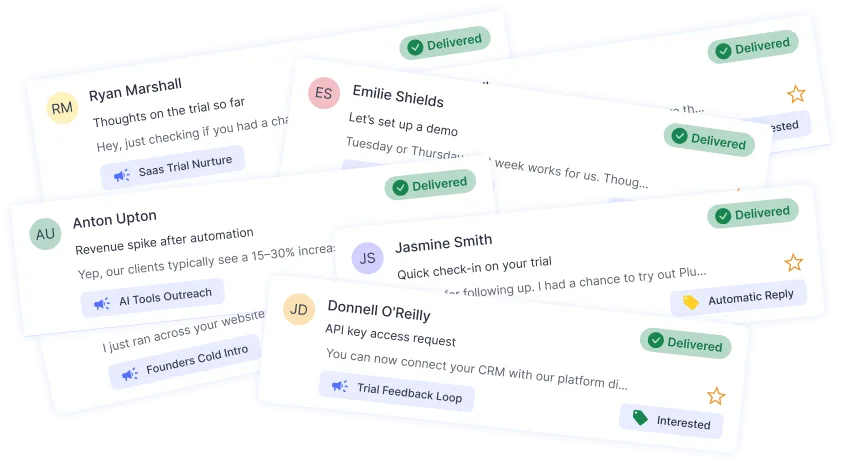
Personalization runs on prospect cards, with AI-generated lines for each lead. Image: PlusVibe.
On the reply side, the AI Reply Agent (Business and up) answers leads automatically and, since March 2026, handles follow-up replies too. Start it on a narrow set of reply types and read its output daily before you widen it.
Enrichment and email verification
Credits cover scraping, personalization, email finding and LinkedIn lookups, and there is a Lead Scraper Chrome extension. PlusVibe's own pages disagree on the number of data sources behind enrichment, citing 35+, 80+ and 100+.
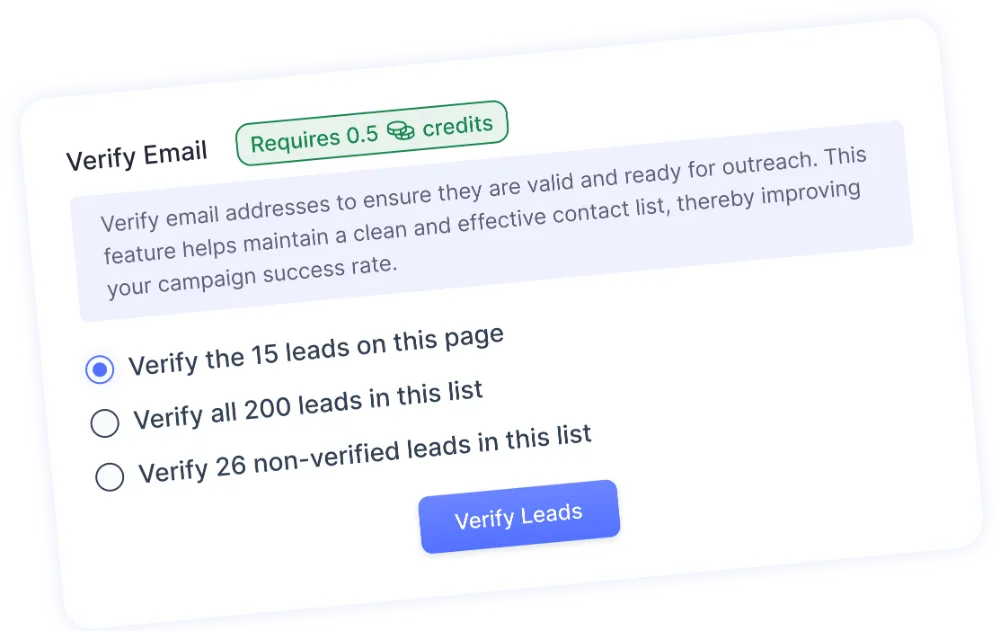
Verify a list before it touches a campaign. Verification uses enrichment credits. Image: PlusVibe.
Verification is included on every paid plan and draws on credits. Run every list through it, even lists from a paid data vendor.
Analytics and the mobile app
Campaign metrics are charted per campaign over time. A G2 reviewer said deliverability reporting "could go deeper," and Salesforge, a competing tool, calls the analytics basic. It is fine for monitoring; leave revenue attribution to your CRM.
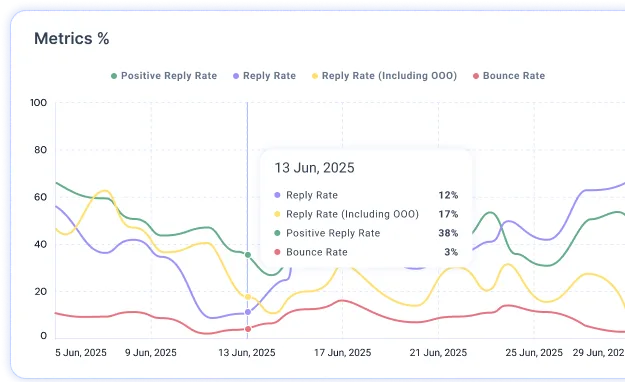
Campaign metrics plotted over time. Image: PlusVibe.
The mobile app shows a campaign overview and pushes Unibox notifications, which helps you answer hot replies fast.
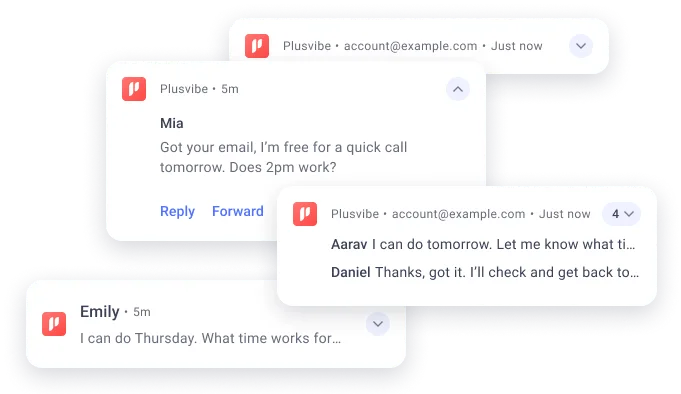
The mobile app pushes reply notifications so you can respond away from your desk. Image: PlusVibe.
Workspaces, white label and the client app
Personal and Business include one workspace, and Business can add more from $29 a month. Agency includes dedicated client workspaces. White label is where PlusVibe's own sources disagree:
- The pricing page lists "White-Labeling for Each Client" under Agency only.
- The help center says the White Label Client App, a branded mobile app with your logo at no charge to the client, is on Business and Agency.
- G2 lists a white-label client workspace at $29 per client per month from Business.
If white label is central to your agency offer, confirm what Business includes before you sign up.
Integrations, API and MCP
Native integrations include HubSpot, Slack, Calendly, Google Sheets, Zapier and Make. The HubSpot integration logs emails and replies, maps lifecycle stages and can create deals. Webhooks and the API start on Business, and an MCP server launched on October 1, 2025 lets tools like Claude and Cursor work with your PlusVibe data.
The gaps: Salesforce and Pipedrive are "Planned" on the roadmap, and we found no native Clay integration, so Clay would connect through the API or webhooks. The roadmap is stale (it still lists Zapier and Make as planned), so ask support about any integration you depend on.
What PlusVibe does not do
- No lead database. The partner kit says it plainly: "PlusVibe doesn't do lead databases."
- No multichannel. No LinkedIn, call or SMS steps.
- No dedicated blacklist monitor on self-serve plans that we could find. It appears only in the Azure DFY offer and Agency's reputation checks.
Deliverability: what PlusVibe gives you and what you still own
PlusVibe brands itself around deliverability, so separate the tools from the marketing.
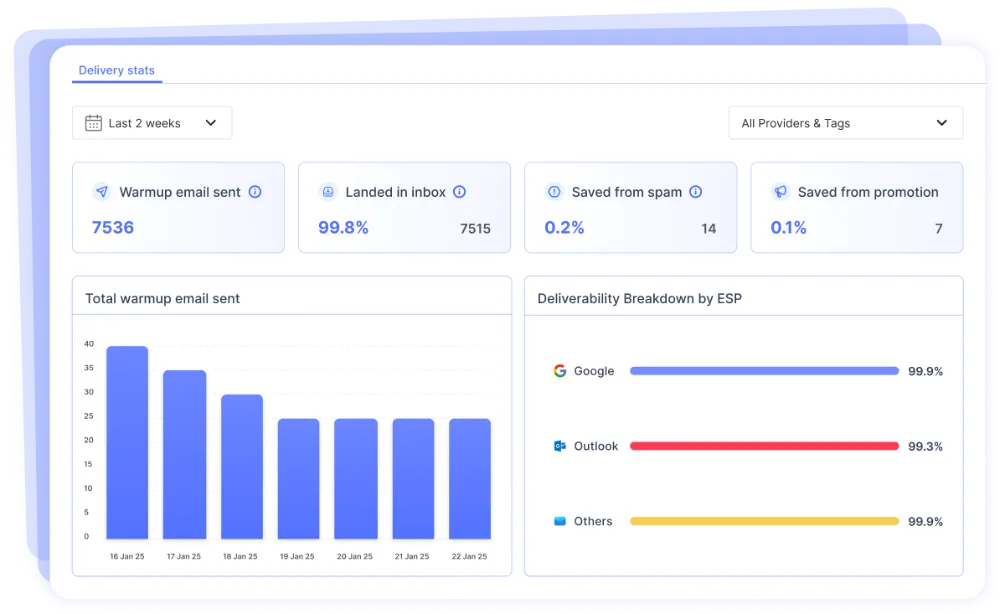
The deliverability dashboard charts inbox health across connected accounts. Image: PlusVibe.
Tools worth relying on:
- Warmup Health Score for each inbox.
- Auto-pause on high bounce rate, so a bad list stops itself.
- Spam reply tracking for replies that landed in spam.
- SEG Detection (July 2026), on by default, which skips recipients behind Secure Email Gateways.
- Daily cap per recipient domain, so one company's mail server does not get flooded.
- Global block list with Google Sheets sync.
- Custom tracking domains and Slack alerts.
With the placement test add-on, you also get Email Recovery Automation, which pauses sending or reduces warmup when placement drops below your threshold.
Claims to read carefully:
- The 99.7% deliverability guarantee. It appears in PlusVibe's pricing comparison table and DFY material, with no published terms, measurement method or remedy. Treat it as a PlusVibe claim, not a contract.
- The "99.8%" inbox figure on the homepage sits in a demo warmup widget, not an audited result.
- Testimonial numbers. PlusVibe's partner kit cites a customer who "contacted over 20 million unique prospects across 73 different clients" at a 4% to 5% reply rate (the homepage version says "over 1 million"), a "5% Average Reply Rate" drawn from that quote, and one customer who "saved 63%" against a previous platform. These are individual stories PlusVibe chose to publish, not platform averages.
What you still own: clean lists, separate domains, authentication, conservative volume and copy that avoids filters. Check drafts against our list of spam trigger words before each launch.
Done-for-you infrastructure: is it worth it?
PlusVibe's DFY service builds inboxes, sets up SPF, DKIM and DMARC, starts warmup and connects everything to your account. The help center says setup is "completed in under 24 hours," with domains delivered through Dynadot. That is PlusVibe's claim, so leave a few days of slack.
At $4 to $4.50 per inbox, it is competitive for teams that do not want to touch DNS. One G2 reviewer said the DFY emails "could use some work." Ask three questions first:
- Who owns the domains, and can you transfer them out? The DFY guide does not say.
- What happens to the inboxes if you cancel?
- How are burned inboxes replaced?
How to set up PlusVibe for cold email
Most deliverability problems start in week one. Set up in this order.
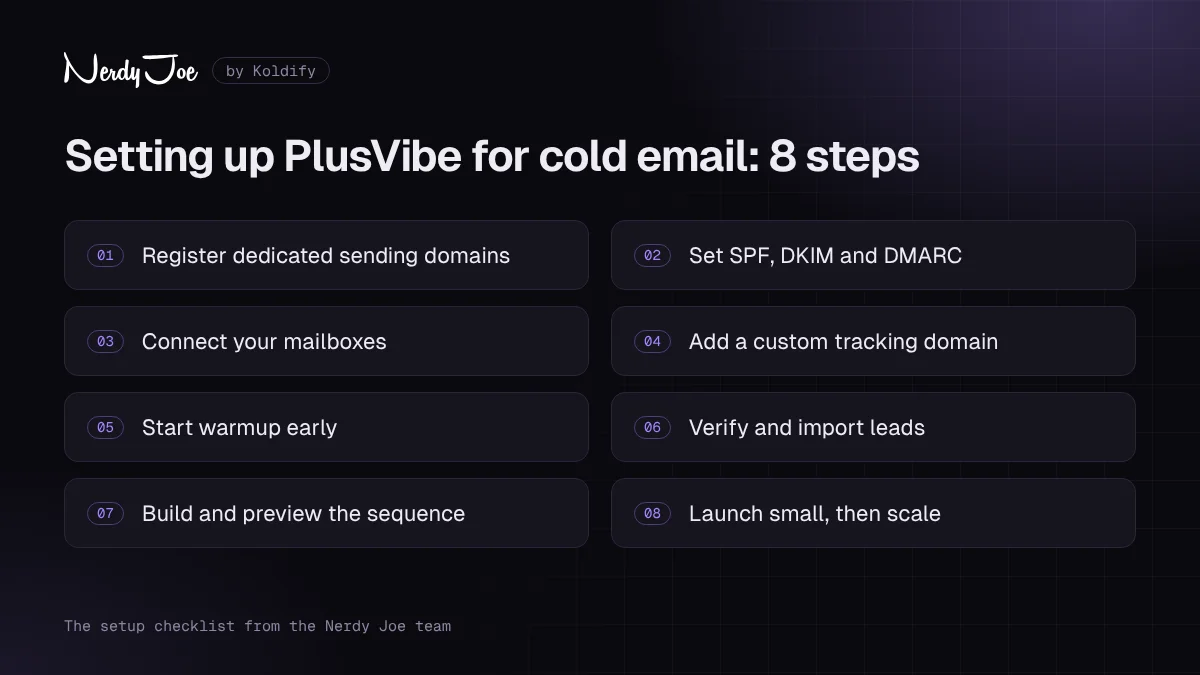
The 8-step PlusVibe setup checklist, in the order we follow.
Step 1: Register dedicated sending domains
Keep your main domain out of cold email. Register a few domains that resemble your brand, point them at your website and use them only for outreach.
Step 2: Set SPF, DKIM and DMARC
Authenticate every sending domain before an inbox goes live. PlusVibe's DFY inboxes handle this for you; otherwise set the records at your registrar and confirm they pass.
Step 3: Connect your mailboxes
Add Google Workspace, Gmail, Microsoft 365 or SMTP accounts, enabling SMTP authentication on Microsoft 365 first. Spread inboxes across domains and mix providers so ESP matching has options.
Step 4: Add a custom tracking domain
Point a subdomain at PlusVibe using the help center guide so tracked links use your domain. If you do not need open tracking, turn it off.
Step 5: Start warmup early
Turn warmup on the day each inbox connects. The default ramp of 5 a day, rising by 5 to a maximum of 50, is a sensible start. On Business, randomize the limit and add business keywords.
Step 6: Verify and import leads
Verify every list before import and load your do-not-contact list into the global block list. Leave SEG Detection on and set a daily cap per recipient domain.
Step 7: Build and preview the sequence
Write three or four short steps with clear waits, add spintax only where it reads naturally, and A/B test the first email. Preview every variant before launch.
Step 8: Launch small, then scale
Start each campaign with a low daily limit and raise it gradually while you watch bounces and replies. Scale by adding inboxes, not by pushing more mail through each one.
If you would rather skip all eight steps, book a call with David and Koldify will build it for you.
Where PlusVibe fits in a cold email stack
PlusVibe is a sending layer. With no lead database, it works best as one part of a stack.
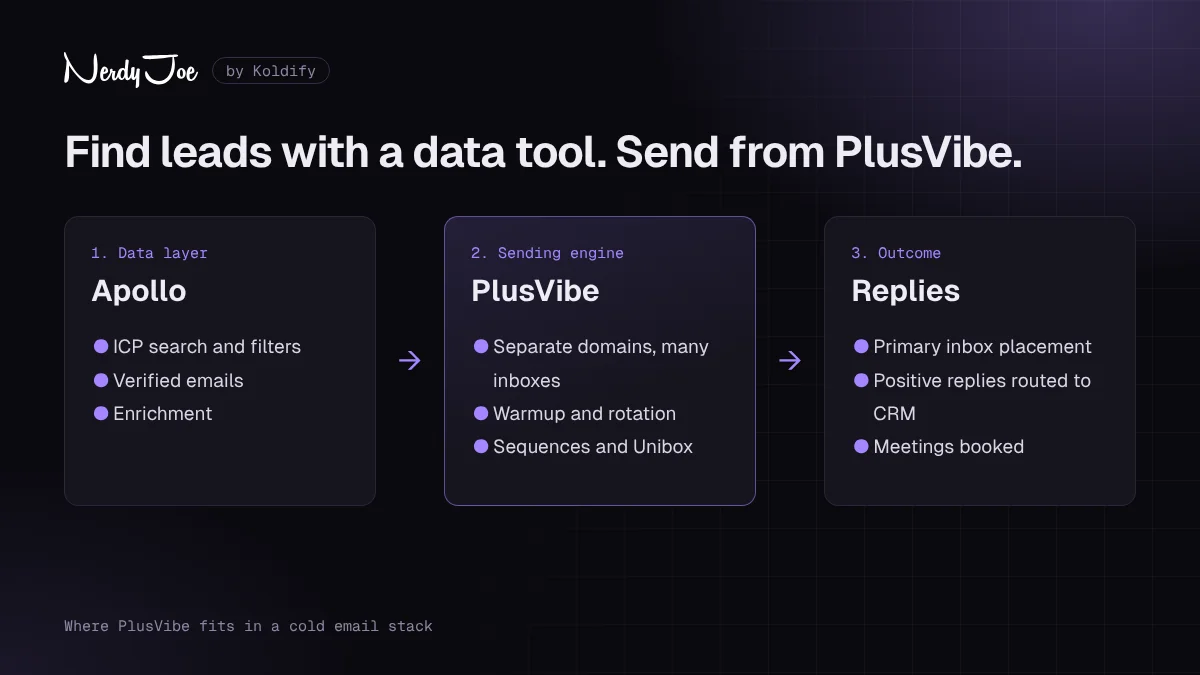
A typical stack: data from a prospecting tool, sending in PlusVibe, interested replies in your CRM.
Want a stack like this built and run for you? Book a call with David.
- Data. Build and verify lists in a prospecting tool. Nerdy Joe is also a certified Apollo.io Managed Services Partner, and our Apollo.io review covers the data side.
- Enrichment. Use PlusVibe credits for scraping and personalization, or bring in another tool through the API on Business.
- Sending. PlusVibe runs inboxes, warmup, rotation, sequences and safeguards.
- Replies. The Unibox and AI Reply Agent sort replies, and HubSpot, Slack or Zapier pass interested leads to your team.
Separate layers mean a burned sending domain never touches your CRM or main domain.
Pros and cons
Pros
- The lowest price of the big three from roughly 6,000 to 150,000 emails a month.
- 100,000 active leads on the $77 Business plan.
- API, webhooks and Zapier and Make triggers from $77.
- Unlimited team members on every plan.
- Useful safeguards: bounce auto-pause, SEG Detection and per-domain caps.
- AI Reply Agent and sentiment labeling built into the plans.
- Native HubSpot integration and an MCP server.
- 4.8 out of 5 on G2, with high sub-scores for setup and support.
Cons
- No lead database.
- Email only: no LinkedIn, calling or SMS.
- Placement testing is a paid add-on, $19 to $89 a month.
- No API or webhooks on the $37 Personal plan.
- White-label gating conflicts across PlusVibe's own pages.
- A steep jump from $77 to $497 past 150,000 emails a month.
- Salesforce and Pipedrive integrations are still on the roadmap.
- A small review base (75 on G2) and repeated UI complaints.
Try PlusVibe free for 14 days and see whether the interface suits your team.
PlusVibe vs Instantly vs Smartlead
These are the three tools most cold email teams shortlist. Prices are monthly billing from official pages, October 2026.
| PlusVibe | Instantly | Smartlead | |
|---|---|---|---|
| About 25,000 emails/mo | $37 (Personal) | $97 (Hypergrowth) | $94 (Pro) |
| About 150,000 emails/mo | $77 (Business) | $97 (Hypergrowth, 125,000) | $174 (Unlimited Smart) |
| About 500,000 emails/mo | From $497 (Agency) | $358 (Light Speed) | $379 (Unlimited Prime) |
| Mailboxes | No cap stated; reviewers say unlimited | Unlimited | Unlimited (fair use caveat) |
| Lead database | None | SuperSearch, paid in credits | SmartProspect |
| Placement testing | Add-on, $19 to $89/mo | Add-on, $47 or $97/mo | Add-on, $49 to $599/mo |
| API | From $77 | From $97 | From $94 |
| Multichannel | None | Email-centric | Calling (SmartDialer) |
| G2 rating | 4.8 (75 reviews) | 4.8 (4,159 reviews) | 4.5 (454 reviews) |
PlusVibe wins on price from about 6,000 to 150,000 emails a month. At 500,000 it is the most expensive, although its Agency plan bundles isolated servers, dedicated IPs and white label, so it is not a like-for-like comparison.
Against Instantly, choose Instantly for a built-in lead database and a broader AI agent suite, and PlusVibe for more capacity per dollar and an API under $97. Our PlusVibe vs Instantly comparison goes deeper.
Against Smartlead, choose Smartlead for a lead finder, calling or unlimited contact storage from $174. Choose PlusVibe for lower mid-volume cost and, per G2, easier setup (9.5 vs 8.8) and better support (9.6 vs 8.6). See our PlusVibe vs Smartlead comparison, or the Smartlead vs Instantly breakdown if you are weighing those two.
Ratings and what users complain about
Review site standing, checked October 16, 2026:
| Platform | Score | Reviews | Note |
|---|---|---|---|
| G2 | 4.8 / 5 | 75 | 93% five-star |
| Capterra (UK) | 4.6 / 5 | 7 | Still listed as pipl.ai; tiny sample |
| Trustpilot | No profile found | n/a | None under plusvibe.ai or pipl.ai |
G2 sub-scores are strong: 9.4 for ease of use, 9.5 for ease of setup, 9.6 for support and 10.0 for product direction. Those rest on a few dozen reviews against thousands for Instantly, and 97.1% of PlusVibe's G2 reviewers are small businesses.
Praise: fast support (one June 2026 reviewer said it "responds with actual answers within 5m"), a "great cost-to-value ratio," deliverability described as "on point," and ease of use.
Complaints:
- Interface. Several reviewers dislike the dark theme; one said "its very blue'ish and the sequence editor becomes white." Capterra reviewers cite a "dated interface" and occasional slowness, and the partner kit itself admits "the UI could be smoother."
- Bugs. One reviewer reported "some bugs in the prospects tab."
- Tier gating. Users want the API on the lowest tier, and one called the free tier "restrictive."
- Reporting depth. "Deliverability reporting could go deeper."
- Data. A Capterra reviewer said enrichment data can be outdated and high volume gets expensive.
Our read: the core sending product is well regarded, and most complaints concern polish and plan gating rather than reliability.
Tips to get more from PlusVibe
- Clear out finished campaigns. Paused and completed campaigns still count toward active leads.
- Use the Business warmup controls. Randomized limits and keywords make warmup look less mechanical.
- Keep SEG Detection on unless you have a reason to email gateway-protected companies.
- Buy placement testing for a month when you launch a new batch of domains, then decide whether to keep it.
- Save important threads. Unibox mail is kept 9 months, unmatched replies only 7 days.
How Nerdy Joe works with PlusVibe as a Certified Silver Partner
Koldify, the agency behind Nerdy Joe, runs its outbound on PlusVibe. Our certification comes through PlusVibe's partner program, and the platform we describe here is the one we use for client work.
For clients, we:
- Plan sending infrastructure, from domains and DFY inboxes to warmup, sized to your volume.
- Configure workspaces, tracking domains, block lists and the safeguards covered above.
- Write, test and run sequences, and handle replies in the Unibox so your team only takes the meetings.
- Connect PlusVibe to HubSpot and pair it with a data source that fits your market.
PlusVibe is a tool, not a result. If nobody on your team can own domains, lists, copy and replies every week, even a cheap plan will cost you money. Our cold email services page explains how we work, or book a call with David to talk through your setup.
Final verdict
PlusVibe is a strong, fairly priced sending platform with sensible safeguards, an AI Reply Agent and an API from $77. Between roughly 25,000 and 150,000 emails a month, it is hard to beat on price. We give it 4.2 out of 5.
It is not an all-in-one. You need a separate data tool, you cannot add LinkedIn or calls, placement testing costs extra, and headline numbers like the 99.7% guarantee and the warmup pool size are unproven vendor claims. At 500,000 emails a month, Instantly and Smartlead are cheaper.
If it fits your volume and you already have data, start your PlusVibe free trial, connect three inboxes and run one small campaign before choosing a plan.
Sources
- PlusVibe homepage
- PlusVibe pricing
- PlusVibe plans
- PlusVibe Help: Cease and desist letter (rebrand)
- PlusVibe Help: System limits
- PlusVibe Help: Email warmup
- PlusVibe Help: Advanced warmup settings
- PlusVibe Help: Connect email accounts
- PlusVibe Help: Custom tracking domain
- PlusVibe Help: Product roadmap
- PlusVibe Help: HubSpot integration
- PlusVibe Help: MCP server launch
- PlusVibe Help: New features, March 2026
- PlusVibe Help: New features
- PlusVibe Help: White Label Client App FAQ
- PlusVibe Help: Email Placement Test FAQ
- PlusVibe Help: Email Recovery Automation
- PlusVibe Help: SEG Detection
- PlusVibe Help: Done-for-you guide
- PlusVibe Help: AI Reply Agent
- PlusVibe Help: Mobile app
- G2: PlusVibe reviews
- G2: PlusVibe reviews and filters
- G2: PlusVibe pricing
- G2: PlusVibe seller page
- G2: Instantly vs PlusVibe
- G2: Smartlead vs PlusVibe
- Capterra UK: pipl.ai
- Crunchbase: PlusVibe
- PartnerStack: PlusVibe and Affilial case study
- Salesforge: PlusVibe review
- Affmaven: PlusVibe review
- Calcalist: Pipl (unrelated company)
Frequently asked questions
Is PlusVibe free?
No. PlusVibe has no permanent free plan. It offers a 14-day free trial with no credit card required, which includes 1,000 emails, a small batch of enrichment credits, warmup for 3 inboxes and up to 3 connected email accounts. Paid plans start at $37 per month.
How much does PlusVibe cost?
As of October 2026, PlusVibe's plans are Personal at $37 per month, Business at $77 and Agency from $497. Annual billing gives you 2 months free (about 17% off), bringing them to $30.80, $64.20 and from $415 per month. Placement testing, extra workspaces and done-for-you inboxes cost extra, so confirm current prices on PlusVibe's pricing page.
Is PlusVibe the same as Pipl.ai?
Yes. PlusVibe is the product formerly called pipl.ai. It rebranded to PlusVibe after receiving a trademark cease-and-desist letter, announced in a help article dated May 7, 2025. It is not related to Pipl (pipl.com), a separate identity data company.
PlusVibe vs Instantly: which is better?
PlusVibe is cheaper between about 25,000 and 150,000 emails a month and includes API access from its $77 Business plan. Instantly has a built-in lead database, a larger AI agent suite, thousands more G2 reviews and a lower price at 500,000 emails a month. Choose PlusVibe for sending value and Instantly if you want data and sending in one place.
PlusVibe vs Smartlead: which is better?
PlusVibe costs less at mid volume ($37 and $77 against Smartlead's $94 and $174) and scores higher on G2 for ease of setup and support. Smartlead explicitly states unlimited mailboxes on every plan, has a lead finder, a dialer and unlimited contact storage from $174, and is cheaper at 500,000 emails a month.
Does PlusVibe have a lead database?
No. PlusVibe has enrichment credits, an email finder and a Lead Scraper Chrome extension, but no searchable B2B contact database. Most teams pair it with a separate data tool such as Apollo and use PlusVibe for sending.
Does PlusVibe include inbox placement testing?
Not in the base plans. Email Placement Tests are a separate paid add-on: Starter at $19 per month for 300 credits, Growth at $39 for 1,000 credits and Scale at $89 for 5,000 credits. One credit covers one sender account per test run.
Does PlusVibe sell done-for-you inboxes?
Yes. PlusVibe's pricing page lists done-for-you Google Workspace inboxes at $4 per inbox per month, Microsoft 365 inboxes at $4.50 and Microsoft Azure setups at $49 per domain per month, with DNS and warmup handled for you. PlusVibe says setup is completed in under 24 hours. Ask about domain ownership and transfer terms before you buy.